Accessing VM from Softphone

Status
Not open for further replies.

Jeff Dale

Bronze Partner
Basic Certified
Joined
Jan 10, 2020
Messages
10
Reaction score
1
I am trying to access the VM system from a softphone and get an error message " Access allowed by system"

For the life of me I can't figure out what the issue is. If we try from a physical desk SIP phone it works fine.

TIA
 
How did you configure the software - importing the config file or scanning qr code
 
Is it just voicemail? Can you place, and receive other calls?
 
Is the message " Access allowed by system" (it says allowed and not disallowed?) shown on the screen?
Have you had a look at the 3CX Activity Log for one of the calls?
Is this on Android phones or iOS, or both? Multiple extensions, or just one? Are you dialing 999 (or whatever the VM number is), or pressing the VM button?
 
Is the message " Access allowed by system" (it says allowed and not disallowed?) shown on the screen?
Have you had a look at the 3CX Activity Log for one of the calls?
Is this on Android phones or iOS, or both? Multiple extensions, or just one? Are you dialing 999 (or whatever the VM number is), or pressing the VM button?
Yes not a typo. Literally says " Access allowed by system " and hangs up. The activity log doesn't show anything. This is on Android and IOS when dialing 7777 ( In my case 4 digit ext )
 
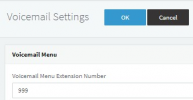
It seems you are calling the PIN Protect IVR instead of the Voicemail menu. What system extension do you see if you go into "Settings >> Voicemail":
1651830066137.png

That is what you should dial.
 
Status
Not open for further replies.

Forum statistics

Threads
111,974
Messages
590,083
Members
164,900
Latest member
Silent_Guru