Accidentally deleted "VMDIALOUTENABLED" from parameters...

Status
Not open for further replies.

Robert Thompson

Joined
Aug 1, 2015
Messages
10
Reaction score
0
Hello:

How do I restore the "VMDIALOUTENABLED" parameter?

Or, must I do a re-install?

Thanks,

Rob.
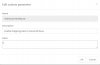
 
You may be able to re-add the parameter by clicking "Add" in the Parameters section, and simply entering in the original values. I've attached a picture of what you should enter.

Value: 0 for disable, 1 for enable

Hope that works for you
 

Attachments

  • VMDIALOUTENABLED.jpg
    VMDIALOUTENABLED.jpg
    26.1 KB · Views: 4
You may be able to re-add the parameter by clicking "Add" in the Parameters section, and simply entering in the original values. I've attached a picture of what you should enter.

Value: 0 for disable, 1 for enable

Hope that works for you

Thank you. :)

I have added it back and it looks ok - just one question: once a call is directed to VM, how do you place an outgoing call? Do you need to enter a special code to get the dial-tone?

Thanks,

Rob.
 
Thank you. :)

I have added it back and it looks ok - just one question: once a call is directed to VM, how do you place an outgoing call? Do you need to enter a special code to get the dial-tone?

Thanks,

Rob.

Enter the voicemail password, press 9, then press 3. Dial the phone number and you should be good to go!
 
Status
Not open for further replies.

Forum statistics

Threads
111,864
Messages
589,459
Members
164,703
Latest member
eokwaro