Add and Remove users from the "Q"

Status
Not open for further replies.

VictorC

SOHO User
Joined
May 1, 2017
Messages
150
Reaction score
16
Hi all, in V16 in the web client if you where a manager you could add and remove people from the "Q" you wanted them in. Did this move or is it just not added?
 
Hi @VictorC,

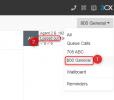
If you're the manager of the queue in V18, you should be able to manually login / logout users from the Web Client >> Panel >> Select the Queue (top right) and there will be a status under the extension number/name:

1636011850206.png
 
  • Like
Reactions: Evolute IT
Ok great, how do you add users from this screen to a Queue?
 
  • Like
Reactions: Thomas Six
Hi @VictorC,

Users are added by logging in to the Management Console >> Call Queues >> Agents tab >> Add+ and select which agents you'd like in the queue. Clicking notification allows you to add queue managers.
 
  • Like
Reactions: Evolute IT
Status
Not open for further replies.

Forum statistics

Threads
111,975
Messages
590,084
Members
164,903
Latest member
dross