- Joined
- Aug 17, 2019
- Messages
- 43
- Reaction score
- 3
Hi,
I think there is some confusion here, allow me to clear it up:
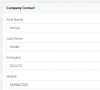
- The Company section contains the contacts that belong to the PBX (everyone can see them)
- The Personal section contains the contacts that belong to your Extension (only you can see them)
The the Company tab is not for searching company names, if you want to search through your contacts and find them by company name, then simply click the Personal section, and type your search there.
Meaning if I'm going to create contacts to the PBX Management console, all the contacts I created on the Management console will upper on the 3CX Webclient under Company, am I right?
Correct. And if you wish to find any contacts that work at a specific company, simply type the name of the company (ie. 3CX LTD) and you will see all contacts that have "3CX" in their Company field
View attachment 16782
Founded in 2005, when VoIP was an emerging technology, 3CX has gone on to establish itself as a global leader in business communications.