Admin - Cant change password

Status
Not open for further replies.

camelstrike

Free User
Joined
May 27, 2019
Messages
2
Reaction score
0
Hello all, this seems like a really simple task unless your password is more than 51 characters, which mine is.

Im running 3CX 15.5 onsite on Win 10, I upgraded 3 weeks ago. While upgrading I created a new password but after restoring my backup I was never able to use it, only the old one works the one from the backup which is 64 characters and it doesnt let me enter in the old password box.

Anybody know how can I reset this long password?
10802
 
Short of re-installing a version 15.5 (on another machine), then applying the original V15 backup, changing the password, backing up again , then restoring on version 16.... I'm not sure. I don't know if the password can be edited (shortened), in the backup, before applying.

Others may have some ideas.

I have to ask...what is the reason for using a password that long?
 
Bragging rights? :)
 
Short of re-installing a version 15.5 (on another machine), then applying the original V15 backup, changing the password, backing up again , then restoring on version 16.... I'm not sure. I don't know if the password can be edited (shortened), in the backup, before applying.

Others may have some ideas.

I have to ask...what is the reason for using a password that long?

I will have to try this, although it seems too much work just for this.

Believe me, if I would have known I would run into this bug I wouldn't have made it this long XD

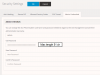
I tried editing the old password box from the elements tab on chrome console but it doesn't work:
10814
 
Although thoroughly unsupported, you can edit a v15.5 backup, it's not very difficult...
 
  • Like
Reactions: camelstrike
Status
Not open for further replies.

Latest Posts

Forum statistics

Threads
111,925
Messages
589,757
Members
164,798
Latest member
Call_Flow.co.uk