Solved Admin Console UI Internationalization issue

Status
Not open for further replies.

NCIA

Premier Customer
Joined
Aug 15, 2023
Messages
30
Reaction score
13
1718822592278.png
1718822313810.png

On a Version 20.0 Update 1 (Build 731 Release) English/US system:
Date should be MM-DD-YYYY not DD.MM.YYYY
Time should be AM/PM format
Duration of call "minuty" is a non-English word
 
Hi there.

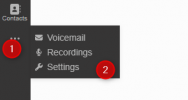
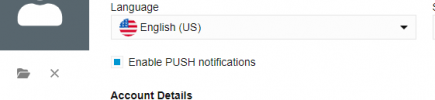
If you go to the settings of the specific user,
1718896148593.png

and then set it in there US :

1718896158387.png

I have just tried this on my 3CX System with the same version and build and get expected outcome :

1718896217379.png
 

Attachments

  • 1718896086837.png
    1718896086837.png
    6.2 KB · Views: 1
  • Like
Reactions: Evolute IT
@NCIA did it work out for you after applying the above?
 
  • Like
Reactions: NCIA
@NCIA did it work out for you after applying the above?


This setting was already configured to English (US), so I changed it to English (UK) and then back to US. Things are displaying properly now. Thanks for the direction.
 
  • Like
Reactions: OlegR_3CX
Perfect, and thank you for the update as well as the feedback provided too, as your workaround can be helpful to someone else there in case facing the same issue.
I will now close this thread.
 
Status
Not open for further replies.

Forum statistics

Threads
111,974
Messages
590,081
Members
164,899
Latest member
mazet