Solved Administrator permissions to install 3CX Desktop App

Status
Not open for further replies.

alessandro.crippa

Bronze Partner
Basic Certified
Joined
Mar 29, 2021
Messages
3
Reaction score
0
Hello, I would like to report that I am experiencing problems installing 3CX Desktop App on client's PCs because although the application is installed in the appdata folder of the user profile, it asks for PC administrator permissions in order to install. Many clients' PCs have company policies that do not give the client administrator permissions and this prevents installation. Other software such as Microsoft Teams, Skype and Whatsapp that installs in the user profile appdata folder does not require PC administrator permissions. Even asking the client's network manager for administrator permissions does not solve the problem because if there is an Admin and User profile on the PC, when I install 3CX Desktop App on the User profile and when Windows asks for Administrator credentials the software is installed on the Admin profile and not on the User. Could you please give me a solution?
Thank you
 
Hi @VasilisV_3CX,
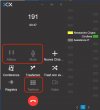
thanks for the instructions, I was able to install the app on the servers without any problems. Another question customers have asked me, why from the dialer of the desktop app in call, the hold, mute and keypad buttons cannot be used? I have tried with both Fanvil X6 and Grandstream GXP2160. See attached screenshot.
Thank you
 

Attachments

  • Screenshot 2021-10-05 alle 11.28.14.jpg
    Screenshot 2021-10-05 alle 11.28.14.jpg
    71 KB · Views: 7
Hi @alessandro.crippa,

Great to hear that resolved the issue.

The CSTA options shown above are correct. The greyed out functions are controlled via the phone itself.
 
No problem @alessandro.crippa! Feel free to open a new thread if you require any further assistance or information.
 
Status
Not open for further replies.

Forum statistics

Threads
112,025
Messages
590,368
Members
164,978
Latest member
FringeIT-Eric