Advanced Call Center Reporting

Status
Not open for further replies.

kriley87

Silver Partner
Advanced Certified
Joined
Jul 24, 2019
Messages
108
Reaction score
22
Hello-

I am contemplating moving a customer of mine over from FreePBX to 3CX but wanted to ensure 3CX would fit the bill before I take on the project. Right now they are using FreePBX in conjunction with Asternic Call Center Stats for their detailed reports so I want to make sure we can still provide them the detailed call center reporting they are currently receiving.

I can see that 3CX has advanced call center reports but I'd like to understand if those reports are able to include the following statistics out of the box?

Queues
  • Answered
  • Unanswered
  • Abandoned
  • Average Wait
  • Average Talk Time

Agents
  • Answered
  • Rejected
  • Failed (Unanswered)
  • Pauses
  • Pause Time
  • Session Time
  • Talk Time
  • AHT

Thank you!
 
Hello @kriley87 ! That's what you'll have if you take an Pro or Enterprise licence ! For a Standard licence you won't have Queue Calls so no Queue calls reports

11598
 
Thanks for the reply @INDY_Mathieu

We are planning on doing a failover setup with 2 enterprise licenses, so we are hoping that the reporting included will fit the bill.

Is there anywhere that we can see samples of all of the available reports?
 
Queues
  • Answered
  • Unanswered
  • Abandoned
  • Average Wait
  • Average Talk Time

So you've all of this in the same report.

Agents
  • Answered
  • Rejected
  • Failed (Unanswered)
  • Pauses
  • Pause Time
  • Session Time
  • Talk Time
  • AHT

So failed and rejected are in the same "% Calls Taken"
There's no pauses or pause time but you've session time
You've both talk and ringing time/average time
 
So you've all of this in the same report.


So failed and rejected are in the same "% Calls Taken"
There's no pauses or pause time but you've session time
You've both talk and ringing time/average time


Thank you! If there is no pause time, then what is the protocol for agents to "pause" themselves from the queues and not receive phone calls until they are ready to take another phone call? I am probably using the wrong terminology but in the FreePBX/Asterisk world, queue members can dial *45 to pause and unpause themselves from call queues.

Is there a way to accomplish the same task in 3CX?
 
Hi kriley87 best to make some calls and build stats, then run the reports one by one to explore what options you need.

You also have CDR generation that you can use with other means
 
Thank you! If there is no pause time, then what is the protocol for agents to "pause" themselves from the queues and not receive phone calls until they are ready to take another phone call? I am probably using the wrong terminology but in the FreePBX/Asterisk world, queue members can dial *45 to pause and unpause themselves from call queues.

Is there a way to accomplish the same task in 3CX?

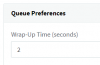
You are probably referring to wrap-up time, this is automatic only.

11601
 
You are probably referring to wrap-up time, this is automatic only.

View attachment 11601


Thanks, John, I am probably getting off topic but since you're here.. In FreePBX you can set an automatic wrap up time on your queues as well, but agents also have the ability to pause and unpause themselves from the queues manually as well (say, if they need to goto the bathroom or if they still need some additional time to wrap up the previous phone call). The total number of pauses an agent takes during the day, along with their total pause time is reflected in the call reports each day.

If this option isn't available in 3CX, let's say an agent needs to run to the bathroom or take a break. Can they set their 3CX phone to DND, not available for calls, or some sort of other status like this? If so, do the call reports reflect how many times or how long an agent puts themselves in this status to avoid taking phone calls from the queues?
 
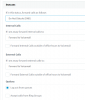
There is the Agent Login history report that shows this. You can set their DND profile to log them out of queues whenever they press it:

11602
 
  • Like
Reactions: kriley87
Perfect makes sense, I appreciate the clarification.
 

Thanks @StefanW this really helps. This customer in particular would be using the 3CX phone on their PC's rather than hardphones.

With that being said, it seems that agents can log themselves in and out of the queues by dialing *62 and *62 respectively or just by toggling the "Q" button in the 3CX phone which seems more intuitive. I'm assuming you can see agent login/logout activity from the included reports as well.

Thanks again!
 
I would advise, even more, the WebClient to manage queues. The visual especially for Queue Managers is even better!
 
  • Like
Reactions: kriley87
We are planning on doing a failover setup with 2 enterprise licenses, so we are hoping that the reporting included will fit the bill.

You only need one Enterprise License, as it allows you to use the license key twice - main server and failover server
 
@kriley87 You can easily log in/log out with one button in the 3CX Web Client, Mobile App or just sync with your extension status

But I don't think there is login/logout reports
 
You only need one Enterprise License, as it allows you to use the license key twice - main server and failover server

Oh, perfect.. thank you @Saqqara , I wasn't aware of that as this would be my first 3CX deployment using a failover scenario.
 
Status
Not open for further replies.

Latest Posts

Forum statistics

Threads
111,932
Messages
589,806
Members
164,805
Latest member
Diana Paladutsa