AFAS CRM Integration, not matching numbers

Status
Not open for further replies.

hknobbe

Free User
Joined
Sep 16, 2022
Messages
7
Reaction score
1
Hi All,

Hope someone can help;

I've made an CRM integration with AFAS Software, I'm getting valid response from the CRM however the testing tool keeps responding with:
CRM Integration is working OK but contact number does not exist. Check log for more info or try a different number.

I think it's in the rules or Variables, however for the life of me I can't find what's wrong with it.

Rules, Variable + mapping:

XML:
<Rules>
          <Rule Type="Any">rows.ID</Rule>
        </Rules>
        <Variables>
          <Variable Name="ContactID" Path="rows.ID">
            <Filter />
          </Variable>
          <Variable Name="CompanyName" Path="rows.bedrijfsNaam">
            <Filter />
          </Variable>
          <Variable Name="Email" Path="rows.emailWerk">
            <Filter />
          </Variable>
          <Variable Name="PhoneBusiness" Path="rows.telWerk">
            <Filter />
          </Variable>
        </Variables>
        <Outputs AllowEmpty="true">
          <Output Type="ContactID" Passes="0" Value="[ContactID]" />
          <Output Type="CompanyName" Passes="0" Value="[CompanyName]" />
          <Output Type="Email" Passes="0" Value="[Email]" />
          <Output Type="PhoneBusiness" Passes="0" Value="[PhoneBusiness]" />
          <Output Type="ContactUrl" Passes="0" Value="https://XXXXX.XXXXXX.nl/XXXXX/verkooprelatie-organisatie-prs?DbId=[ContactID]" />
          <Output Type="EntityId" Passes="0" Value="[ContactID]" />
          <Output Type="EntityType" Passes="0" Value="Contacts" />
        </Outputs>

Response in testing:

Started scenario with empty id
Request text: https://XXXXX.XXXXX.XXXXX.XXXXXX/ProfitRestServices/connectors/XXXXXXX?filterfieldids=telWerk&filtervalues=6810715&operatortypes=6&take=1
Response text: { "skip" : 0, "take" : 1, "rows" : [{"ID":"XXXXX","bedrijfsNaam":"XXXXXXXX","telWerk":"XXXXXXXX","emailWerk":"[email protected]"}]}
Response finished
Finished scenario with empty id

Hope someone can help me!

Let me know if you need more information

Thanks!
 
I think posting the matching scenario my be useful
 
I think posting the matching scenario my be useful
The whole scenario:

XML:
<Scenario Id="" Type="REST">
      <Request Url="https://XXXX.XXXX.XXXXX.online/ProfitRestServices/connectors/Lookup_3cx?filterfieldids=telWerk&amp;filtervalues=[Number]&amp;operatortypes=6&amp;take=1" MessagePasses="0" RequestEncoding="UrlEncoded" RequestType="Get" ResponseType="Json">
        <Headers>
          <Value Key="Authorization">AfasToken <<AUTHTOKEN>></Value>
        </Headers>
        <Rules>
          <Rule Type="Any">rows.ID</Rule>
        </Rules>
        <Variables>
          <Variable Name="ContactID" Path="rows.ID">
            <Filter />
          </Variable>
          <Variable Name="CompanyName" Path="rows.bedrijfsNaam">
            <Filter />
          </Variable>
          <Variable Name="Email" Path="rows.emailWerk">
            <Filter />
          </Variable>
          <Variable Name="PhoneBusiness" Path="rows.telWerk">
            <Filter />
          </Variable>
        </Variables>
        <Outputs AllowEmpty="true">
          <Output Type="ContactID" Passes="0" Value="[ContactID]" />
          <Output Type="CompanyName" Passes="0" Value="[CompanyName]" />
          <Output Type="Email" Passes="0" Value="[Email]" />
          <Output Type="PhoneBusiness" Passes="0" Value="[PhoneBusiness]" />
          <Output Type="ContactUrl" Passes="0" Value="https://XXXX.XXXXXX.nl/XXXXX/verkooprelatie-organisatie-prs?DbId=[ContactID]" />
          <Output Type="EntityId" Passes="0" Value="[ContactID]" />
          <Output Type="EntityType" Passes="0" Value="Contacts" />
        </Outputs>
      </Request>
    </Scenario>

Am I missing something?
 
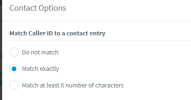
Try setting the Match Caller ID to exact
1663585940516.png
 
Try setting the Match Caller ID to exact
View attachment 31964

Even with match exactly (and also double checking it's an match in both the CRM and in the testing) it still returns:

CRM Integration is working OK but contact number does not exist. Check log for more info or try a different number.

Started scenario with empty id
Request text: https://XXXXX.rest.XXXXXX.online/ProfitRestServices/connectors/Lookup_3cx?filterfieldids=telWerk&filtervalues=0206620XXX&operatortypes=6&take=1
Response text: { "skip" : 0, "take" : 1, "rows" : [{"ID":"11148","bedrijfsNaam":"'t Blauwe Theehuis BV","telWerk":"0206620XXX","emailWerk":"[email protected]"}]}
Response finished
Finished scenario with empty id
 
What does it show in the 3cxSystemService.log?
 
What does it show in the 3cxSystemService.log?
It seems like it doesn't post anything to the Log:

data:2.5564ms
Events:0.085ms
externals:0.018ms
2022/09/19 13:45:00.865|7358|0102|Info|TryGetLocalIpListOsDependent
2022/09/19 13:45:00.866|7358|0102|Info|TryGetLocalIpListOsDependent. Result = [{"Description":"ens4 (ens4)","HasDefaultGateway":true,"IsIpv6":false,"IpAddressStr":"10.164.0.7"}]

These are the only entries arround the same time as when I tested the lookup.
 
Is your reporting set to verbose?
 
Is your reporting set to verbose?
This is the full report at the time of the test:
Code:
2022/09/19 13:49:00.868|7358|0102|Info|TryGetLocalIpListOsDependent. Result = [{"Description":"ens4 (ens4)","HasDefaultGateway":true,"IsIpv6":false,"IpAddressStr":"10.164.0.7"}]
2022/09/19 13:49:24.333|7358|0009|Trac|###TRANSACTION.870 started
2022/09/19 13:49:24.336|7358|0009|Trac|+++TRANSACTION.870 updated - elapsed 3.4056
2022/09/19 13:49:24.336|7358|0009|Trac|Finalizing TRANSACTION.870
2022/09/19 13:49:24.336|7358|0009|Trac|---TRANSACTION.870 finished 3.5164ms
    data:3.4053ms
    Events:0.0915ms
    externals:0.0196ms
2022/09/19 13:49:24.336|7358|0013|Info|Log verbosity is set to Verbose
2022/09/19 13:49:24.336|7358|0013|Verb|Dequeue Deleted.TRANSACTION.870
2022/09/19 13:49:24.345|7358|0009|Trac|###TRANSACTION.871 started
2022/09/19 13:49:24.345|7358|0009|Verb|Enqueue Inserted.TRANSACTION.871
2022/09/19 13:49:24.345|7358|0013|Verb|Dequeue Inserted.TRANSACTION.871
2022/09/19 13:49:24.346|7358|0009|Trac|+++TRANSACTION.871 updated - elapsed 0.9473
2022/09/19 13:49:24.346|7358|0009|Verb|Enqueue Updated.TRANSACTION.871
2022/09/19 13:49:24.346|7358|0009|Verb|Enqueue Updated.PARAMETER.307
2022/09/19 13:49:24.346|7358|0009|Trac|Finalizing TRANSACTION.871
2022/09/19 13:49:24.346|7358|0009|Verb|Enqueue Deleted.TRANSACTION.871
2022/09/19 13:49:24.346|7358|0009|Trac|---TRANSACTION.871 finished 1.0552ms
    data:0.9471ms
    Events:0.0792ms
    externals:0.0289ms
2022/09/19 13:49:24.346|7358|0013|Verb|Dequeue Updated.PARAMETER.307
2022/09/19 13:49:24.346|7358|0013|Verb|Dequeue Deleted.TRANSACTION.871
2022/09/19 13:49:24.836|7358|0102|Info|Detected change of public IP or STUNDISABLED. IP=XXXXX, STUNDISABLED=1
2022/09/19 13:49:24.837|7358|0102|Info|Updating 3cxmediaserver.ini
2022/09/19 13:49:24.837|7358|0102|Info|3cxmediaserver.ini path = /var/lib/3cxpbx/Bin/3cxmediaserver.ini
2022/09/19 13:49:24.837|7358|0102|Info|IP type static, NOT using STUN
2022/09/19 13:49:24.837|7358|0102|Info|SetValue. sectionName = MSSettingsCache , key = EXTADDR , value = PT_STRING,XXXXXX
2022/09/19 13:49:24.837|7358|0102|Info|SetValue. sectionName = MSSettingsCache , key = EXTIF , value = PT_STRING,10.164.0.7
2022/09/19 13:49:24.837|7358|0102|Info|SetValue. sectionName = MSSettingsCache , key = MS_BLINDEXTPORTS , value = PT_INT32,1
2022/09/19 13:49:24.837|7358|0102|Info|SetValue. sectionName = MSSettingsCache , key = STUNTOUT , value = PT_INT32,3000
2022/09/19 13:49:24.837|7358|0102|Info|SetValue. sectionName = MSSettingsCache , key = STUN , value =
2022/09/19 13:49:24.837|7358|0102|Info|SetValue. sectionName = MSSettingsCache , key = LOCALADDR , value = PT_STRING,
2022/09/19 13:49:24.837|7358|0102|Info|SetValue. sectionName = MSSettingsCache , key = MS_ALLOWVIDEOANDIMAGEPROXY , value = PT_INT32,1
2022/09/19 13:49:24.837|7358|0102|Info|SetValue. sectionName = MSSettingsCache , key = ANSP , value = PT_INT32,0
2022/09/19 13:49:24.837|7358|0102|Info|SetValue. sectionName = MSSettingsCache , key = TOS , value = PT_INT32,0
2022/09/19 13:49:24.837|7358|0102|Info|SetValue. sectionName = MSSettingsCache , key = CS , value = PT_INT32,62914560
2022/09/19 13:49:24.837|7358|0102|Info|SetValue. sectionName = MSSettingsCache , key = MCFS , value = PT_INT32,5242880
2022/09/19 13:49:24.837|7358|0102|Info|SetValue. sectionName = MSSettingsCache , key = MOH , value = PT_STRING,""
2022/09/19 13:49:24.837|7358|0102|Info|SetValue. sectionName = MSSettingsCache , key = USELINEIN , value = PT_INT32,0
2022/09/19 13:49:24.837|7358|0102|Info|SetValue. sectionName = MSSettingsCache , key = LINEINGUID , value = PT_STRING,
2022/09/19 13:49:24.837|7358|0102|Info|SetValue. sectionName = MSSettingsCache , key = allowExternalOn , value = PT_STRING,0.0.0.0/0
2022/09/19 13:49:24.837|7358|0102|Info|SetValue. sectionName = MSSettingsCache , key = externalIPRange , value = PT_STRING,
2022/09/19 13:49:24.837|7358|0102|Info|SetValue. sectionName = MSSettingsCache , key = allowSourceAsOutbound , value = PT_INT32,1
2022/09/19 13:49:24.837|7358|0102|Info|SetValue. sectionName = MSSettingsCache , key = reportSourceConflicts , value = PT_INT32,0
2022/09/19 13:49:24.837|7358|0102|Info|SetValue. sectionName = MSSettingsCache , key = MS_LOGFOLDER , value = PT_STRING,/var/lib/3cxpbx/Data/Logs
2022/09/19 13:49:24.837|7358|0102|Info|SetValue. sectionName = MSSettingsCache , key = ADD2833 , value = PT_INT32,1
2022/09/19 13:49:24.837|7358|0102|Info|SetValue. sectionName = MSSettingsCache , key = MS_LOGLEVEL , value = PT_INT32,3
2022/09/19 13:49:24.837|7358|0102|Info|SetValue. sectionName = MSSettingsCache , key = FLP , value = PT_INT32,7000
2022/09/19 13:49:24.837|7358|0102|Info|SetValue. sectionName = MSSettingsCache , key = LLP , value = PT_INT32,8499
2022/09/19 13:49:24.837|7358|0102|Info|SetValue. sectionName = MSSettingsCache , key = FEP , value = PT_INT32,9000
2022/09/19 13:49:24.837|7358|0102|Info|SetValue. sectionName = MSSettingsCache , key = LEP , value = PT_INT32,10499
2022/09/19 13:49:24.838|7358|0102|Info|Ini file saved. path = /var/lib/3cxpbx/Bin/3cxmediaserver.ini
2022/09/19 13:49:24.838|7358|0102|Info|Updating custom parameters
2022/09/19 13:49:24.838|7358|0102|Info|Notifying MediaServer about changes
2022/09/19 13:49:24.839|7358|0009|Trac|###TRANSACTION.872 started
2022/09/19 13:49:24.839|7358|0009|Verb|Enqueue Inserted.TRANSACTION.872
2022/09/19 13:49:24.840|7358|0013|Verb|Dequeue Inserted.TRANSACTION.872
2022/09/19 13:49:24.847|7358|0009|Trac|+++TRANSACTION.872 updated - elapsed 8.127
2022/09/19 13:49:24.847|7358|0009|Verb|Enqueue Updated.TRANSACTION.872
2022/09/19 13:49:24.847|7358|0009|Verb|Enqueue Updated.PARAMETER.915
2022/09/19 13:49:24.847|7358|0009|Trac|Finalizing TRANSACTION.872
2022/09/19 13:49:24.847|7358|0009|Verb|Enqueue Deleted.TRANSACTION.872
2022/09/19 13:49:24.847|7358|0009|Trac|---TRANSACTION.872 finished 8.3108ms
    data:8.1266ms
    Events:0.1427ms
    externals:0.0415ms
2022/09/19 13:49:24.847|7358|0013|Verb|Dequeue Updated.PARAMETER.915
2022/09/19 13:49:24.847|7358|0013|Verb|Dequeue Deleted.TRANSACTION.872
2022/09/19 13:49:38.654|7358|0009|Verb|Enqueue Updated.REGISTRAR.35
2022/09/19 13:49:38.654|7358|0009|Verb|Enqueue Updated.REGISTRATION.35
2022/09/19 13:49:38.655|7358|0013|Verb|Dequeue Updated.REGISTRAR.35
2022/09/19 13:49:38.655|7358|0013|Verb|Dequeue Updated.REGISTRATION.35
2022/09/19 13:49:50.510|7358|0009|Verb|Enqueue Updated.REGISTRAR.97
2022/09/19 13:49:50.511|7358|0013|Verb|Dequeue Updated.REGISTRAR.97
2022/09/19 13:49:50.512|7358|0009|Verb|Enqueue Updated.REGISTRATION.97
2022/09/19 13:49:50.512|7358|0013|Verb|Dequeue Updated.REGISTRATION.97
 
Last edited:
Is your reporting set to verbose?
The (verbose) log is awaiting Mod approval to post (but to my untrained eye, i can't find anything about the lookup), however I did just noticed that when looking at the "template". it isn't showing any of the mapping. But when I look at for example the template of MYSQL, it is showing..

XML:
<?xml version="1.0"?>
<Crm xmlns:xsi="http://www.w3.org/2001/XMLSchema-instance" xmlns:xsd="http://www.w3.org/2001/XMLSchema" Country="NL" Name="AFAS CRM" Version="1" SupportsEmojis="true">
  <Number Prefix="AsIs" MaxLength="[MaxLength]" />
  <Connection MaxConcurrentRequests="2" />
  <Parameters>
    <Parameter Name="AFASTOKEN" Type="String" Parent="General Configuration" Editor="String" Title="AFAS TOKEN:" />
    <Parameter Name="AFASBASEURL" Type="String" Parent="General Configuration" Editor="String" Title="AFAS CONNECTOR URL:" />
    <Parameter Name="AFASCONNECTOR" Type="String" Parent="General Configuration" Editor="String" Title="AFAS CONNECTOR NAAM:" />
  </Parameters>
  <Authentication Type="No" />
  <Scenarios>
    <Scenario Id="" Type="REST">
      <Request Url="[AFASBASEURL]/[AFASCONNECTOR]?filterfieldids=telWerk&amp;filtervalues=[Number]&amp;operatortypes=6&amp;take=1" MessagePasses="0" RequestEncoding="UrlEncoded" RequestType="Get" ResponseType="Json">
        <Headers>
          <Value Key="Authorization" Passes="0" Type="String">AfasToken [AFASTOKEN]</Value>
        </Headers>
      </Request>
      <Variables />
      <Outputs AllowEmpty="false" />
    </Scenario>
    <Scenario Id="LookupByEmail" Type="REST">
      <Request Url="[AFASBASEURL]/[AFASCONNECTOR]?filterfieldids=emailWerk&amp;filtervalues=[Email]&amp;operatortypes=1&amp;take=1" MessagePasses="0" RequestEncoding="UrlEncoded" RequestType="Get" ResponseType="Json">
        <Headers>
          <Value Key="Authorization" Passes="0" Type="String">AfasToken [AFASTOKEN]</Value>
        </Headers>
      </Request>
      <Variables />
      <Outputs AllowEmpty="false" />
    </Scenario>
  </Scenarios>
</Crm>

Maybe I missed something in the config file?

Edit: this is the original uploaded file:

XML:
<?xml version="1.0"?>
<Crm xmlns:xsi="http://www.w3.org/2001/XMLSchema-instance" xmlns:xsd="http://www.w3.org/2001/XMLSchema" Country="NL" Name="AFAS CRM" Version="1" SupportsEmojis="true">
  <Number Prefix="AsIs" MaxLength="[MaxLength]" />
  <Connection MaxConcurrentRequests="2" />
  <Parameters>
    <Parameter Name="AFASTOKEN" Type="String" Parent="General Configuration" Editor="String" Title="AFAS TOKEN:" />
    <Parameter Name="AFASBASEURL" Type="String" Parent="General Configuration" Editor="String" Title="AFAS CONNECTOR URL:" />
    <Parameter Name="AFASCONNECTOR" Type="String" Parent="General Configuration" Editor="String" Title="AFAS CONNECTOR NAAM:" />
  </Parameters>
  <Authentication Type="No">
    <!-- <Value>[APIkey]:X</Value> -->
  </Authentication>
  <Scenarios>
    <Scenario Id="" Type="REST">
      <Request Url="[AFASBASEURL]/[AFASCONNECTOR]?filterfieldids=telWerk&amp;filtervalues=[Number]&amp;operatortypes=6&amp;take=1" MessagePasses="0" RequestEncoding="UrlEncoded" RequestType="Get" ResponseType="Json">
        <Headers>
          <Value Key="Authorization">AfasToken [AFASTOKEN]</Value>
        </Headers>
        <Rules>
          <Rule Type="Any">rows.ID</Rule>
        </Rules>
        <Variables>
          <Variable Name="ContactID" Path="rows.ID">
            <Filter />
          </Variable>
          <Variable Name="CompanyName" Path="rows.bedrijfsNaam">
            <Filter />
          </Variable>
          <Variable Name="Email" Path="rows.emailWerk">
            <Filter />
          </Variable>
          <Variable Name="PhoneBusiness" Path="rows.telWerk">
            <Filter />
          </Variable>
        </Variables>
        <Outputs AllowEmpty="false">
          <Output Type="ContactID" Passes="0" Value="[ContactID]" />
          <Output Type="CompanyName" Passes="0" Value="[CompanyName]" />
          <Output Type="Email" Passes="0" Value="[Email]" />
          <Output Type="PhoneBusiness" Passes="0" Value="[PhoneBusiness]" />
          <Output Type="ContactUrl" Passes="0" Value="https://XXXXX.afasinsite.nl/XXXXXX/verkooprelatie-organisatie-prs?DbId=[ContactID]" />
          <Output Type="EntityId" Passes="0" Value="[ContactID]" />
          <Output Type="EntityType" Passes="0" Value="Contacts" />
        </Outputs>
      </Request>
    </Scenario>
    <Scenario Id="LookupByEmail" Type="REST">
      <Request Url="[AFASBASEURL]/[AFASCONNECTOR]?filterfieldids=emailWerk&amp;filtervalues=[Email]&amp;operatortypes=1&amp;take=1" MessagePasses="0" RequestEncoding="UrlEncoded" RequestType="Get" ResponseType="Json">
        <Headers>
          <Value Key="Authorization">AfasToken [AFASTOKEN]</Value>
        </Headers>
        <Rules>
          <Rule Type="Any">rows.ID</Rule>
        </Rules>
        <Variables>
          <Variable Name="ContactID" Path="rows.ID">
            <Filter />
          </Variable>
          <Variable Name="CompanyName" Path="rows.bedrijfsNaam">
            <Filter />
          </Variable>
          <Variable Name="Email" Path="rows.emailWerk">
            <Filter />
          </Variable>
          <Variable Name="PhoneBusiness" Path="rows.telWerk">
            <Filter />
          </Variable>
        </Variables>
        <Outputs AllowEmpty="false">
          <Output Type="ContactID" Passes="0" Value="[ContactID]" />
          <Output Type="CompanyName" Passes="0" Value="[CompanyName]" />
          <Output Type="Email" Passes="0" Value="[Email]" />
          <Output Type="PhoneBusiness" Passes="0" Value="[PhoneBusiness]" />
          <Output Type="ContactUrl" Passes="0" Value="https://XXXXX.afasinsite.nl/XXXXX/verkooprelatie-organisatie-prs?DbId=[ContactID]" />
          <Output Type="EntityId" Passes="0" Value="[ContactID]" />
          <Output Type="EntityType" Passes="0" Value="Contacts" />
        </Outputs>
      </Request>
    </Scenario>
  </Scenarios>
</Crm>
 
Ah, that's the issue, you need to put the <Rules>, <Variables> and <Outputs> elements outside the <Request> element.
 
Ah, that's the issue, you need to put the <Rules>, <Variables> and <Outputs> elements outside the <Request> element.
Awesome! that worked!

Thanks!
 
  • Like
Reactions: edossantos
How did you generate the template?
 
Status
Not open for further replies.

Forum statistics

Threads
112,322
Messages
591,889
Members
165,470
Latest member
Robert Lee