After Hours VM vs During Office hours VM (v20)

EddieTND

Silver Partner
Basic Certified
Joined
Feb 28, 2023
Messages
4
Reaction score
0
So I'm trying to setup 2 different voicemails; One for during hours and one for after hours. Is there a way to have a different message for each but have them sent to the same user extensions voicemail?
Right now its my understanding that i can make a voicemail on the extension and set the call handling to that mailbox for the "destination if no answer". If i then set the office closed route to the same mailbox and check the "play announcement" toggle and record an after hours greeting, it will play it but then also forward to the extensions voicemail and play the regular voicemail as well after the after hours announcement. Is there a way around this in v20?
 
Can you play announcement for both paths, and have no message on the actual voicemail box?
 
Nope, there's no play announcement toggle for the "destination if no answer" box under the ring group.
 
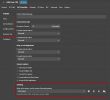
You can have different greetings per user profile in 3CX.

Just go to the forwarding rules of the user, and under each profile you can have a different message. Depending on the status of the user, a different greeting will play.

1740555821174.png

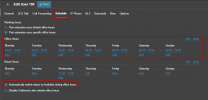
You would need to setup office hours on the extension, and you would need to automate the change to make sure it switches over to DND when it is out of office hours.

1740555909987.png

Of course, the user can follow the department office hours as well. In that case, just enable the 1st radio button on this page.
 
So enabling the Automatic switch status will put her into DND outside of office hours? Also, under call forwarding and DND, do i have to check the "Out of office hours voicemail" checkbox for external and internal calls as well as the accept calls from ring groups check box if this user is part of a ring group for external calls? And will they both get forwarded to the same user's voicemail or is there a separate out of office hours voicemail that's accessed a different way?
 
So enabling the Automatic switch status will put her into DND outside of office hours?
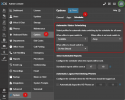
Thats correct! The mapping is as follows:

During office hours: Available (can also be configured to trigger Custom 1)
During break times: Away (Can be configured to trigger DND or Custom 2)
Out of office hours: DND (Can be configured to trigger Away or Custom 2)

This customisation is global on the system, and can be configured from the system Options

1741083705026.png

Also, under call forwarding and DND, do i have to check the "Out of office hours voicemail" checkbox for external and internal calls

This option needs to be checked only if you want to have a different destination out of office hours or if you choose the DND sttatus during office hours. You might want your calls to go to a colleague during a meeting for example, but after office hours to go to your voicemail.

as well as the accept calls from ring groups check box if this user is part of a ring group for external calls?
That would depend on your business use case. Some companies want the calls from queues and ring groups to keep going to their users/agents irrespective of their status.

And will they both get forwarded to the same user's voicemail or is there a separate out of office hours voicemail that's accessed a different way?
Its the same voicemail box, but just gives you that extra bit of granularity in the behaviour.
 

Latest Posts

Forum statistics

Threads
111,964
Messages
590,000
Members
164,869
Latest member
hpgitsupport