• We do not provide troubleshooting help for unsupported phones. Please try with a supported phone.
  • V20 Update 10 Alpha 2 Learn more

After upgrade to v18 update 4 build 965 phones lost connection to pbx

Status
Not open for further replies.

ArtoSkogman

Silver Partner
Basic Certified
Joined
Feb 5, 2021
Messages
57
Reaction score
3
Hi. After update, all our Grandstream phones lost the registration to pbx inside lan network (and also one phone we outside office). When trying to assign the phone to extention, nothing happens. Phones are visible in the "phones". Has anybody any ideas how solve this?
 
Here are the requested details:
V 18 update 4 965 build Pro annual
Server win10
server is on premises
Ip-phone Grandstream GXP-1780 fw 1.0.1.116
provision method LAN
Trunk Generic (ours)
firewall checker passed yes
No custom templates is used on the phone
 
I assume you just upgraded from your management console (not by reinstall method)

Thanks! Let's check a couple of things:

1. Has the IP address of the 3CX machine changed? If yes - all phones will fail to register

Login to one of your phone's web UI, and check the the provisioned IP address. Compare it to the IP the server currently has.


2. Do you see any local phone IPs in the PBX Blacklist? If yes - you have to learn why they were blacklisted before you do anything.

3. Does your server have more than 1 ethernet card? If yes - this will cause trouble, we can discuss what to do
 
Hi!
1) No ip has changed.
2) No local ips are blacklisted.
Server has 2 ethernet cards, but only one is active
 
On this Windows server, do you have anything else running or just Windows + 3CX?

Does it have any antivirus programs installed?
 
There is only 3CX, nothing else. No antivirus programs.
 
Thanks! Ok let's try some actions:

1. The other LAN card should be disabled completely ( from BIOS or from Windows Device manager) and then restart the machine so 3CX cannot see the other interface.

2. In the PBX settings, under Network, make sure the correct interface is selected:
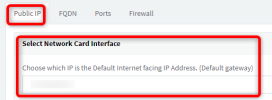
1662463912758.png

3. Press OK to confirm, even if the correct one appears.

4. Now go to "Phones", select all the phones that appear there in bold, and click "Reject"

5. Factory reset only one Grandstream, and wait until it is completed.

6. Refresh your phones page, and see if the phone appears there and try to provision it.

Let me know what happens or which step you were stuck on. This will tell us whether the PBX and phones can actually see each other.
 
The lan phone did not show up in the "phones"list, but remote phone did.
 
Ok we have two problems to look at

1. The LAN that connects the phones to the PBX probably has an issue.

- Do you use VLANs?
- What range are the phones and PBX using? ie. 192.168.1.xxx

2. The remote phone should not be appearing at all if it is not registered. Is there a site to site VPN connecting the remote phone site to your LAN perhaps?
 
1) No VLAN.
Ip range is 192.168.178.xxx
2) Remote phone is online and registered.No VPN.
 
Ah ok then your remote phone is working fine, no problem there.

As for the local phones, if you open a browser on the 3CX server and type the IP of one of the phones, can you open its web UI?
 
After going to server opening the broswer, the phone registered...No idea why, but all seems to be working fine. Thank you for your help.
 
No problem! Sounds like a network issue, maybe consider restarting everything (phones and switches) just in case.
 
Status
Not open for further replies.

Forum statistics

Threads
112,147
Messages
590,961
Members
165,167
Latest member
Finatra.us