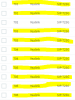
After Upgrading to V16 showing several duplicate extensions under "Phones"

Status
Not open for further replies.

Erik Nathe

Free User
Joined
Sep 22, 2017
Messages
56
Reaction score
3
Hoping someone has a quick fix for me here. After updating to V16 we have several Yealink phones that are duplicated under "Phones" of the 3cx console. Also each of the ones that has a duplicate is unable to make or receive phone calls... Our 3cx instance is hosted on Google Cloud.

I have tried rebooting, re-provisioning and even deleted the whole extension and then imported it back in. As soon as I set it up with the phone it duplicates again. Any help would be greatly appreciated!
11772
 
Hi Erik,

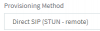
How are the phones connected to the PBX? Are they on STUN ?
 
Very sorry, forgot to include that. They are connected via STUN.


11773
 
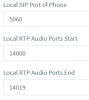
Ok please check your extensions one by one, and ensure there are no overlapping ports between them:

11774

These must be different for each deskphone
 
Just the local SIP Port of Phone or all three?
 
It looks like the users are able to make and receive phone calls now, though the console is still showing duplicates. I am also unable to send commands to the phones from the console, like "Reboot" or "reprovision" I have to have someone onsite physically unplug the phone... seems to only be an issue with the yealinks.
 
All 3 actually. The local SIP port, if the same across many devices, will cause duplicates.

The RTP ports (20 ports per phone as you see in the screenshot) must also be different so that one phone does not end up with the audio from another phone.
 
In addition, at the phones site, the firewall must be configured to forward the ports on each phones in order to avoid audio and registration issues.

If you more than a couple of phones, you will greatly benefit by installing an SBC. That should make port management unnecessary (SBC uses a tunnel for traffic), and also make provisioning and management a bit easier.
 
  • Like
Reactions: Evolute IT
Are your phones with LAN STATIC IP ?
 
I was interested in SBC as I saw it in a few other posts. Though I did not understand how to install it for our needs... We do not have a server onsite at that location as they are a small remote site.. They come in over a Site to Site VPN. So do we install SBC on our local server, one the 3cx cloud server, or does it need to be installed at their local site?
 
If you have site to site VPN then the phones will appear as local phones and should be set up as "Local".

In your scenario, neither STUN nor SBC is necessary then.

Are the phones on the same IP network effectively as the PBX?
 
No the PBX is hosted on a Google Cloud server
 
So where is VPN ?
 
The VPN is from our remote site to our main site... to be able to access our network. Google Cloud hosted 3CX does not require a VPN to access.
 
For now on main and remote site all your phones are STUN mode ?
Globally how many phones do you have connected to PBX ?

As you surely have more than 2 or 3 phones you should add an SBC on main site, remote site is VPN so phones are seen in same LAN as main site.
 
We have about 40 phones between the two sites.

Understood. I will look into installing SBC at our main site.

Thank you!
 
You can use one or 2 SBC's , one on each site and connect phones from site to each.
it can be a hardware redondancy, if one dies other can handle phones
 
You also have the option of installing a Raspberry Pi 3B+ as an SBC for a more cost effective solution
https://www.3cx.com/docs/3cx-tunnel-session-border-controller/

  • Raspbian Linux on the latest Raspberry Pi (3B+ model), for up to 30 phones and a maximum of 10 BLF keys per device.
  • Windows and Debian Linux on x64 hardware, supporting more than 30 phones.
 
Status
Not open for further replies.

Forum statistics

Threads
111,933
Messages
589,809
Members
164,808
Latest member
jsbjsb