Agent Login History for past 24hrs

Status
Not open for further replies.

CrownSDS

Premier Customer
Advanced Certified
Joined
May 23, 2023
Messages
5
Reaction score
0
Hi 3CXers,

I am new to this and need help to create a daily report for Agent Login History for our night shift agents who are working from 7pm to 7pm next day. Your help on this highly appreciated.

Kind regards,
Malinda
 
Hi @CrownSDS

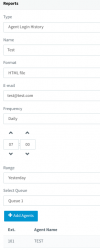
To do so navigate from the Management Console >> Reporting >> Reports >> Click on Add, under the Type click on the dropdown menu scroll all the way down and select the Agent Login history.
Under the Frequency select daily and add the time that the report will be generated.
Under "Range" choose for which day the report will run.
Under "Select Queue" choose for which queue the report will be generated and click on the Add agents to add for which agents the report will run.

It should look like this:
1698337828692.png
 
Hi @NikolasA_3CX ,

Thank you for the reply. The report you mentioned is showing only yesterdays history. I want Last night 7pm to today 7am.

Kind regards,
 
Status
Not open for further replies.

Forum statistics

Threads
111,973
Messages
590,079
Members
164,898
Latest member
grahamaskew