Agent Report

Status
Not open for further replies.

Rmn3

Free User
Joined
Aug 30, 2021
Messages
90
Reaction score
2
Hi guys,

to make the log of their work time easier, i would like to use the Agentlogin-Report.

I´ve added them into the agent queue.

One of my three colleagues used the explicit log out of queue function to make a technical test of this reporting.

The other agent just have logout as usual.

But none of them are listed in the reporting.

Do you have an idea?

Thanks in advance.
 
Hi @Rmn3,

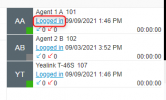
I've logged in and out using both Dial Codes (default: *62 / *63) and the Web Client as shown below:

1631184596126.png

My report generated comes back with the exact log in / log out as they were supposed to be shown.

Would you mind giving me the steps you follow to replicate?
 
HI,

of course mate :)

Queue - Added the three colleagues into a queue
All three using the Windows App.
To make the technical test, one colleague used the Q-Button before finished work for the day to log out of the queue
the other colleague just had shut his pc regular down.

But none of the colleagues are logged in the report, even though they are in the queue, i´ve chosen in the agent log reporting.
 
Hi @Rmn3,

I see, shutting the PC down won't log the user out of the queue, it'll just unregister the extension.

Try the following, on one extension use *63 then *62 to log out then log in to the queues. On the other extension, use the Q button (so it becomes greyed out) then again so that it becomes blue.

Run the report just for today, does it show on the report?
 
Hi,

while both methods are working, so the log out via code or just with the Q, my team members are still not listed in the report, even though they have used similar methods, the login logou via the Q or just have shut down their pc like always with being in the queue for this team where the working teams shall be logged.
 
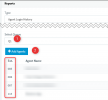
I can only think of small things that could be missed, like not selecting the right Queue in the report option or, maybe not selected all the Agents:
1631196259517.png

If you have done this and still, it may be a good idea to talk to a 3CX Partner to help you with our setup.
 
Status
Not open for further replies.

Latest Posts

Forum statistics

Threads
111,977
Messages
590,098
Members
164,906
Latest member
Nari