AI Receptionist not respecting Knowledge Source

moonmotel

Customer
Joined
Jul 14, 2022
Messages
16
Reaction score
1
Hi, we have setup 3 AI receptionists configured for 3 different departments and using 3 different knowledge sources. Each AI receptionist is only assigned 1 knowledge source (respective to their department).. the Agents however are not using their own knowledge source and are providing answers from another departments knowledge source. Wondering if this is related to this: https://www.3cx.com/community/threads/department-membership-not-respected.137239/
 
Just to clarfiy, each AI Agent is assigned to specific Department and only using specific Knowledge base however calls to AI Agents are responding based on other AI Agents knowledge base?
 
  • Like
Reactions: KyriacosS_3CX
Just to make it clear for everyone following, let's brake it down completely, just making sure the cause is not a trivial oversight that can easily be sorted out:

I will assume you are on the latest PBX and AI release.

In general, I would also suggest any old AI Agents that had prompts customised are re-done, based on the new 3CX base prompts and with the guidelines given above taken into consideration.

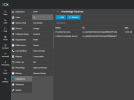
1) Here, there is one entry per department? NOT one general entry that includes multiple files, one for each department? -:
1782105354116.png

2) Each knowledge source ONLY has the file(s) relevant to that department added.

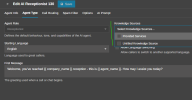
3) And here, each agent has only one box ticked:
1782105615230.png
 
I've mostly disregarded the knowledge at this point and put it all directly into the prompt. I've found that the prompt always supercedes the knowledge.
 
  • Sad
Reactions: nikolascx
To confirm, we have everything setup as @KyriacosS_3CX has pictured. The only thing different would be that we customized the default prompt quite a bit (it's almost completely different). Is there a relevant section we should put back in?
 
I've mostly disregarded the knowledge at this point and put it all directly into the prompt. I've found that the prompt always supercedes the knowledge.

Hi Dears

what "knowledge" are you refering to?
If it is a knowledge of 3 sentences, you can.
Otherwise you will make this model dumber like this.

You are doing something wrong. We need to understand why your knowledge when put in the best vector storage on earth, is not working.

Putting knowledge in the prompt will cause a model disease called Context Rot. It will start forgetting chunks.

You need to stick to knowledge base - maybe the context of your files are incorrect. Lets check those first.
 
To confirm, we have everything setup as @KyriacosS_3CX has pictured. The only thing different would be that we customized the default prompt quite a bit (it's almost completely different). Is there a relevant section we should put back in?

Hi Moonmotel

What is the problem you have?
Send it to me and I will give you feedback on it.
The prompt shouldn't be completely different.

So when a developer releases a prompt, you need to **build on it**

For example: When openai release guidelines, I dont just dump them and make my own completely different.
No. I get it as is, and build on it. Keeping it as a skeleton / boiler plate template.

You need to keep the prompt as we make it, and add minimum parts to it in a somewhat surgical fashion.

Send it to me and we can use the prompt as an exercise..
 
Hi Dears

what "knowledge" are you refering to?
If it is a knowledge of 3 sentences, you can.
Otherwise you will make this model dumber like this.

You are doing something wrong. We need to understand why your knowledge when put in the best vector storage on earth, is not working.

Putting knowledge in the prompt will cause a model disease called Context Rot. It will start forgetting chunks.

You need to stick to knowledge base - maybe the context of your files are incorrect. Lets check those first.
We actually found context rot by relying on the knowledge source. We've left it as is but copied/moved much of it to the prompt. I'm not going to post my prompt here but there's constant work to be done on it.

Everytime the AI decides to do something new we have to go back in and readjust.

I will spend another couple of weeks fine tuning and going over your KIND response.
 
We actually found context rot by relying on the knowledge source. We've left it as is but copied/moved much of it to the prompt. I'm not going to post my prompt here but there's constant work to be done on it.

Everytime the AI decides to do something new we have to go back in and readjust.

I will spend another couple of weeks fine tuning and going over your KIND response.

Dear guzzitech,

I think your approach is going to lead you to a painful experience.

If you keep moving more and more knowledge into the prompt, you are effectively forcing the model to carry too much information in its runtime context. The system prompt is best used for behavior, rules, tone, and process - not as a large knowledge base.

Once the prompt becomes too large, you can start seeing issues such as:
  • Less consistent behavior
  • Changes in tone
  • Forgetting important instructions
  • Random or unexpected responses
  • The model prioritizing the wrong information
This is usually a sign that the prompt is becoming too heavy.

A better approach is to keep the prompt short and structured, then use the knowledge source for reference material. The prompt should tell the AI how to behave and how to use the knowledge, not contain all the knowledge itself.

You can check your prompt size here:

https://platform.openai.com/tokenizer

As a rough guide, if the prompt is getting close to 4,000 tokens or more, I would start reviewing and simplifying it. Even if the model supports a much larger context window, filling it with too much static information can still reduce consistency.

So my recommendation would be:

Keep the system prompt lean.
Move business knowledge into the knowledge source.
Use the prompt only for rules, call flow, tone, and escalation logic.

You can also send the prompt as a Private message and I can skim through it to at least give you some pointers.

These videos may also help explain the issue:


God bless
 
We actually have a supposed "expert" that was guiding me... lol it's complicated. But I am taking your advice and working on it now, actually. Just need time and testing.

To be honest, I took some offense to your assumption my knowledge base was 3 lines. All good. Working through it. Thanks for more details.
 
I ran my prompt through the link you provided and it's approx 5300 tokens right now. I'm going to shrink it down and work on moving some parts to the KB if possible. I may take you up on the PM :D
 
Hi dear guzzitech

Sorry about that - I didn't mean to imply your knowledge base was only three lines.
I was referring to the general pattern of moving too much knowledge into the system prompt, not your specific implementation.

It sounds like you're taking a thoughtful approach, and with some testing you'll end up with something much more maintainable. Happy to help if you hit any roadblocks along the way. Thanks so much - take care
 
I'm sensitive haha.

Probably taking the easy way out but I was able to shrink the prompt to roughly 2600 tokens. I think perhaps my use case is just different. I am currently struggling to see what, if anything, to put into the KB.
 

Latest Posts

Members Online Now

Forum statistics

Threads
111,831
Messages
589,276
Members
164,658
Latest member
gumby156