AI Receptionist not responding

ryan_harmonsav

Customer
Basic Certified
Joined
Mar 7, 2023
Messages
6
Reaction score
3
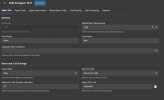
So I updated to the latest version of 3cx last night and got the OpenAI integration setup, setup an AI receptionist but when I call that extension it picks up but theirs no audio. Just dead air. It shows as green in the AI portal and I think I have it all setup correctly. Any suggestions on what to do or what the problem could be?

 

Attachments

  • Screenshot 2026-02-10 at 08.15.24.png
    Screenshot 2026-02-10 at 08.15.24.png
    6.5 KB · Views: 26
  • Screenshot 2026-02-10 at 08.15.47.png
    Screenshot 2026-02-10 at 08.15.47.png
    66.4 KB · Views: 27
We can see that you updated to update 8 today. Can you try restarting all three 3CX services?

Also, have you tried calling this AI from an internal extesnion, using the webclient?

Additionally, check the open Ai models for u8: https://www.3cx.com/docs/ai-agent-configuration/
 
We can see that you updated to update 8 today. Can you try restarting all three 3CX services?

Also, have you tried calling this AI from an internal extesnion, using the webclient?

Additionally, check the open Ai models for u8: https://www.3cx.com/docs/ai-agent-configuration/
I have the same issue, no sound either internal call or via call DID.
Already restarted the 3CX services.
 
We can see that you updated to update 8 today. Can you try restarting all three 3CX services?

Also, have you tried calling this AI from an internal extesnion, using the webclient?

Additionally, check the open Ai models for u8: https://www.3cx.com/docs/ai-agent-configuration/
The only thing I did not do was attempt to enable or disable models in OpenAI, it does not give me that option in my OpenAI portal.
 
  • Like
Reactions: nikolascx
Please confirm that billing is enabled and that the OpenAI account has been credited. Additionally, review the guide carefully, as the models should be included.
 
The only thing I did not do was attempt to enable or disable models in OpenAI, it does not give me that option in my OpenAI portal.
I remember trying to find that option drove me nuts the first time, try this...

Screenshot 2026-02-11 at 20-56-10 Project limits - OpenAI API.png
 
Steps to configure and what to be aware regarding the account are also listed in the guideline.
 
Im having my V20 U8 going unresponsive and hanging up when sending message. Its working to transfer calls with the receptionist ai, but when I ask it to send a message to a user it successfully sends the message as I receive it in the chat but the agent then becomes unresponsive and does not respond to my voice and then ends the call. I have updated to the gpt-5 models. The ai continues to respond to me in the chat interface. I have the call recording.
 
The AI receptionist should acknowledge that the message has been sent. Instead the Ai asks "is there anything else you would like to add to the message before I send it along" The caller replies "no" and the AI is silent, caller asks the AI if the AI is still on the line but no response. Caller is asking AI if they are there for 49 seconds and then the AI ends the call. Is this the intended AI behavior? AI should acknowledge that the message was sent and if there is anything else that they can assist with. Dead air for 49 seconds with no AI response waste's resources and leaves the caller wondering if the message was successful. This behavior is consistently happening, do I need to modify my AI prompt?
 
  • Like
Reactions: nikolascx
The AI receptionist should acknowledge that the message has been sent. Instead the Ai asks "is there anything else you would like to add to the message before I send it along" The caller replies "no" and the AI is silent, caller asks the AI if the AI is still on the line but no response. Caller is asking AI if they are there for 49 seconds and then the AI ends the call. Is this the intended AI behavior? AI should acknowledge that the message was sent and if there is anything else that they can assist with. Dead air for 49 seconds with no AI response waste's resources and leaves the caller wondering if the message was successful. This behavior is consistently happening, do I need to modify my AI prompt?

Hi @drewt
You are right to wonder - no it is not normal. It should behave as you expect in your message.

What realtime model are you using? Is it realtime-mini by any chance?

If yes, Do the following:
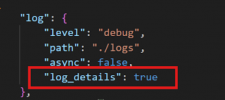
In the 3CX Folder you should have a subfolder named AI. go in and find bridge.json
set "level": "debug",
and at the end put
"log_details": true

1771090989743.png


Stop the AI service
Delete the 3CXAI.log
Then start the service and reproduce the call again.
Send me the logs in private message.

Then switch to the realtime model (gpt-realtime) and the problem should go away.

Let me know.
 
Hi, thanks, I'm on lightsail, and I dont have that level of local file access, is there way to accomplish from the web console?
 
Turns out I am using gpt-realtime for "OpenAi model for real-time calls" as configured in the OpAi API configuration section. I have gpt-5-mini selected for Text.
 
Set to verbose, generate the logs and send them in pm - we will check whats going on.
Also explain the steps and what you tell the AI to do.
 
I completely deleted my instance and reinstalled from the 3cx portal and started from the beginning. The ai receptionist can transfer calls but when i ask to get a message to the extension she sends the messsage as I can see it arrives in my web client, but she goes silent and unresponsive and ends the call. in my api config I have gpt-realtime for real-time calls and gpt-5-mini for text. This seems to to be the exact same issue as before I deleted and reinstalled. What can I try next?

Im sorry I didnt see your reply above, I will get logs to you this weekend. Thank you!
 
I completely deleted my instance and reinstalled from the 3cx portal and started from the beginning. The ai receptionist can transfer calls but when i ask to get a message to the extension she sends the messsage as I can see it arrives in my web client, but she goes silent and unresponsive and ends the call. in my api config I have gpt-realtime for real-time calls and gpt-5-mini for text. This seems to to be the exact same issue as before I deleted and reinstalled. What can I try next?

Im sorry I didnt see your reply above, I will get logs to you this weekend. Thank you!

Yes get the logs and I will check. Send them in PM.
 
i have the same issue as @drewt

is there any solution?
 
i have the same issue as @drewt

is there any solution?
Hello,

Did you follow all the suggestions made? Can you also share the info that was requested from the original poster?
 
Hi, I’ve set and done alll suggestions.

Is the problem for Drewt also not solved?
 

Forum statistics

Threads
112,025
Messages
590,368
Members
164,978
Latest member
FringeIT-Eric