ai receptionist very long to transfer

FedericoRELCO

Customer
Joined
Oct 20, 2020
Messages
7
Reaction score
2
Hello AI receptionist works well but when I need to transfer a call it takes more than 2 minutes and no MOH.
 
Hello,

Transfer speed will depend to an extend on your internet connectivity (as the PBX needs to send the audio and receive back the transfer request from the AI Agent processor), and also on local machine specs and load (it checks extension names/description/availability, a lot of activity is happening in the back end).

No MOH because call is never placed on hold, the transfer is started as soon as the PBX is informed about it.

I have not in my testing experienced more than a 30 seconds wait for the transfer to happen, and I am not using the best hardware for it. Could you advice where the PBX is deployed and what specs it has?
 
  • Like
Reactions: nikolascx
I've only noticed delays when knowledge sources are linked to the agent. Do you have knowledge sources attached?
 
I've only noticed delays when knowledge sources are linked to the agent. Do you have knowledge sources attached?
Indeed when there are knowledge sources attached the Agent takes a little longer to respond as they need to be consulted.

A true receptionist AI Agent should have few if any of those, and different "support" Agents should be made that have only the knowledge they need for their role (plus OpenAI costs associated with knowledge base processing).
This goes for any use of Agentic AI.

Of course now in the Beta stages we all have freedom to play, but for production some thought should be given about what each agent does, and how different tasks should be split between them, to ensure callers have a great experience interacting with them.
 
Taking more than ~2 minutes to decide where to transfer a call is a red flag. Even with an LLM in the loop, routing should be milliseconds to a few seconds, not minutes. When it’s that slow, it usually means the system is trying to “search everything” (or build an enormous prompt) instead of narrowing the scope first.
A couple of common causes:

1) too much data in one bucket
If you have, say:
  • 1000 extensions
  • each with huge phonebooks
  • and everything (including the AI Agent) in one department
…that’s like asking the agent to scan an entire library with no sections. The result is slow retrieval and expensive token usage.

Tip: Organize your PBX using Departments so the AI Agent can filter out what it doesn’t need. Departments are your “library sections.”

2) Vector storage / knowledgebase not scoped correctly
If Vector Storage Knowledge Base is enabled:
  • How many documents did you add?
  • Did you set a proper Vector Store Description?
That description is effectively routing metadata. A good description allows the retriever/router to exclude irrelevant stores before doing any similarity search.
If stores are not “ruled out” correctly, the system may select all stores, then run embeddings + similarity search across all of them – which is exactly how you end up with huge delays and cost.

This description is like the routing table / ACL in a router. It must be optimized and cheap to read. This is how packets are correctly forwarded to the correct interface. We must keep network concepts in mind here.

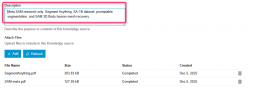
I made an example of how a description should look like

1766575302841.png
Keep us posted on this delay.
Also where are you geographically?
 
I've only noticed delays when knowledge sources are linked to the agent. Do you have knowledge sources attached?
If knowledge sources are linked to the agent, a short delay is expected because the RAG pipeline has to run retrieval (embedding + similarity search) to select the top-N most relevant chunks. In real time, ~3–4 seconds is generally acceptable for this step, especially if there are multiple sources or larger stores.

Anything like tens of seconds or minutes isn’t normal and usually indicates the agent is searching too broadly (too many stores/chunks), the knowledge base is too large/unfiltered, or the system is pulling too much context.

Always back check your work with no knowledge sources. Without knowledge sources, responses are faster because there’s no retrieval step – it’s just the model responding directly. Mind you, if you start with a delay without knowledge attached, then there is a latency issue or something at network level between your pbx and openAI.
 
I'm having the same issue where it will not always transfer right away even when it responds correctly telling me that it will be transferring me to the specific queue. While I'm waiting it prompts me to respond to "are you still there". Sometimes when I respond with yes it will kick it into gear and the transfer starts. Other times I don't get any response and I ask the ai if it is still there and it responds with yes and then transfers the call. It's doing this with the standard prompt in a test department where I have 1 extension and no knowledge base.

We're testing this as it looks promising but I'm not sure if I need to change anything specific.
 
  • Like
Reactions: nikolascx
It also doesn't honor the department it is in. It will use other departments even though the agent is only assigned to one department.
 
  • Like
Reactions: nikolascx
I'm having the same issue where it will not always transfer right away even when it responds correctly telling me that it will be transferring me to the specific queue. While I'm waiting it prompts me to respond to "are you still there". Sometimes when I respond with yes it will kick it into gear and the transfer starts. Other times I don't get any response and I ask the ai if it is still there and it responds with yes and then transfers the call. It's doing this with the standard prompt in a test department where I have 1 extension and no knowledge base.

We're testing this as it looks promising but I'm not sure if I need to change anything specific.

When it says "Are you still there" is a sign of a bad network issue.
So bad, that your voice, nor any background noise is not arriving to openai.
You need to check if there is something affecting the bandwidth on your network at this current moment because it seems that sometimes it works, and other times it doesnt.

Set to verbose
Restart the 3CX Ai Service
Replicate the problem and send us the logs in PM. We will have a look to check what is happening.
 
It also doesn't honor the department it is in. It will use other departments even though the agent is only assigned to one department.

What version are you using? Make sure you update to the latest version and try again. I remember we had a released update that yes, was not restrictive enough. Then we made another update which fixed this problem.

Whoever is testing AI, ensure you are always on the latest update you can possibly get.

Thanks for reporting. You can also replicate this issue in your log capture and send both evidences for checking. No worries. Looking forward for your reply.
 
I'm running Version 20.0 Update 8 (Build 1089 Beta). I set the logging to verbose, restarted the AI Service and was able to reproduce the issue. I'll send you the logs.
 
Can you also record all calls on the AI agent? I want to have the recording and the log so I can compare the wait.
 
Troubleshooting tips:

Make a simple scenario. If there are delays, tell AI to transfer to an extension first. To see if there is a delay there.
Don't transfer to a queue to check the delay because a queue has polling, fw to mobile, and lots of activity that also generate lots of logs.

Generate support info and send the full package because the activity related to AI is collected in a log file named 3CXAI.log
 
I just sent the support info and a recording of a transfer to an extension. This one repeated the same issue which was a long silence where I had to ask the agent if it was there before it transferred.
 
did you get to the bottom of this issue as i'm having the same problem, sometimes it's fine other times it's not :-(
 
@Phone systems NZ
We fixed it - The model was set to gpt-realtime mini
When this happens, the tool calling is non predicatble.
We opened an issue on open ai and made a workaround in update 9 coming soon.
 
  • Like
Reactions: KyriacosS_3CX
@Phone systems NZ
We fixed it - The model was set to gpt-realtime mini
When this happens, the tool calling is non predicatble.
We opened an issue on open ai and made a workaround in update 9 coming soon.
Thanks for the reply Nikolascx, is there anything we can do in update 8 to improve it (like picking a different OpenAI option in the 3CX settings) or is the only option to wait for update 9?

Thanks.
 
Hi dear @Phone systems NZ
Yes sure - go to openai config
In the model select gpt-realtime (not gpt-realtime-mini)
And also make sure that the limits on openai dashboard are OK as per documentation.
https://www.3cx.com/docs/ai-agent-configuration/

Do these 2 things and you should be ok. Then in update 9 we can revert back to the cheap model because you will inherit the fix.
 
thanks again, sorry just one more question. What is counted as an OK limit in open ai as the documentation does not list this.
 

Forum statistics

Threads
112,025
Messages
590,368
Members
164,978
Latest member
FringeIT-Eric