- Joined
- Feb 28, 2022
- Messages
- 6
- Reaction score
- 1
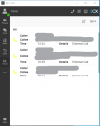
We have recently upgraded to version 18 and installed the Windows client version 18.7.10. We mostly have the 'panel' open on the 'All' view. We've noticed that this view in the panel gets cut off half way down. It's like there's another panel in the lower half of the screen which is always blank (see screenshot). It doesn't matter how much you resize the window, the lower half of the panel is always blank. The same is true when you pop out the panel in to its own window.
I don't know if anything is meant to appear in the lower section but, regardless, is there any way to get rid of it so that the calls can take up the full screen? At the very least, is it possible to put a horizontal line at the cut off point so that it's obvious where the list is finishing? Currently it's only obvious where it finishes if a line just happens to be half off the screen (as per screenshot). The scroll bar on the right is so thin that it's just not obvious, especially on a maximised pop-out version of the screen.
Note that there are only 3 calls active when the screenshot was taken. The scrollbar on the right only moves a tiny amount and doesn't go below where the 'external call' text is half missing.
One other thing. You can't size the panel any less than it is in the screenshot. This means there's loads of room for 'contacts', 'voicemail' and 'settings' to appear down the left hand side (under 'Panel'). Are the buttons getting cut off as well due to another invisible lower section? It's annoying that you have to click the '. . .' button in order to get to these three buttons when there is plenty of room for them on the side bar.
I don't know if anything is meant to appear in the lower section but, regardless, is there any way to get rid of it so that the calls can take up the full screen? At the very least, is it possible to put a horizontal line at the cut off point so that it's obvious where the list is finishing? Currently it's only obvious where it finishes if a line just happens to be half off the screen (as per screenshot). The scroll bar on the right is so thin that it's just not obvious, especially on a maximised pop-out version of the screen.
Note that there are only 3 calls active when the screenshot was taken. The scrollbar on the right only moves a tiny amount and doesn't go below where the 'external call' text is half missing.
One other thing. You can't size the panel any less than it is in the screenshot. This means there's loads of room for 'contacts', 'voicemail' and 'settings' to appear down the left hand side (under 'Panel'). Are the buttons getting cut off as well due to another invisible lower section? It's annoying that you have to click the '. . .' button in order to get to these three buttons when there is plenty of room for them on the side bar.