Analogue Door Entry System

Status
Not open for further replies.

RichardW

Free User
Joined
Apr 15, 2020
Messages
12
Reaction score
0
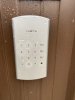
We curently have an Anologue door entry system (Nista - pic attached) which was installed as an extension on our existing on-premise Avaya UC500. A visitor simply hits the 'bell' button and it dials a hunt group. Any user in the hunt group can answer the call, speak to the visitor and press '5' on their telephone handset to release the door.

This unit was supplied and installed by North Supply on behalf of BT. Clearly, BT have no interest in helping me move to 3CX and North Supply have just advised that a CISCO SPA112 or SPA122 'should' work.

Has anyone had any experience with this type of setup?
 

Attachments

  • NISTA.jpg
    NISTA.jpg
    63.2 KB · Views: 11
Hi Richard,

You could potentially go for a Grandstream HT801 which is already supported, and hook up your analog device there. Best to check the manual of the doorphone and see how it works just to be sure.

A list of supported PSTN Gateways & ATA’s can be found here towards the end of the page: https://www.3cx.com/support/
 
Any ATA mentioned should work, but , of course, it makes it easier if it is one that is 3CX supported, or, you are familiar enough with to programme manually. Most will have a "hot dial" function, or a dial plan that accommodates this feature. You will have to put your ring group number in there so that when the line is seized, that number is dialled automatically. Everything else should function the same as the old set up.
 
I have purchased a Grandstream HT801, but from what I am seeing on the configuration page it seems to require a local setup. We are currently in a test environment in 3CX's Cloud but plan to move it to a Linux cloud setup. When clicking the provisioning link it is trying to take me to a local IP address which won't open for obvious reasons.
 
The fact that you want this to auto-dial upon seizure, means that you will have to provision "that bit", manually. Or, perhaps a custom template. If the 801 updates it's auto provisioning every time it is is re-booted, it may overwrite this. For this reason you might want to consider manually provisioning everything.
 
Before trying the HT801 with the door entry system, I wanted to get it provisioned and working with a normal analogue phone - thought get the provisioning method down I could later move on to the specifics of using it with the entry phone.

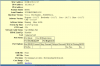
I have updated the firmware as instructed and uploaded the provisioning file that I exported out of the 3CX portal. However, in the 3CX portal there remains a Red dot next to the extension. I have screenshot the Status page from the gateway. Any ideas where I'm going wrong?
 

Attachments

  • Capture.PNG
    Capture.PNG
    92.1 KB · Views: 12
We provision it as a local device by default, we do not support remote FXS.

So essentially, the provisioning point the HT801 to the local IP of the PBX, but the PBX is not on premises so it cant find it to register
 
Is there a way to do it or is the HT801 just not able to do it?
 
You will have to manually change the Server information in the ATA as, once moved, it will no longer be registering to the local IP of the server. Once you have auto-provisioned, you will want to disable any further attempts, as that would overwrite the changes you will need to make. Depending on the remote location, you may need to enable STUN, but wait and see if what the registration looks like before making those changes. If there is an SBC, then that IP would be used as the server. If there are other SIP devices already using STUN, then the local port must be unique, and there may be some audio port issues..
 
Being a novice to this system, I am a little lost in the terminology. STUN? SBC?? I was originally going to go with a Cisco ATA but was recommended in a forum to go with Grrandstream (further up in this thread) as it was 'supported' so thought it was going to be tried, tested and moreover - supported. Seems I was mislead a little.
 
Originally you did not mention this was a cloud PBX, and the supported gateways are only tested by 3CX for local use.

You do have some options though:

1) Supported method: You can still make it appear as local if there is a VPN between your FXS and the PBX, that way it will work "out of the box" using standard 3CX configuration. They need to be on the same network virtually, so that that local IPs of the PBX & FXS can talk to each other as if they were on the same LAN.

2) Unsupported Methods - manual work required, results not guaranteed. What @leejor describes can potentially work even though we do not officially support or test those methods, they could work in theory. STUN is one method, SBC is another method that can be used, you may have to test either if you pick option 2.

3) Replace the doorphone with a fully supported SIP model that can work remotely without any analog FXS needed. These can be deployed as Local, STUN or SBC devices and this gives you more options. An example is the 18S https://www.3cx.com/sip-phones/fanvil-sip-doorphones/


So to recap, option 1 is the easy way, provided you can setup a VPN between the 2 ends and if you already have an FXS device to use. Option 2 requires more work and some knowledge or research, but we do not support or test that method so results may vary or be inconsistent Option 3 is also on the table if you don't mind replacing the doorphone for a SIP model. Weigh your options accordingly, and let us know if you have any further questions before you proceed.
 
@JohnS_3CX Are there some instructions on the steps required to do Option 1?
 
Hi Richard,

That relies more on your own specific network infrastructure and what cloud provider you are hosting the PBX on. I would recommend to research for how to do it online for your specific cloud provider and specific firewall you may be using.
 
@JohnS_3CX We are currently in a testing only phase and the system is hosted on your servers. All I'm trying to get to is to prove that we can get everything up and running before making a decision to implement it. With this in mind I was just trying to get a standard anologue phone to work, once that's been proven I will then try connecting the actual analogue door entry phone. Will use an implementation partner for the 'real' deal, but at this point I'm just trying to satisfy myself that the system will do what I need it to do before going out and making the financial commitment.
 
Status
Not open for further replies.

Members Online Now

No members online now.

Forum statistics

Threads
111,831
Messages
589,277
Members
164,660
Latest member
RJenkinsROCK