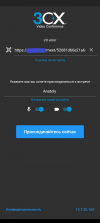
We've got error while conneting to conference with android APP. Meanwhile desktop browser connecting without any troubles.
Where we can find clues to solve this problem?
Does this happen only for this meeting or have you tried to join others too?
Also, have you tried from some other Internet Connection (different WiFi, over LTE, etc).
Hello!
It happened with any meeting our users created. we try diffrent providers and mobile operators - same result.
It's interesting that if we choose PC version mode in mobile chrome, we can connect to conference, video and audio work as planned.
The issue is related to your custom-installed SSL certificate. It misses the intermediate certificates.
Chrome adds such things by itself but apps do not...
Go here https://www.sslshopper.com/ and fix the SSL certs for your nginx or switch to a 3CX managed certificate to not have such issues.
<<YOUR CERT>>
The certificate is not trusted in all web browsers. You may need to install an Intermediate/chain certificate to link it to a trusted root certificate. Learn more about this error. You can fix this by following GlobalSign's Certificate Installation Instructions for your server platform. Pay attention to the parts about Intermediate certificates.