Solved Anonymous calls not getting through

Status
Not open for further replies.

th0r

Forum User
Joined
Jan 20, 2022
Messages
7
Reaction score
1
Hi All.

New to the forum, so please forgive if I'm posting in the wrong section.

So on 3CX, we have a number of call queues setup and one of them is with polling strategy as prioritized hunt.

This is what's happening...

1) Anonymous number rings

2) Is presented with digital receptionist menu options

3) They press 0 to connect to reception ext, which is part of the call queue

4) The reception ext never rings because the caller id is anonymous and eventually goes to voicemail

Is a 3CX limitation or setting that we can change this behaviour?

I was even thinking of doing the following, but the issue is we have single 3CX system but used by 6 different schools, so setting up this rule will mean all anonymous calls will go to a single etx, when it could be intended for another. I hope all this makes sense. Any input greatly appreciated.

inbound Rules:

New CID rule.

name:
some callers.

caller id:
*anonymous*

route call to:
extension:
xxx
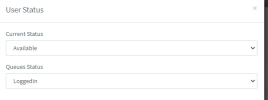
 
Are extensions logged into the queue ? - https://www.3cx.com/docs/pbx-queue-status/#:~:text=3CX has call queues, with agents as members,,of logging in and out of the queues.

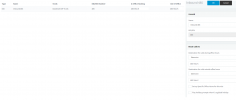
You can check the status - 3cx management console -> users - select an user and click on status in the top menu bar

View attachment 27284

If you ring the queue internally does the same thing happen ?

Hi. Thank you for replying.

I can't see Users option in 3cx but I can tick the extension in question and then Status and it is showing as Vailable & LoggedIn
 
Does the same thing happen internally if you call the queue extension.

What are your queue settings, , can you post the settings just down to 'Destination if no answer'

You sure the reception extension is a Call Queue Agent of the queue

On the IVR, what is the 'If no input within seconds' - could the IVR being timed out

Check the activity log, to see what route the call is taking

The issue has nothing to do with caller id being anonymous, as you are hitting the IVR
 
Last edited:
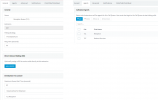
I can confirm that reception ext is a call queue agent of the queue. Here's the settings.

1642682787952.png
 
Hi @th0r ,

Welcome to our forum!

I was reading your initial description and I am a bit confused with what the exact problem is.

As I understand your setup, you can DID(s) routing to an IVR/Digital Receptionist.
From there, option 0 routes to a Queue, and in this Queue you have 2 Extensions, one of which is the Receptionist.

Is the problem that if you receive a call from a Caller that shows their number (not anonymous), the routing works correctly, but if the Caller is "anonymous", it doesn't work correctly?
 
Hi @th0r ,

Welcome to our forum!

I was reading your initial description and I am a bit confused with what the exact problem is.

As I understand your setup, you can DID(s) routing to an IVR/Digital Receptionist.
From there, option 0 routes to a Queue, and in this Queue you have 2 Extensions, one of which is the Receptionist.

Is the problem that if you receive a call from a Caller that shows their number (not anonymous), the routing works correctly, but if the Caller is "anonymous", it doesn't work correctly?

Hi. Thank you for your reply.

You have understood this correctly if caller ID is not anonymous then the routing works correctly (in that the reception actually rings and if someone is available they will answer). If caller is anonymous then the routing doesn't work correctly (in that caller on hold for 30 seconds, the reception phone never rings and caller is eventually led to voicemail).

Now the users have said it's only stopped working since Sept 2021 (they only just got around to reporting it). The reason why they flagged it as an issue, is because a certain range of numbers (from local authority), all show up as caller ID anonymous. I'm guessing prior to Sept 2021 these local authority numbers didn't hide their caller ID, thus problem began since Sept 2021.
 
OK, now it's clear, thank you :)

Could you send a screenshot of your Inbound Rules?
 
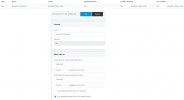
Here's what the Inbound Rule looks.

1642687138395.png
 

Attachments

  • 1642686959228.png
    1642686959228.png
    33 KB · Views: 16
Are the DIDs actually 711 and 485, or have you hidden some digits?

I would suggest making sure your SIP Trunk is setup as per this doc and checking the DIDs in 3CX have been configured in the format explained here:
https://www.3cx.com/docs/gradwell-uk-sip-trunk/#h.7v0g0mvetpm

If after doing this the issue remains, you call from your mobile using "anonymous" (usually all Telcos have a dial code to do that) and live, check in Dashboard --> Number of calls in use where the call is being routed. Those calls may in fact be being routed elsewhere ad that's why the caller is hearing "ringing" but they are never reaching the Queue.
 
Are the DIDs actually 711 and 485, or have you hidden some digits?

I would suggest making sure your SIP Trunk is setup as per this doc and checking the DIDs in 3CX have been configured in the format explained here:
https://www.3cx.com/docs/gradwell-uk-sip-trunk/#h.7v0g0mvetpm

If after doing this the issue remains, you call from your mobile using "anonymous" (usually all Telcos have a dial code to do that) and live, check in Dashboard --> Number of calls in use where the call is being routed. Those calls may in fact be being routed elsewhere ad that's why the caller is hearing "ringing" but they are never reaching the Queue.

The DIDs are actually as that, I've not hidden them.

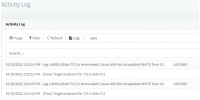
The SIP Trunk is set as per the instructions. I done a test from my mobile with caller ID hidden and then looked on the Activity Log and this is what's showing. I've redacted the full from IP.

1642690690627.png
 
First thing you should do is what @NickD_3CX mentioned, which is configure the DIDs to be the full number and use the format mentioned in the guide.

Note: Do bear in mind that DID must have at least 6 digits as also mentioned in the 3CX Academy course on SIP Trunks(slide 7)

Configure at least one of the DIDs in this manner, do the test with your mobile again by calling that specific DID and let us know what happens.
 
Thank you all for your input, much appreciated.

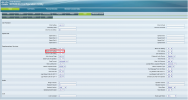
I've found a solution, simply setting the Block ANC Setting to No, on a Cisco handset, in this case SPA504G.

1642756973591.png


PS. How does one mark this post as solved?
 
  • Like
Reactions: ChrisC_3CX
Glad to see you managed to identify the cause of the issue!

I'll be marking it as solved so no need to worry, feel free to post anew should anything else come up!
 
Status
Not open for further replies.

Forum statistics

Threads
111,974
Messages
590,081
Members
164,899
Latest member
mazet