App Extension switching to DND

FuTech-Nel

Bronze Partner
Advanced Certified
Joined
May 25, 2020
Messages
82
Reaction score
3
I have a user on 3CX v20 update 6, running on a Windows 10 Pro workstation using an app on an iPhone 14.

The user is having an issue with the iPhone app setting itself to DND when outside of office hours.

The extension follows the system's office hours.

What else can I check?
 
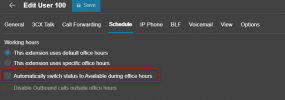
Hi, check in the user extension ---- schedule tab ---- the automatic switch is disabled.

1754589759700.png

Also validate if you are using any M365 or Google integration that may be synchronizing the calendar or teams presence.
 
Hi, check in the user extension ---- schedule tab ---- the automatic switch is disabled.

View attachment 48893

Also validate if you are using any M365 or Google integration that may be synchronizing the calendar or teams presence.

I do have it set to be available during office hours. Is that the issue?
 
If you have enabled the option mentioned in my previous reply, then that will automatically switch the extension to DND when it is out of office hours, away status for break hours and available for office hours.

Disable the parameter and the extension will stop switching the status automatically.
 
If you have enabled the option mentioned in my previous reply, then that will automatically switch the extension to DND when it is out of office hours, away status for break hours and available for office hours.

Disable the parameter and the extension will stop switching the status automatically.
But I have the same setup in my office with the same settings on my app on my iPhone, and it does not automatically change.
 
When the user is between these status: available, DND or Away and the AUTO SWITCH is enabled, then:
  • During Office Hours, the extension will be in the “Available” state
  • During Out of Office Hours, the extension will be in the “Do Not Disturb” state
  • During Break Times, the extension will be in the “Away” state
The extension will not change its status when using Custom 1 or 2 profiles, in those status the auto switch will not change the extension status.
 
When the user is between these status: available, DND or Away and the AUTO SWITCH is enabled, then:
  • During Office Hours, the extension will be in the “Available” state
  • During Out of Office Hours, the extension will be in the “Do Not Disturb” state
  • During Break Times, the extension will be in the “Away” state
The extension will not change its status when using Custom 1 or 2 profiles, in those status the auto switch will not change the extension status.
OK. I will make that change. But that has not been made clear to me until now.
 

Members Online Now

Forum statistics

Threads
111,832
Messages
589,278
Members
164,662
Latest member
DejanMDS