Archiving not clearing recordings anymore

Status
Not open for further replies.

MattJames

Gold Partner
Advanced Certified
Joined
Sep 23, 2021
Messages
16
Reaction score
2
Hi Everyone,

We have several 3CX servers that are set to archive to and SFTP site every night.

While the archiving appears to be happening - the recordings are not being cleared from the local server anymore. The behavior seems to have started around the beginning of the month.

Are we now required to manually purge the old recordings? Is there a reason this has changed? or is it a bug?

Thanks

Matt
 
Hi, which SFTP service are you using?

The below SFTP services are not supported:
  1. Amazon S3 buckets
  2. AWS Transfer for SFTP managed service
  3. MS Azure Blob Storage

do you see all the recordings with the archived icon?

are you using the default recording path in the 3cx or using a separate disk with a custom folder?
 
Hi, which SFTP service are you using?

The below SFTP services are not supported:
  1. Amazon S3 buckets
  2. AWS Transfer for SFTP managed service
  3. MS Azure Blob Storage

do you see all the recordings with the archived icon?

are you using the default recording path in the 3cx or using a separate disk with a custom folder?
Hi Alejandro,

We are using an SFTP service running off a physical server we maintain in a datacentre (it is a Dell system running Windows Server 2019) - so not Azure, Amazon etc...

The recordings do show an archived icon - and we can see them in the SFTP share, they are just not removing from the server after archiving (that is something that always happened before automatically..)

We are using the default recoding path in our 3CX servers.

Thanks

Matt
 
I wonder if you are using the default recording path or did you move to another recording location? is this a separated disk?

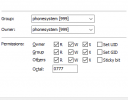
can you check that the folder has all these rights for the phonesystem

permisos en carpeta.png

one last thing, check if by any chance the option Automatically delete all recordings from local recording folder older than X days is enabled, if so, please disable it.
 
I wonder if you are using the default recording path or did you move to another recording location? is this a separated disk?

can you check that the folder has all these rights for the phonesystem

View attachment 37389

one last thing, check if by any chance the option Automatically delete all recordings from local recording folder older than X days is enabled, if so, please disable it.

It is definitely the default location - the system is running on a windows server, the file location is

C:\ProgramData\3CX\Instance1\Data\Recordings

We have noticed that we are getting the same behaviour on all our systems copying to SFTP - we do have one system that archives to a normal FTP site provided by a customer on a NAS, and it is working correctly (i.e it is deleting the local recordings when moving the data)

I can confirm that the Automatically Delete All Recording setting is off (and has never been active)

Thanks

Matt
 

Attachments

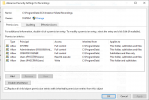
  • 3Cx recordings.png
    3Cx recordings.png
    71.6 KB · Views: 22
Hi Matt, could you please open a technical support ticket with us so we can gather the logs and analize.

Thanks!
 
Good Morning. My I ask what the resolution was for this issue? We're also seeing a similar issue.
Thanks
 
Good Morning. My I ask what the resolution was for this issue? We're also seeing a similar issue.
Thanks
Hi, Unfortunately, there has been no fix yet. Support have moved it to R&D, and we have not heard back as of yet...

We have had to set alerts on all the servers, and when the records start getting full, we go manually clear the files that have moved to the FTP storage.

We have found some more info though.

FTP and SFTP are both equally affected - the reason the FTP test mentioned above was working is it was on version 18.0 Update 6 (Build 908) - any system updated to 3cx 18.0 Update 8 (Build 939) or newer fails.

We have also found that if a file is archived, it will not purge - if it is not archived, it will.

Hopefully R&D have a fix sooner rather than later...
 
Hi, Unfortunately, there has been no fix yet. Support have moved it to R&D, and we have not heard back as of yet...

We have had to set alerts on all the servers, and when the records start getting full, we go manually clear the files that have moved to the FTP storage.

We have found some more info though.

FTP and SFTP are both equally affected - the reason the FTP test mentioned above was working is it was on version 18.0 Update 6 (Build 908) - any system updated to 3cx 18.0 Update 8 (Build 939) or newer fails.

We have also found that if a file is archived, it will not purge - if it is not archived, it will.

Hopefully R&D have a fix sooner rather than later...
 
Thanks, Matt,

Helpful to know. I'll also set up a manual task to clear the local files.
 
Status
Not open for further replies.

Forum statistics

Threads
111,974
Messages
590,081
Members
164,899
Latest member
mazet