audio bridge issues.

MMDTerry

Premier Customer
Joined
Jan 11, 2017
Messages
83
Reaction score
27
Users calling into the web meeting get added, an announcement is made that they joined, and you can see them in the meeting but they are left hearing the hold music and no one can hear them. We also have the issue where they get audio, but it's only between users that called in, the web-joined users can't interact with them. Abandoning the scheduled meeting, making a new one and everyone re-joining seems to fix it. If the meeting is all PC audio users, no issues, if it's all call-in users, no issues. People have said this started a few months ago but never thought to bring it up. Has anything changed on the 3cx side that could be causing this? It's both internal and external call-in's that are having issues.

We had a very similar issue a while ago and there was some changes on the 3cx side that fixed it. Not sure if those were reverted or if something else had changed.
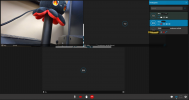
 
I think i found the issue. It seems that even after being told multiple times to NOT use the legacy email option when setting up the meeting they still are. I made a meeting and schedule via ICS, everything is good, we can call in and everyone can hear.

I created one and scheduled it via the legacy email option. When i called in, I was prompted to say my name and got the hold music. it would seem that the conference dial-in for the web meeting is being set up as an audio-only conference. I had a second test user call in, i could hear him from the call-in user, but the web users could only hear themselves. We also noted that if you hover over the called-in user, it says audio muted, even though the user is not muted.

is this expected behavior for the legacy email option?

image.png
 
Users calling into the web meeting get added, an announcement is made that they joined, and you can see them in the meeting but they are left hearing the hold music and no one can hear them. We also have the issue where they get audio, but it's only between users that called in

This sounds a lot like RTP firewall/port related issues on your PBX. Calling into any audio conference by dialing even the ones for the Video Conferences actually just connects all callers to an audio conference on the PBX. IF that audio conference happens to have a Video Conference counterpart, then the audio stream for that entire audio conference is also sent to a cloud MCU where the Video Conference is occurring.

If everyone in the audio conference can hear each other and can hear announcements and such, it means the audio conference has never connected to any Video Conferences. This typically occurs when you have some kind of issue with firewall config/RTP port on your PBX, perhaps overlapping ranges with other RTP ports not related to WebRTC as well.

My suggestion is to try performing tests where you explicitly allow the WebRTC RTP range of ports for outbound connectivity to 3CX MCUs. A dynamically updated IP list of MCUs can be found by performing an nslookup to v18-vc-qos.3cx.net
 
  • Like
Reactions: NatalyS_3CX_
Bit late but an update, I re-did the FortiGate config following the 3cx guide, the only difference was how i did the VIP which according to Fortigate both methods do the same thing, firewall checker was all green before, and still is. Still intermittently happening. After asking around more, this seems to have started after the final v18 update. Did anything change with the webmeeting config on the backend? v20 upgrade is coming soon when i have a few free min to verify the groups to department change. If its still occurring after that i will try to dig into the RTP streams and see if can find any faults. It just seems the audio stream between the PBX and MCU are failing randomly.
 
Using the dialin feature, the mcu contact the pbx. Because your meeting can be hosted on one of the mcus of the pool, you need to be sure that every mcu can access. The list of mcus can be obtained with:
nslookup v18-vc-qos.3cx.net
From the randomness of the behavior that are you describing, it seems that only some mcus have access.
Can you confirm that you configured this correctly?
 
  • Like
Reactions: MMDTerry
Using the dialin feature, the mcu contact the pbx. Because your meeting can be hosted on one of the mcus of the pool, you need to be sure that every mcu can access. The list of mcus can be obtained with:
nslookup v18-vc-qos.3cx.net
From the randomness of the behavior that are you describing, it seems that only some mcus have access.
Can you confirm that you configured this correctly?
I do have a geo-ip block to limit incoming connections to only the US and Canada, but I believe it has occurred with the US mcu's and that block has been in place since we installed 3cx 8 years ago without issue. I'll try to get it to fail again and see what MCU is in use.
 
I might have found some of the issue. 3cx likes digital oceans, but so does a lot of scammers and we have a block that covered one of the US MCU's that resolved. I believe the MCU's are dynamic so its possible we were getting redirected to one that was in that net block while another meeting was on another block. I will adjust the block and test.
 
I might have found some of the issue. 3cx likes digital oceans, but so does a lot of scammers and we have a block that covered one of the US MCU's that resolved. I believe the MCU's are dynamic so its possible we were getting redirected to one that was in that net block while another meeting was on another block. I will adjust the block and test.
In Version 20 we have the option to create your own MCU server as well.
 
  • Like
Reactions: MMDTerry
I have tested with more meetings, as have others with actual meetings and it's now working, the bridge between the call-in and web users is good. The one IP that was in the netblock we had blocked was the culprit. Thanks for the help and information.
 
  • Like
Reactions: Emanuele Bizzarri
Please keep updated the ips reported by:
nslookup v18-vc-qos.3cx.net
on your firewall, because mcus are created dynamically and their ips can change.
Thank you for reporting
 

Latest Posts

Forum statistics

Threads
111,973
Messages
590,075
Members
164,895
Latest member
jasonkkrause