Audio Conference Recording

Status
Not open for further replies.

jcostlow

Gold Partner
Advanced Certified
Joined
Jul 11, 2020
Messages
396
Reaction score
152
Hi Everyone,


I am pretty sure there isn't a workaround for this but figured it wouldn't hurt to ask. We have a customer whose policy is all external calls are recorded and the user doesn't have the ability to turn it off. We were asked to pull a recording the other day and it didn't exist. The user called a client and placed them on hold and then called a coworkers cell to establish a 3 way call from the physical phone. There are recordings of each external call and they end once the 3 way call is established since it uses the conference extension of 7000.

Is the only way to record conference calls going to be giving users the ability to start/stop recordings and make sure they start the recording from webclient or desktop app? I didn't see an idea for recording system extensions to upvote so I am asking if there is a workaround here.
 
Hi @jcostlow,

We're aware of this issue and are investigating it at present. The issue is not that the recording isn't made, but rather that it isn't shown in the recordings list. You can SSH to your machine and navigate to the recordings folder (Linux default: /var/lib/3cxpbx/Instance1/Data/Recordings and find the recording there).
 
I have looked in /var/lib/3cxpbx/Instance1/Data/Recordings under the users extension and extension 7000 folder but can't find the recording.
 
Hi @jcostlow,

What app / device are you starting the conference from?

Are there recordings in the Management Console before the Conference, which correlate to the extensions in the Recordings folder? As in, you should see the same recordings in the Management Console as you do in the path mentioned above, prior to the Conference extension disappearing?
 
The users are starting the call from a Snom D735 and there are recordings of the call prior to the conference. As soon as the conference starts the recording stops.

While testing I can get a recording but only if the webclient is up and I manually hit record after starting the conference.
 
Can you provide the scenario that you're using so that I can replicate?

Which extensions have recordings enabled, and how are they set up?

I know that the Snom D735 starts the call, puts an extension on hold, calls the 3rd extension and then hits the conference button (triangle), each party can hear each other and then when hanging up there is no recording made on the extension of the Snom D735? Have you listened to the recordings leading up to the conference?
 
I call an external number from the D735 provisioned on ext 0099 and place that person on hold. I then call another external number and choose conference (triangle) the phone then shows a list of the numbers I have on hold and I scroll to the number I placed on hold and hit select.

The phone then shows conference and both parties.

When I listen to the recording prior to the conference I have audio and it just stops as if the call was ended once the conference starts. I have been able to replicate on 2 systems using D735 and D785 phones.
 
Hi @jcostlow,

What version is the PBX running?

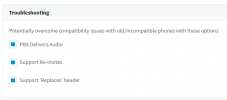
Have you got Supports Reinvites checked on the trunk? Also, on the extension what options do you have checked under Troubleshooting in the Options section?

To summarise, you're seeing the recording of the first call until you put them on hold (this is correct), you find the second recording which I'm assuming is short since you conference them in right after (this is correct too) but you do not see the conference recording (this should be there)?
 
The PBX is running 18.0.1880

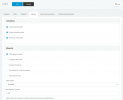
Here is the trunk options:
trunk.png

Here is the extension options:
options.png

I have tried with and without PBX delivers audio on the extension.

Correct, I see both calls recordings before the conference but no conference recording.
 
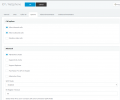
On another system that I experience the same behavior it is running 18.0.1880 and the trunk has the following:
n2p.png
 
When you navigate to the recordings folder, are you looking inside the folder of the extension associated to the Snom?
 
Yes, I check extension 0099 folder which is provisioned to that phone.
 
Hi @jcostlow,

It sounds like an interesting one, I'd suggest escalating this to 3CX Support to investigate further.
 
I have a ticket open but am being told the phone is using non standard ports and a few other things even though it is using 3CX provided firmware and template. It does record if I manually start it but didn't want that at this customer.

Not sure where to go from here but I appreciate your help. I mainly made the post to see if there was a work around.
 
  • Like
Reactions: VasilisV_3CX
Status
Not open for further replies.

Forum statistics

Threads
111,976
Messages
590,089
Members
164,904
Latest member
gdstratton