Solved Audio issue on 3CX for windows

Status
Not open for further replies.

luc.jubeau

Platinum Partner
Advanced Certified
Joined
Nov 10, 2021
Messages
42
Reaction score
3
We have a PC with Windows 10. We have plugged a headphone : Jabra biz 24002 USB UC.
We have installed 3CX app for windows v16. The microphone is ok but we have no audio.
When we use 3cx Webclient, all is ok.
We have updated all what we could.
Have you any idea ?
thanks
Luc
 
Try the following:

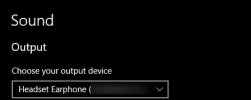
Right click on the Windows speaker in the system try of the task bar (lower-right corner) and click on "Open Sound Settings". Make sure the headset is set as the Output device:
1636541692421.png

Then, launch the 3CX Windows App and go to "Settings >> Audio Options >> Speaker" and set the headset here. Completely exit the 3CX Windows App by clicking on "Settings >> Exit Client" and relaunch it. Click on the dial pad and click on a few digits, do you here the tone for every digit? Then try dialing *777 for an echo test, can you hear your own voice?
 
We actually have the same problem with a v16 server and echo test does not work, voip phones do work though.
 
Try the following:

Right click on the Windows speaker in the system try of the task bar (lower-right corner) and click on "Open Sound Settings". Make sure the headset is set as the Output device:
View attachment 25779

Then, launch the 3CX Windows App and go to "Settings >> Audio Options >> Speaker" and set the headset here. Completely exit the 3CX Windows App by clicking on "Settings >> Exit Client" and relaunch it. Click on the dial pad and click on a few digits, do you here the tone for every digit? Then try dialing *777 for an echo test, can you hear your own voice?
Thanks a lot for your answer. But, we have checked these settings before posting that. And all these settings are ok.
 
Last edited:
Thanks a lot for your answer. But, we have checked these settings before posting that. And all these settings are ok.
Understood, however have you tested the dial pad tone and the *777 echo test? Do you have no audio for both or only the echo test?

Also could you both @luc.jubeau @StefanDeViske please provide the information mentioned here: https://www.3cx.com/community/threads/information-to-provide-when-requesting-help.67558/

@luc.jubeau
Since you say the microphone is okay, I take it that an extension to extension call would result in the other party of the call being able to hear you but you not being able to hear them correct?

@StefanDeViske
Is this the case with you also? Does the microphone work meaning you essentially have one way audio in an extension to extension call?
 
Understood, however have you tested the dial pad tone and the *777 echo test? Do you have no audio for both or only the echo test?

Also could you both @luc.jubeau @StefanDeViske please provide the information mentioned here: https://www.3cx.com/community/threads/information-to-provide-when-requesting-help.67558/

@luc.jubeau
Since you say the microphone is okay, I take it that an extension to extension call would result in the other party of the call being able to hear you but you not being able to hear them correct?

@StefanDeViske
Is this the case with you also? Does the microphone work meaning you essentially have one way audio in an extension to extension call?
correct.


3CX Version, Enterprise Annual 16.0.8.9
Server OS, e.g. Debian 9
Is the 3CX Server Hosted and where? Hosted in [by 3CX]
Has the Firewall Checker passed: YES
Are custom Phone Templates being used: NO
 
@StefanDeViske

Are you sure this instance is Hosted by 3CX? If it were you would be running 3CX v18 on Debian 10 as all Hosted by 3CX instances are running the latest stable version of 3CX.

Also, do you have this same issue with other 3CX Apps as well such as the 3CX android/ios apps or other 3CX Windows Apps on other PCs?
 
@StefanDeViske

Are you sure this instance is Hosted by 3CX? If it were you would be running 3CX v18 on Debian 10 as all Hosted by 3CX instances are running the latest stable version of 3CX.

Also, do you have this same issue with other 3CX Apps as well such as the 3CX android/ios apps or other 3CX Windows Apps on other PCs?
my bad, its hosted at keen systems, android / ios have no problems but other windows clients do have the same problem.
 
@StefanDeViske

Can you give the following a quick try:

Access the Management Console and go to "Extensions >> Edit the extension >> Phone Provisioning", select 3CX App from the drop-down list. Scroll down and uncheck the option that reads "Use 3CX Tunnel for remote connections (3CX App only)". Apply the settings and then on one of the affected PCs, completely exit the 3CX Windows App by clicking on "Settings >> Exit Client" and then relaunch it. Try the echo test with *777 again and let me know what happens.
 
Understood, however have you tested the dial pad tone and the *777 echo test? Do you have no audio for both or only the echo test?

Also could you both @luc.jubeau @StefanDeViske please provide the information mentioned here: https://www.3cx.com/community/threads/information-to-provide-when-requesting-help.67558/

@luc.jubeau
Since you say the microphone is okay, I take it that an extension to extension call would result in the other party of the call being able to hear you but you not being able to hear them correct?

@StefanDeViske
Is this the case with you also? Does the microphone work meaning you essentially have one way audio in an extension to extension call?
We have no audio for both of tests. And, yes, an extension to extension call would result in the other party of the call being able to hear me but i not being able to hear them
  • 3CX Version Entreprise Annual 16.0.8.9
  • Server OS, Debian 9
  • Is the 3CX Server Hosted and where ? On-premise
 
We have no audio for both of tests.
Okay, this helps as narrow it down as the tone for the dialed digits is generated locally. Do you have the same issue if you use a different audio device, say the PCs built-in speakers if it has any? Also, do you have the same issue on other PCs running the 3CX Windows App?
 
Okay, this helps as narrow it down as the tone for the dialed digits is generated locally. Do you have the same issue if you use a different audio device, say the PCs built-in speakers if it has any? Also, do you have the same issue on other PCs running the 3CX Windows App?
Yes, we have the same issue if we use the PC's speaker.
We have three PCs with this issue. For the others, that is correct.
 
@StefanDeViske

Can you give the following a quick try:

Access the Management Console and go to "Extensions >> Edit the extension >> Phone Provisioning", select 3CX App from the drop-down list. Scroll down and uncheck the option that reads "Use 3CX Tunnel for remote connections (3CX App only)". Apply the settings and then on one of the affected PCs, completely exit the 3CX Windows App by clicking on "Settings >> Exit Client" and then relaunch it. Try the echo test with *777 again and let me know what happens.
if they do that, they can't connect but works on my machine so might be a firewall issue?
 
@luc.jubeau
Yes, we have the same issue if we use the PC's speaker.
We have three PCs with this issue. For the others, that is correct.
Do these three PC's have anything in common such as the antivirus software, network location, any other 3rd party software or configuration, etc? If it's just these three PCs having the issue and you can eliminate the network from being the culprit, it might be worth completely uninstalling the app or even related audio drivers. I do have to say that this is weird since not hearing the tone when pressing digits almost definitely means it's a problem local to the PC but to have this happen on three different PCs seems very unlikely unless of course they share something in common that is causing this hence the questions above.

if they do that, they can't connect but works on my machine so might be a firewall issue?
Not necessarily, if however your machine is on the same network as theirs then this might actually mean its a problem local to the specific PC. Are all affected PC's on the same network? Does your PC work with 3CX Tunnel enabled too? Can you ensure that both TCP and UDP port 5090 is forwarded to the 3CX PBX?
 
@luc.jubeau

Do these three PC's have anything in common such as the antivirus software, network location, any other 3rd party software or configuration, etc? If it's just these three PCs having the issue and you can eliminate the network from being the culprit, it might be worth completely uninstalling the app or even related audio drivers. I do have to say that this is weird since not hearing the tone when pressing digits almost definitely means it's a problem local to the PC but to have this happen on three different PCs seems very unlikely unless of course they share something in common that is causing this hence the questions above.


Not necessarily, if however your machine is on the same network as theirs then this might actually mean its a problem local to the specific PC. Are all affected PC's on the same network? Does your PC work with 3CX Tunnel enabled too? Can you ensure that both TCP and UDP port 5090 is forwarded to the 3CX PBX?
All of ours PCs have the same antivirus software. 2 of the three PCs are on the same network. They have no 3rd party software or configuration for all of them.
We have uninstalled 3cx app and audio drivers. We have cheked with 3Cx tunnel enabled and disabled. The issue is here after of these stages.
On the three PCs, headphones run correctly with 3CX Webclient.
 
We'll need more information on this:

1. I forgot to ask but, are the affected PC's n the same LAN as the 3CX PBX? If not, test an affected PC on a different network that has other PCs 3CX Windows Apps working. Testing it with a data connection should also be an equivalent test. If for instance you could create a hotspot with a mobile device which mobile device has the 3CX App installed and works fine should help us understand if the issue is related to the network or not since the 3CX Mobile app also utilizes the 3CX Tunnel.

2. I doubt the antivirus is interfering at this point but completely uninstalling it (not just disable) and rebooting the PC in order to eliminate this possibility would be great.

3. What version of the 3CX Windows App are you running? Check in "Settings >> Advanced Settings>> About".

4. Also I assume this is also affecting external calls to or from these extensions correct?

5. Also, try creating a new test extension and configure it to one of the affected 3CX Windows Apps, does anything change?
 
Last edited:
We'll need more information on this:

1. I forgot to ask but, are the affected PC's n the same LAN as the 3CX PBX? If not, test an affected PC on a different network that has other PCs 3CX Windows Apps working. Testing it with a data connection should also be an equivalent test. If for instance you could create a hotspot with a mobile device which mobile device has the 3CX App installed and works fine should help us understand if the issue is related to the network or not since the 3CX Mobile app also utilizes the 3CX Tunnel.

2. I doubt the antivirus is interfering at this point but completely uninstalling it (not just disable) and rebooting the PC in order to eliminate this possibility would be great.

3. What version of the 3CX Windows App are you running? Check in "Settings >> Advanced Settings>> About".

4. Also I assume this is also affecting external calls to or from these extensions correct?

5. Also, try creating a new test extension and configure it to one of the affected 3CX Windows Apps, does anything change?
to 1 : We have tried : not ok
to 2 : After antivirus had been uninstalling, not ok
to 3 : version 16.3.0.261
to 4 : yes, all calls
to 5 : anything change
 
@luc.jubeau

I'll PM you shortly for more information on this.
 
Hi,
Also having no end of audio problems with the new windows app. For everyone the inbuild audio/mic just does not work. Luckily, they have Sennheiser headsets, which is working for all but one user.

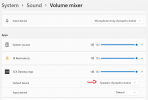
I've also tried on my PC and I cannot get mic to work at all. Speakers now work after adjusting the output from default to speakers:
1636985023380.png

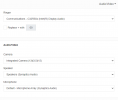
doesnt seem to have any effect on the Mic, tried several settings with the *777 service.

1636985096126.png

settings in the app dont seem to align at all with the windows settings. There are three options for the same thing?

App version is 18.5.28

Of course its working perfectly headset/no headset on Teams. Also worked perfectly (apart from the fact it kept loosing the headset integration) in the webclient before the upgrade.
 
@ChrisBCH

First off just to clarify, are you saying that the microphone is not working even if you connect the sennheiser headset to this PC? I'd recommend making absolutely sure the webclient site has permissions to use the microphone. Also, maybe give another browser a try such as firefox too.

If both fail, give this site a go that will check the mic in the browser to hopefully help narrow this down: https://www.onlinemictest.com/
 
Status
Not open for further replies.