Audio issues with SBC on dect phones

Status
Not open for further replies.

Sias Hattingh

Bronze Partner
Advanced Certified
Joined
Jun 30, 2022
Messages
14
Reaction score
1
Good day All,

I'm having an odd issue on a site:
3cx v20 build 2 self hosted
8CH Pro edition
3cx SBC on Raspberry PI
All firmware is up to date

Everything onsite was working nice. Two weeks after install issues started popping up on the dect phones.

issue is as follows:
ext 400 dect
ext 401 dect
ext 402 desk phone
ext 403 dect
ext 500 desk phone
ext 501 desk phone
etc.. etc...

All external call is working perfect with no issues. when 400 calls 401 (on same yealink base station) then only caller (400) has audio, when you swap around and caller is now 401 -> 400 then only (401) has audio.

BUT... when you use any of the dect phones (400/401/403) to call any desk phone audio has no issues. Issue only occours on extensions that share the same base station.

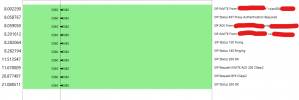
When using Wireshark pcap shows all is good:

"Start Time","Stop Time","Initial Speaker","From","To","Protocol","Duration","Packets","State","Comments"
"8.002290","21.088511","127.0.0.1",""user 400 "<sip:[email protected]:5060>","<sip:[email protected]:5060>","SIP","00:00:13","10","COMPLETED","INVITE 407 200 200"
"8.282236","11.604153","127.0.0.1",""user 400"<sip:[email protected]:5060>","<sip:[email protected]>","SIP","00:00:03","6","CANCELLED","INVITE 200 487"
"8.298632","20.877207","127.0.0.1",""user 400"<sip:[email protected]:5060>","<sip:[email protected]:5060>","SIP","00:00:12","8","COMPLETED","INVITE 200"

Any help will be appreciated
 
Does this occur if you turn on call recording for these extensions?
 
or enable PBX Deliver Audio in extensions (users) ? (Has the same effect, without audio recording.)
 
  • Like
Reactions: Sias Hattingh
Assuming manual config of DECT phones, are they connecting via SBC?
 
  • Like
Reactions: Sias Hattingh
If you have another DECT base station, i would provision that and connect the handsets and see if the issue replicates itself.

How many DECT phones do you have configured to each base station?

Also ensure that all base station is up to the latest 3cx firmware and not the latest yealink firmware

I believe raspberry pi can only have up to 50 devices behind it as an SBC so ensure that number of both DECT and Desk phones is below this or use multiple SBC's
 
  • Like
Reactions: Sias Hattingh
Hi all thanks for your replies.

I have about 25 devices connected behind SBC.

I have tried call recording on and off.

Pabx delivers audio on and off.

When I register dect via stun registration audio works as normal.

I went to another base which only has 1 handset on and registered another handset to that base (base 2) and it is exactly the same - calls to all extensions are good except between the two handsets thats on that dect.

Caller has audio but receiver not . Change ext who is dialing and has same effect
 
OK, here’s what we can do:

1. Hang up all calls (made or received with the base phones).
2. Configure your Dect base via SBC.
3. Log into the base (web interface).
Navigate to Settings > Configuration.
Choose Advanced for the Pcap Type

4. Start a packet capture (pcap).
You will then select a location on your local computer to save the pcap file.
5. Make a call to another DECT phones.
6. Answer and test the voice... reproduce the one-way voice issue.
7. Keep the line connected for at least 40 consecutive seconds (we want to see if the call drops on its own after 32 seconds).
8. After the 40 seconds (minimum), hang up.
9. Stop the capture.

If you are comfortable, send me the capture file (pcap) privately, and I will analyze it and share information here to enable everyone to collaborate. I will take care to "blurring" any sensitive information, of course.
 
Update:

after disabling Recordings I still had pabx deliver audio on - issue was still there,

when having recordings off and pabx deliver audio off, that combination seemed to work, I then reactivated recording but only for external calls then audio is perfect, so seems like the issue is when recording audio for internal calls also.
 
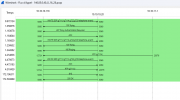
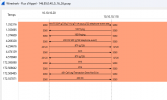
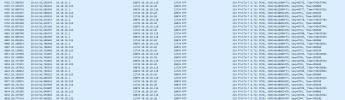
Apologies for the delay. Here are the screenshot and other details from the PCAP you sent me.
I'm sharing these to allow others to participate and provide their opinions.
Rest assured, I will not share any sensitive information (Public IP, Phone Number, FQDN, MAC).

In a separate reply, I will share my suspicions and upcoming questions.

Local IP : 10.10.10.118 is Yealink W70B
Local IP : 10.10.10.20 is RaspberryPI .. is 3CX SBC ?
Local IP : 10.10.11.1 is ? In the Wireshark capture, I see "Source is Raspberry" with the same MAC address as 10.10.10.20 ...
but when I look at ICMP traffic, I see "Sophos" with the actual MAC address of the Sophos device.

Ethernet II, Src: RaspberryPiF_REDACTED (b8:27:eb:REDACTED), Dst: YealinkNetwo_REDACTED (44:db:d2:REDACTED)
Destination: YealinkNetwo_REDACTED (44:db:d2:REDACTED)
Address: YealinkNetwo_REDACTED (44:db:d2:REDACTED)
.... ..0. .... .... .... .... = LG bit: Globally unique address (factory default)
.... ...0 .... .... .... .... = IG bit: Individual address (unicast)
Source: RaspberryPiF_REDACTED (b8:27:eb:REDACTED)
Address: RaspberryPiF_REDACTED (b8:27:eb:REDACTED)
.... ..0. .... .... .... .... = LG bit: Globally unique address (factory default)
.... ...0 .... .... .... .... = IG bit: Individual address (unicast)
Type: IPv4 (0x0800)

Ethernet II, Src: YealinkNetwo_REDACTED (44:db:d2:REDACTED), Dst: RaspberryPiF_REDACTED (b8:27:eb:REDACTED)
Destination: RaspberryPiF_REDACTED (b8:27:eb:REDACTED)
Address: RaspberryPiF_REDACTED (b8:27:eb:REDACTED)
.... ..0. .... .... .... .... = LG bit: Globally unique address (factory default)
.... ...0 .... .... .... .... = IG bit: Individual address (unicast)
Source: YealinkNetwo_REDACTED (44:db:d2:REDACTED)
Address: YealinkNetwo_REDACTED (44:db:d2:REDACTED)
.... ..0. .... .... .... .... = LG bit: Globally unique address (factory default)
.... ...0 .... .... .... .... = IG bit: Individual address (unicast)
Type: IPv4 (0x0800)

Ethernet II, Src: YealinkNetwo_REDACTED (44:db:d2:REDACTED), Dst: Sophos_REDACTED (00:1a:8c:REDACTED)
Destination: Sophos_REDACTED (00:1a:8c:REDACTED)
Address: Sophos_REDACTED (00:1a:8c:REDACTED)
.... ..0. .... .... .... .... = LG bit: Globally unique address (factory default)
.... ...0 .... .... .... .... = IG bit: Individual address (unicast)
Source: YealinkNetwo_REDACTED (44:db:d2:REDACTED)
Address: YealinkNetwo_REDACTED (44:db:d2:REDACTED)
.... ..0. .... .... .... .... = LG bit: Globally unique address (factory default)
.... ...0 .... .... .... .... = IG bit: Individual address (unicast)
Type: IPv4 (0x0800)


1723813651025.png

1723813674986.png
1723815990593.png


Session Initiation Protocol (INVITE)
Request-Line: INVITE sip:[email protected]:5060 SIP/2.0
Method: INVITE
Request-URI: sip:[email protected]:5060
Request-URI User Part: 401
Request-URI Host Part: yourFQDN.3cx.com
Request-URI Host Port: 5060
[Resent Packet: False]
Message Header
Via: SIP/2.0/UDP 10.10.10.118:5060;branch=z9hG4bK676056910
From: "Your Name" <sip:[email protected]:5060>;tag=675877079
To: <sip:[email protected]:5060>
Call-ID: [email protected]
[Generated Call-ID: [email protected]]
CSeq: 2 INVITE
Contact: <sip:[email protected]:5060>
Proxy-Authorization: Digest username="USERID", realm="3CXPhoneSystem", nonce="REDACTED:REDACTED", uri="sip:[email protected]:5060", response="REDACTED", algorithm=MD5
Content-Type: application/sdp
Allow: INVITE, INFO, PRACK, ACK, BYE, CANCEL, OPTIONS, NOTIFY, REGISTER, SUBSCRIBE, REFER, PUBLISH, UPDATE, MESSAGE
Max-Forwards: 70
User-Agent: Yealink W70B 146.85.0.40 44dbd2redacted
Allow-Events: talk,hold,conference,refer,check-sync
Supported: replaces
Content-Length: 306
Message Body
Session Description Protocol
Session Description Protocol Version (v): 0
Owner/Creator, Session Id (o): - 20010 20010 IN IP4 10.10.10.118
Session Name (s): SDP data
Connection Information (c): IN IP4 10.10.10.118
Time Description, active time (t): 0 0
Media Description, name and address (m): audio 12724 RTP/AVP 0 8 9 18 101
Media Attribute (a): rtpmap:0 PCMU/8000
Media Attribute (a): rtpmap:8 PCMA/8000
Media Attribute (a): rtpmap:9 G722/8000
Media Attribute (a): rtpmap:18 G729/8000
Media Attribute (a): fmtp:18 annexb=no
Media Attribute (a): ptime:20
Media Attribute (a): sendrecv
Media Attribute (a): rtpmap:101 telephone-event/8000
Media Attribute (a): fmtp:101 0-15
[Generated Call-ID: [email protected]]

Session Initiation Protocol (200)
Status-Line: SIP/2.0 200 OK
Status-Code: 200
[Resent Packet: False]
[Request Frame: 7]
[Response Time (ms): 3306]
Message Header
Via: SIP/2.0/UDP 10.10.10.118:5060;branch=z9hG4bK676056910
Record-Route: <sip:[email protected]:5060;user=proxy;tnlid=sbc.f131ebd9>
Contact: "your Name"<sip:[email protected]:5060>
To: <sip:[email protected]:5060>;tag=8d6de63a
From: "your Name"<sip:[email protected]:5060>;tag=675877079
Call-ID: [email protected]
[Generated Call-ID: [email protected]]
CSeq: 2 INVITE
Allow: INVITE, ACK, CANCEL, OPTIONS, BYE, REGISTER, SUBSCRIBE, NOTIFY, REFER, INFO, MESSAGE, UPDATE
Content-Type: application/sdp
Supported: replaces, timer
User-Agent: 3CXPhoneSystem 20.0.2.715 (715)
Content-Length: 308
Message Body
Session Description Protocol
Session Description Protocol Version (v): 0
Owner/Creator, Session Id (o): 3cxPS 3519264224968704 26535381897838593 IN IP4 127.1.2.3
Session Name (s): 3cxPS Audio call
Connection Information (c): IN IP4 10.10.10.20
Time Description, active time (t): 0 0
Media Description, name and address (m): audio 20076 RTP/AVP 0 8 9 18 101
Media Attribute (a): rtpmap:0 PCMU/8000
Media Attribute (a): rtpmap:8 PCMA/8000
Media Attribute (a): rtpmap:9 G722/8000
Media Attribute (a): rtpmap:18 G729/8000
Media Attribute (a): fmtp:18 annexb=no
Media Attribute (a): rtpmap:101 telephone-event/8000
Media Attribute (a): sendrecv
[Generated Call-ID: [email protected]]
 
  • Like
Reactions: Sias Hattingh
Apologies for the delay. Here are the screenshot and other details from the PCAP you sent me.
I'm sharing these to allow others to participate and provide their opinions.
Rest assured, I will not share any sensitive information (Public IP, Phone Number, FQDN, MAC).

In a separate reply, I will share my suspicions and upcoming questions.

Local IP : 10.10.10.118 is Yealink W70B
Local IP : 10.10.10.20 is RaspberryPI .. is 3CX SBC ?
Local IP : 10.10.11.1 is ? In the Wireshark capture, I see "Source is Raspberry" with the same MAC address as 10.10.10.20 ...
but when I look at ICMP traffic, I see "Sophos" with the actual MAC address of the Sophos device.

Ethernet II, Src: RaspberryPiF_REDACTED (b8:27:eb:REDACTED), Dst: YealinkNetwo_REDACTED (44:db:d2:REDACTED)
Destination: YealinkNetwo_REDACTED (44:db:d2:REDACTED)
Address: YealinkNetwo_REDACTED (44:db:d2:REDACTED)
.... ..0. .... .... .... .... = LG bit: Globally unique address (factory default)
.... ...0 .... .... .... .... = IG bit: Individual address (unicast)
Source: RaspberryPiF_REDACTED (b8:27:eb:REDACTED)
Address: RaspberryPiF_REDACTED (b8:27:eb:REDACTED)
.... ..0. .... .... .... .... = LG bit: Globally unique address (factory default)
.... ...0 .... .... .... .... = IG bit: Individual address (unicast)
Type: IPv4 (0x0800)

Ethernet II, Src: YealinkNetwo_REDACTED (44:db:d2:REDACTED), Dst: RaspberryPiF_REDACTED (b8:27:eb:REDACTED)
Destination: RaspberryPiF_REDACTED (b8:27:eb:REDACTED)
Address: RaspberryPiF_REDACTED (b8:27:eb:REDACTED)
.... ..0. .... .... .... .... = LG bit: Globally unique address (factory default)
.... ...0 .... .... .... .... = IG bit: Individual address (unicast)
Source: YealinkNetwo_REDACTED (44:db:d2:REDACTED)
Address: YealinkNetwo_REDACTED (44:db:d2:REDACTED)
.... ..0. .... .... .... .... = LG bit: Globally unique address (factory default)
.... ...0 .... .... .... .... = IG bit: Individual address (unicast)
Type: IPv4 (0x0800)

Ethernet II, Src: YealinkNetwo_REDACTED (44:db:d2:REDACTED), Dst: Sophos_REDACTED (00:1a:8c:REDACTED)
Destination: Sophos_REDACTED (00:1a:8c:REDACTED)
Address: Sophos_REDACTED (00:1a:8c:REDACTED)
.... ..0. .... .... .... .... = LG bit: Globally unique address (factory default)
.... ...0 .... .... .... .... = IG bit: Individual address (unicast)
Source: YealinkNetwo_REDACTED (44:db:d2:REDACTED)
Address: YealinkNetwo_REDACTED (44:db:d2:REDACTED)
.... ..0. .... .... .... .... = LG bit: Globally unique address (factory default)
.... ...0 .... .... .... .... = IG bit: Individual address (unicast)
Type: IPv4 (0x0800)


View attachment 43239

View attachment 43240
View attachment 43243


Session Initiation Protocol (INVITE)
Request-Line: INVITE sip:[email protected]:5060 SIP/2.0
Method: INVITE
Request-URI: sip:[email protected]:5060
Request-URI User Part: 401
Request-URI Host Part: yourFQDN.3cx.com
Request-URI Host Port: 5060
[Resent Packet: False]
Message Header
Via: SIP/2.0/UDP 10.10.10.118:5060;branch=z9hG4bK676056910
From: "Your Name" <sip:[email protected]:5060>;tag=675877079
To: <sip:[email protected]:5060>
Call-ID: [email protected]
[Generated Call-ID: [email protected]]
CSeq: 2 INVITE
Contact: <sip:[email protected]:5060>
Proxy-Authorization: Digest username="USERID", realm="3CXPhoneSystem", nonce="REDACTED:REDACTED", uri="sip:[email protected]:5060", response="REDACTED", algorithm=MD5
Content-Type: application/sdp
Allow: INVITE, INFO, PRACK, ACK, BYE, CANCEL, OPTIONS, NOTIFY, REGISTER, SUBSCRIBE, REFER, PUBLISH, UPDATE, MESSAGE
Max-Forwards: 70
User-Agent: Yealink W70B 146.85.0.40 44dbd2redacted
Allow-Events: talk,hold,conference,refer,check-sync
Supported: replaces
Content-Length: 306
Message Body
Session Description Protocol
Session Description Protocol Version (v): 0
Owner/Creator, Session Id (o): - 20010 20010 IN IP4 10.10.10.118
Session Name (s): SDP data
Connection Information (c): IN IP4 10.10.10.118
Time Description, active time (t): 0 0
Media Description, name and address (m): audio 12724 RTP/AVP 0 8 9 18 101
Media Attribute (a): rtpmap:0 PCMU/8000
Media Attribute (a): rtpmap:8 PCMA/8000
Media Attribute (a): rtpmap:9 G722/8000
Media Attribute (a): rtpmap:18 G729/8000
Media Attribute (a): fmtp:18 annexb=no
Media Attribute (a): ptime:20
Media Attribute (a): sendrecv
Media Attribute (a): rtpmap:101 telephone-event/8000
Media Attribute (a): fmtp:101 0-15
[Generated Call-ID: [email protected]]

Session Initiation Protocol (200)
Status-Line: SIP/2.0 200 OK
Status-Code: 200
[Resent Packet: False]
[Request Frame: 7]
[Response Time (ms): 3306]
Message Header
Via: SIP/2.0/UDP 10.10.10.118:5060;branch=z9hG4bK676056910
Record-Route: <sip:[email protected]:5060;user=proxy;tnlid=sbc.f131ebd9>
Contact: "your Name"<sip:[email protected]:5060>
To: <sip:[email protected]:5060>;tag=8d6de63a
From: "your Name"<sip:[email protected]:5060>;tag=675877079
Call-ID: [email protected]
[Generated Call-ID: [email protected]]
CSeq: 2 INVITE
Allow: INVITE, ACK, CANCEL, OPTIONS, BYE, REGISTER, SUBSCRIBE, NOTIFY, REFER, INFO, MESSAGE, UPDATE
Content-Type: application/sdp
Supported: replaces, timer
User-Agent: 3CXPhoneSystem 20.0.2.715 (715)
Content-Length: 308
Message Body
Session Description Protocol
Session Description Protocol Version (v): 0
Owner/Creator, Session Id (o): 3cxPS 3519264224968704 26535381897838593 IN IP4 127.1.2.3
Session Name (s): 3cxPS Audio call
Connection Information (c): IN IP4 10.10.10.20
Time Description, active time (t): 0 0
Media Description, name and address (m): audio 20076 RTP/AVP 0 8 9 18 101
Media Attribute (a): rtpmap:0 PCMU/8000
Media Attribute (a): rtpmap:8 PCMA/8000
Media Attribute (a): rtpmap:9 G722/8000
Media Attribute (a): rtpmap:18 G729/8000
Media Attribute (a): fmtp:18 annexb=no
Media Attribute (a): rtpmap:101 telephone-event/8000
Media Attribute (a): sendrecv
[Generated Call-ID: [email protected]]
Thank you for taking the time to look into this,

So this site is running on VLAN's for the phone , and on the bridge ports on the Sophos it has 10.10.11.1, and vlan is running on 10.10.10.1/24 ,

To me looking at your analysis, it seems like trafic from 10.10.10.20 (which is the sbc) is not getting back to the dect??
 
From my perspective, it seems that Sophos is responsible for your issue.
I also notice that the two SIP accounts on the same base are not using the same CODEC.

1. Replace the codecs to use G711 (PCMU) as the priority for both.
2. Please send us the information returned by this procedure in Sophos.

Sign in to the command line via Telnet or SSH.
Alternatively, access it from Admin > Console located in the upper-right corner of the web admin console.
Select option 4: Device Console.

Check the SIP module status with:
Code:
system system_modules show

When you disable PBX Deliver Audio, do you disable it on both extensions ? Is that correct?
 
Last edited:
From my perspective, it seems that Sophos is responsible for your issue.
I also notice that the two SIP accounts on the same base are not using the same CODEC.

1. Replace the codecs to use G711 (PCMU) as the priority for both.
2. Please send us the information returned by this procedure in Sophos.

Sign in to the command line via Telnet or SSH.
Alternatively, access it from Admin > Console located in the upper-right corner of the web admin console.
Select option 4: Device Console.

Check the SIP module status with:
Code:
system system_modules show

When you disable PBX Deliver Audio, do you disable it on both extensions ? Is that correct?
on 3cx you can actually change the dect codec from management console, on the dect itself all accounts was set to PCMU.

yes when disabling i first tried one and then both, only worked when doing it on both

with check the sophos and gve feedback
 
on 3cx you can actually change the dect codec from management console, on the dect itself all accounts was set to PCMU.

Disable the other codecs in the DECT base, just to force the use of the same codec, which is not currently the case.
Keep only PCMU.
 
Also check UDP time-out value on Sophos
Command line

Type:
Code:
show advanced-firewall

The output will display the current UDP timeout value next to UDP timeout stream.
If it is less than 150

Type:
Code:
set advanced-firewall udp-timeout-stream 150


After with Sophos GUI (Interface) go to Intrusion prevention > DoS & spoof protection.
Under DoS settings, clear the Apply flag checkboxes for UDP flood.
 
Status
Not open for further replies.

Forum statistics

Threads
111,953
Messages
589,914
Members
164,849
Latest member
BillyAkansel