Solved Audio problem

Status
Not open for further replies.

Brock_4118

Customer
Joined
Jul 16, 2019
Messages
61
Reaction score
7
Hi Team,
I have just changed the my firewall & installed new Fortigate firewall,
after that i have faced the problem that when i called form yealink Ip phone no one can hear anything but when i make call from softphone it works well,
I am not able to figure it out what i am missing ,
SIP trunk is registered & Ip phones also get registered & Firewall check also good but when called from Ip phone cant hear anything.
Please guide me on this.
 
The softphone uses port 5090 to tunnel all ports for signalling and audio over this. The deskphones use independent ports for SIP (5060) and audio (9000-10999): https://www.3cx.com/docs/ports/

If you have changed the firewall and the issue is due to this then you still need to concentrate here most likely, if the firewall checker passes (despite the fact that the majority of the time one way/no way audio is the result of a blocked audio port) check also for settings such as SIP ALG, SIP Transformations or SIP helper on the firewall.

Where is your 3CX system in relations to the phones.
 
Hi Brock,

After changing your firewall you will definitely need to configure it for 3CX

The phone should work, but it depends on where it is and how it is provisioned. If the PBX is local and the phone is also local, try to factory reset and reprovision it as a first step

Some guides including fortigate can be found here
https://www.3cx.com/support/firewall-configuration/
 
Hi Brock,

After changing your firewall you will definitely need to configure it for 3CX

The phone should work, but it depends on where it is and how it is provisioned. If the PBX is local and the phone is also local, try to factory reset and reprovision it as a first step

Some guides including fortigate can be found here
https://www.3cx.com/support/firewall-configuration/
Hi JohnS,
Local phones are working good but it doesn't work on remote locations & its provisioned with STUN configuration,
hence i was having very much problem so i changed it back to old router as all our offices are working,
i have to do it again on this coming weekend probably on Saturday.
i did everything as you suggested but no luck even upgraded the firmware of the phone but that didn't work also.
 
With the above in mind also, has the checker been re-run since the firewall was replaced ? this is key.
Hi eddv,
i did re-run after installing new router & surprisingly it passed all test,
i can again install new router on this weekend & i will let you know guys.
 
provisioned with STUN configuration

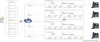
Despite the firewall checker passing I would think that your issue is related to the STUN setup on the firewall. If this is for multiple STUN phones (2 or above) on the same location site each device ideally should have its own port forwarding rule and if possible linked to a statically assigned IP phone (can also be assigned by static DHCP allocation).

Also ports should be segregated for each phone for both SIP and RTP also (2 for SIP, 12 for RTP) please see the attached diagram, it shows this fairly well.
 

Attachments

  • stun_master (003).jpg
    stun_master (003).jpg
    318.7 KB · Views: 18
Despite the firewall checker passing I would think that your issue is related to the STUN setup on the firewall. If this is for multiple STUN phones (2 or above) on the same location site each device ideally should have its own port forwarding rule and if possible linked to a statically assigned IP phone (can also be assigned by static DHCP allocation).

Also ports should be segregated for each phone for both SIP and RTP also (2 for SIP, 12 for RTP) please see the attached diagram, it shows this fairly well.
i have been using the same type of configuration in 3cx with my old router,
all the phones have different SIP & RTP ports assign
SIP ports start : 5065 till 5249
RTP start : 14000 to 16220 with the gape of 12
 
i have been using the same type of configuration in 3cx with my old router,

If this has been implemented exactly then I would advise running a PCAP trace from 3CX and if possible from a phone interface (or mirrored port onsite) whilst placing a call to see whether the audio streams are passing or not.
 
One point we might have not raised, is your provider's CPE.
Depending on whether your modem is configured as bridge, PPPoE, DMZ or with port forwards, you may have to make adjustments there too

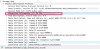
But I do agree with @eddv123 that you should run a capture on a phone and on the PBX simultaneously and see what happens. You should pay attention to the ports that appear in the capture (to ensure they are preserved and not randomly assigned by either side) and you should also check the SDP of the phone capture VS the SDP of the PBX capture. The phone needs to state its public IP here, not its private IP
1598355784270.png
 
  • Like
Reactions: eddv123
If your old firewall works fine, did you log in his admin to see how it was set and compare to your new fortigate ?
 
A small addition: Enable PBX Delivers Audio on the extension to ensure that your 3CX Server proxies the audio in all calls
 
Hi All,
Thanks for quick response & guidance really appreciate many thx,
Now as i said i am using old router as of now & on weekend i'll setup the new router again & i'll check every point that you guys have mentioned here.
Replying to @aws2p
I have setup my new router exactly the way my old one was configured
 
  • Like
Reactions: AWS2P
Hi All,
First of all thx to all of you for your suggestions & quick response ,
i have always learnt something new every-time i post any query here,
Now coming back to my problem it has been resolved today as soon as i turned off NAT from the new router & it worked like a charm :)
just only i disable NAT & people can hear from both end.
i got the idea when i used 3cx firewall checker app ,link is given below for that firewall checker,
https://www.3cx.com/docs/firewall-checker-client/

Thanks a ton everyone :)
stay safe.
 
glad you fix it ;)
 
Thanks for updating the thread Brock, and glad it was resolved
 
Status
Not open for further replies.

Members Online Now

No members online now.

Forum statistics

Threads
111,831
Messages
589,277
Members
164,660
Latest member
RJenkinsROCK