


- Joined
- Jun 27, 2017
- Messages
- 42
- Reaction score
- 3
Hello,
We have bought several new Dell computers Small Form Factor with combo jack on front (Optiplex 5080, 5090) and Precision 3450. We have installed all newest drivers from Dell page based on the Serial Number and Waves MaxxAudio Pro application. Without this application Windows 10 does not recognize Headset and microphone at all.
After that we have installed 3CX Client for 3CX Phone System Version 16.3.220 on each computer.
Additional settings:
Transport SIP: UDP
RTP mode: Normal
DTMF mode : RFC 2833
Audio Codecs:
G.722
PCMU
PCMA
Audio options:
Deleting echo: enabled
Users complaining about poor audio quality, when speaking with other people that are located outside of the company.
Additional setting from Windows:
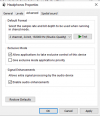
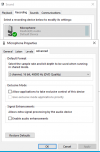
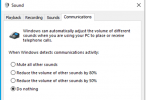
Additional setting from Waves MaxxAudio Pro:
Noise level : enabled
MaxxBass and details: set to 0
Waves NX: Disabled
Microphone:
enhancemnets disabled,
Noise protection:disabled
I have created support case at Dell but with no luck so far. I have tried to update Realtek Driver to Realtek High Definition Audio but in that case there is no microphone recognized within Control Panel > Sound. It looks like Dell is requiring its own Application for headest to be properly recognized in Windows.
Any idea how to try improve Audio quality? Any suggestion much appreciated,
There is no problem with old computers that have two audio ports, sound + microphone separately in front or in the back. In that case there is no need for additional application, only Realtek Driver is required.
We have bought several new Dell computers Small Form Factor with combo jack on front (Optiplex 5080, 5090) and Precision 3450. We have installed all newest drivers from Dell page based on the Serial Number and Waves MaxxAudio Pro application. Without this application Windows 10 does not recognize Headset and microphone at all.
After that we have installed 3CX Client for 3CX Phone System Version 16.3.220 on each computer.
Additional settings:
Transport SIP: UDP
RTP mode: Normal
DTMF mode : RFC 2833
Audio Codecs:
G.722
PCMU
PCMA
Audio options:
Deleting echo: enabled
Users complaining about poor audio quality, when speaking with other people that are located outside of the company.
Additional setting from Windows:
Additional setting from Waves MaxxAudio Pro:
Noise level : enabled
MaxxBass and details: set to 0
Waves NX: Disabled
Microphone:
enhancemnets disabled,
Noise protection:disabled
I have created support case at Dell but with no luck so far. I have tried to update Realtek Driver to Realtek High Definition Audio but in that case there is no microphone recognized within Control Panel > Sound. It looks like Dell is requiring its own Application for headest to be properly recognized in Windows.
Any idea how to try improve Audio quality? Any suggestion much appreciated,
There is no problem with old computers that have two audio ports, sound + microphone separately in front or in the back. In that case there is no need for additional application, only Realtek Driver is required.


