Auto switch off DND

Status
Not open for further replies.

RRussell

Forum User
Joined
Aug 12, 2019
Messages
6
Reaction score
1
Hi Team

Is there a way to auto switch off from DND after a period of time? I've found some of our team switch to DND when with clients which is fine but forget to turn it back to Available when done.

Using 3CX 16.0.8.9 (planning out v18 upgrade late this month) on Debian and hosted locally/ Using yealink T52S phones with standard templates.
 
If you go to the extension settings and on the Forwarding tab you will see the "Auto-Switch" option. Tick the box, click on the configure button and then the "specific hours" option, configure the hours you want the phone to be available. Outside of these hours the phone will be set to DND.

Ah- sorry - I do not know of a way to automatically switch it back to available after a given time.
 
Is there a way to auto switch off from DND after a period of time?
EDITED:
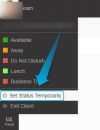
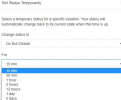
You can automate extension Profile Status based on time using the autoswitch feature, however, this uses the PBX's office hours. If you're looking for a way to set something like a "timer" to switch the extension back to available what you can do is, set the Do not Disturb profile status with a timer and therefore have it automatically switch back to available once the timer expires:

(Screenshots are from the 3CX V18 Webclient)
1630926930457.png


1630926937503.png
 
Last edited:
Status
Not open for further replies.

Latest Posts

Forum statistics

Threads
111,977
Messages
590,098
Members
164,906
Latest member
Nari