Solved auto-switch status

Status
Not open for further replies.

nicoonline

SOHO User
Joined
Jul 4, 2019
Messages
54
Reaction score
6
Hello,

When an agent is not present in the office due to certain circumstances, the automatic switch will reset the agent to available.

Is there a way to make the automatic switch set him to the last available status? (if manually forced to Away), leave Away until the next manual action or set a status for X days?
 
  • Like
Reactions: ChrisC_3CX
If autoswitch is enabled and the extension is set to any of the following statuses:

1. Available
2. Away
3. DND

Then it will automatically switch as follows and there's no way to prevent this from happening:

1. In Office: Available
2. Break: Away
3. Out of Office: DND

What you can do though is use the Custom 1(Lunch) or Custom 2(Business Trip) profile statuses instead. These do will not change based on autoswitching and will stay until manually changed. In your case you would have to use Custom 2 which behaves similar to the DND status.

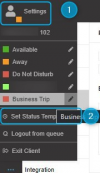
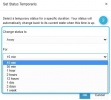
Alternatively, you can indeed set a Profile status for a specific duration and this will also not be affected by autoswitching. This however must be configured from within the 3CX App hence by the user:

1648537832149.png

1648537867795.png
 
Thanks for all your advice !
 
  • Like
Reactions: ChrisC_3CX
You're very welcome!

Don't hesitate to post anew should you need anything else!
 
Status
Not open for further replies.

Forum statistics

Threads
111,974
Messages
590,081
Members
164,899
Latest member
mazet