Automated paging announcements

Johny99

SMB User
Joined
Jun 5, 2026
Messages
2
Reaction score
0
HI All, after some advice on how to set up or if automated paging announcements are possible with 3CX? I have 15 plus years of PBXnSIP / Snom / Vodia Pbx experience but zero hours of 3CX. In Vodia it is rather simple to configure time based service flags, in order to trigger pre-recorded paging voice annoucements. To be fair I havent poked around 3CX too much (at all really) however there is a use case on a site with 3CX Profession already running, to which this function would come in very handy, and thought i would ask you all here first, if this is possible or am I chasing my tail. Thank you all in advance.
 
Hi @Johny99

It may be possible using 3CX CFD (Call Flow Designer). My initial thought would be to create a CFD application that uses a Date & Time condition to trigger at specific times, then places a call to a paging/intercom group and plays a pre-recorded WAV announcement before hanging up.

I haven't tested this exact scenario, but on paper it looks achievable. The main thing to verify is how the paging group behaves when the call is originated by a CFD application rather than a user extension.
 
  • Like
Reactions: Evolute IT
Hi @Johny99

It may be possible using 3CX CFD (Call Flow Designer). My initial thought would be to create a CFD application that uses a Date & Time condition to trigger at specific times, then places a call to a paging/intercom group and plays a pre-recorded WAV announcement before hanging up.

I haven't tested this exact scenario, but on paper it looks achievable. The main thing to verify is how the paging group behaves when the call is originated by a CFD application rather than a user extension.
You need to use a dialer CFD, which has its cons (need to be started manually everytime the service or the system is restarted, and cannot be monitored easily.)

The easiest would be to use an IVR with prerecorded message, a paging group, and the XAPI to trigger a MakeCall between the two.
 
Hi @Johny99 — great question, and Evolute IT is right about the Dialer CFD limitation.

There's a cleaner approach that avoids starting the dialer manually and survives service restarts. Here's how I'd structure it:

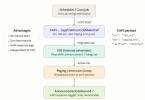
1. Create a simple IVR — configure it to play your pre-recorded WAV and hang up immediately (no menu options, no input required). This becomes your "announcement engine."

2. Use the 3CX XAPI (/api/CallControl/MakeCall) — schedule a call at your desired times, using the IVR extension as the source and your Paging/Intercom group as the destination. This originates the call as if the IVR itself is dialing out.

3. Trigger the XAPI call from any scheduler — a cron job, a Windows Task Scheduler entry, n8n, or even a simple hosted script. This means:
  • ✅ No manual start required
  • ✅ Survives 3CX service or system restarts
  • ✅ Fully monitoreable via XAPI response logs
  • ✅ Easy to adjust timing or add new schedules without touching CFD
The key insight is that XAPI's MakeCall lets you originate a call from any extension, including an IVR — so the paging group receives it as an internal call, plays the audio to all registered phones, and hangs up automatically.

This approach scales well too: multiple scheduled announcements, different WAV files per time slot, or even dynamic triggers via webhook — all from the same pattern.
I put together a quick flow diagram of this approach — happy to share it if it helps visualise the setup.
1780669544273.png

Happy to share a sample XAPI payload or walk through the IVR setup if useful!
 
  • Like
Reactions: Evolute IT
You may also want to look at our 3CX Audio Scheduler tool. This is a very popular tool with schools for playing the bells at the start of school, class changes, recess, etc. You can create profiles for "snow days", "Teacher conference Days" or "Summer School" schedules. The schedule is calendar based so you can create recurring schedules easily.

Additional typical uses include retail stores to let people know the store is closing and it is time to bring their purchases to the register. Airports use it to remind people not to leave bags unattended, or that the yellow zone is for loading and unloading only, and Manufacturing businesses use horns for shift changes. That is just a few examples of how to use our tool.
 
I have done this with a CyberData page server/ breakbell via multicast paging. I did use a custom template to assign multicast page groups.