Hi @Johny99 — great question, and Evolute IT is right about the Dialer CFD limitation.
There's a cleaner approach that avoids starting the dialer manually and survives service restarts. Here's how I'd structure it:
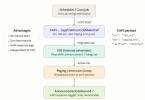
1. Create a simple IVR — configure it to play your pre-recorded WAV and hang up immediately (no menu options, no input required). This becomes your "announcement engine."
2. Use the 3CX XAPI (/api/CallControl/MakeCall) — schedule a call at your desired times, using the IVR extension as the source and your Paging/Intercom group as the destination. This originates the call as if the IVR itself is dialing out.
3. Trigger the XAPI call from any scheduler — a cron job, a Windows Task Scheduler entry, n8n, or even a simple hosted script. This means:
 No manual start required
- Survives 3CX service or system restarts
- Fully monitoreable via XAPI response logs
- Easy to adjust timing or add new schedules without touching CFD
The key insight is that
XAPI's MakeCall lets you originate a call from any extension, including an IVR — so the paging group receives it as an internal call, plays the audio to all registered phones, and hangs up automatically.
This approach scales well too: multiple scheduled announcements, different WAV files per time slot, or even dynamic triggers via webhook — all from the same pattern.
I put together a quick flow diagram of this approach — happy to share it if it helps visualise the setup.
Happy to share a sample XAPI payload or walk through the IVR setup if useful!


