Automatic open contact url

Status
Not open for further replies.

pgarcia

Customer
Joined
Jul 13, 2022
Messages
5
Reaction score
2
Good afternoon everyone

We have integrated 3cx with Zoho crm and automatic open the contact url for one extension and does not do for others. Contact card appears when incoming call is received and open crm once it is clicked
HAve checked several times and everything looks fine in settings. Extensions match email address for 3cx and zoho crm
Any ideas?
Thanks in advance
 
You should check 2 things here:
1) If the browser is blocking popups.
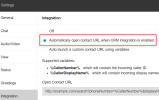
2) The Web Client > Settings > Integration, ensure that you select the option to automatically open the popup:
1664485017325.png
 
Thanks for your quick reply Ernesto
Both checks have been done and they are as indicated. No blocking pop up in browser and selected automatically open url when crm integration is enabled
Settings in all extensions are the same and one is working perfectly the others two dont
In all of three contact card icon is working
 
Are you answering the call? The popup happens when the call is answered, and not when it starts ringing.
 
Dear Ernesto

Yes. Call have been answered
Thanks in advance
 
Weird, can you open a support ticket with us? This is something that needs to be checked more deeply, I can't tell what's going on with the details provided.
 
こんにちは、私はグループの新しいメンバーで、新しい仕事を探しています。私も現在、同じ症状に悩まされています。
3CX コントロールでのテストでは、通常の検索結果が表示されますが、Web アプリとデスクトップ アプリの両方がポップアップしません。
 
@Masaya Hanato Keep in mind that the pop-up depends on whether there is a match returned from the CRM to the PBX. Once the call is answered the pop-up will be triggered. Also ensure that any pop block is disabled from your browser
 
  • Like
Reactions: edossantos
@Masaya Hanato Keep in mind that the pop-up depends on whether there is a match returned from the CRM to the PBX. Once the call is answered the pop-up will be triggered. Also ensure that any pop block is disabled from your browser
First, the situation is.
...registered phone number.
When the test was performed, the response from the zohoCRM side was returned normally (the registered information responded normally).
The desktop app version uses variables to automatically launch custom contact URLs. The URL is displayed without any problem in the following way. (It doesn't pop up when I set it to CRM)
The URL was working fine before.

The following is a list.
Of course, answering the phone did not change the result.

Translated with www.DeepL.com/Translator (free version)
 
The custom url depends on the variables but if you have an active CRM integration you may use the automatically pop-up. The contact lookup also needs to send the number in E164 format and the CRM contact is configured in E164. In this case it is mandatory to make a whole number lookup as it is also explained below:
https://www.3cx.com/docs/pbx-crm-integration-zoho/#h.sh2udbgzpt45
 
  • Like
Reactions: edossantos
The custom url depends on the variables but if you have an active CRM integration you may use the automatically pop-up. The contact lookup also needs to send the number in E164 format and the CRM contact is configured in E164. In this case it is mandatory to make a whole number lookup as it is also explained below:
https://www.3cx.com/docs/pbx-crm-integration-zoho/#h.sh2udbgzpt45
Thanks for the reply.
I found the cause of the problem and I am sharing it with you.
I found that the linkage is working properly.
There was the following symbol next to the phone number and I could connect by pressing it.
However, it did not pop up automatically.
 

Attachments

  • スクリーンショット (116).png
    スクリーンショット (116).png
    12.8 KB · Views: 10
Thanks for the reply.
I found the cause of the problem and I am sharing it with you.
I found that the linkage is working properly.
There was the following symbol next to the phone number and I could connect by pressing it.
However, it did not pop up automatically.
The automatic popup happens for inbound calls only. Is this an inbound or outbound call?

If this is an inbound call, ensure that:
1) Your Web Client / Desktop App is configured to automatically launch the contact URL, in Settings > Integration.
2) Your browser is not blocking popups.
 
When you press the contact from the client where is it redirecting you?
I would advice that you remove this specific contact and any duplicate from the 3CX Phonebook. Then make another test and check.
 
  • Like
Reactions: edossantos
クライアントから連絡先を押すと、どこにリダイレクトされますか?
この特定の連絡先と重複する連絡先を 3CX 電話帳から削除することをお勧めします。次に、別のテストを実行して確認します。
返信いただきありがとうございます。頭の中で問題を解決しましたが、共有します。
まず、E .164 フォーマットが表示されなくても CRM を検索できますが、自動的にポップアップ表示されません。
通常の検索結果が得られました。ちなみに、CRM側もE.164形式なしで保存しました。
E.164形式に変更したらポップアップが表示されました。
それで全部です。ありがとう。
 
  • Like
Reactions: TheodorosG_3CX
Status
Not open for further replies.

Members Online Now

Forum statistics

Threads
111,843
Messages
589,326
Members
164,679
Latest member
SamadMYK