Automatic Status change

Status
Not open for further replies.

MichelRa

Forum User
Joined
Feb 3, 2020
Messages
12
Reaction score
3
I'd would like to have the status automatically change upon arriving or leaving the company wifi.
Now I easily forget to change the status on arriving and leaving the job-place!
I don't like to be called when not at the company by anyone ;)
 
Apart from other technical issues, that would mean the client continuously running in the background in order to monitor the network change - which is not the case.
 
The client is always running in the background, so why not check every 5 minutes if 1 or more specific named wifi's are present?
I do use Llama Automate on my Android phone which could interact with the 3CX app, but I don't know how: "com.tcx.sipphone14", Activity class...., Action....

The only other solution is to just remove the app from my phone and only use the windows-computer :( Then I can leave it on "available" and if I'm not there then I'm not picking up....

It's a shame that it can't only use the company wifi :(
A call even waked me up at home and colleagues sometimes can't reach my when I'm in the company, just because I forget to set the status to "available"
 
"The client is always running in the background" - who said this?
 
MichelRa, Allow trafic only specific IP address (company WIFI). That way you can keep status avaliable on ext. all the time and be actualy avaliable only when on specific WIFI connection.
 
Well, if it wouldn't run in the background on my phone, it wouldn't be able to call me, right?
 
That's Android Push - it's received by the Android OS and it then launches the client.
 
Then the app can check if it's still on a specific wifi network before ringing ;)
 
Well, if it wouldn't run in the background on my phone, it wouldn't be able to call me, right?

no it does not work like this - For example - whats app - that does not run in the background. Actually this point helps me improve my next video.. Good one..

I will quickly explain.
A phone's battery is limited needs to be taken care of. So developers must be responsible to look after battery consumption (they do this in the code by avoiding bad code)
However Android knows that some developers out there (sometimes even developers of phone manufacturers) do not care about Android Battery consumption guidelines. or are simply bad developers.
And here comes Android - Who kills the app the moment you don't use it. Leaves a small memory footprint in cache - similar to a little hook. bit kills it completely.
But you and I need to be reached at all times.
This is where push comes in. Push is a mechanism where an online mega cluster of backend infrastructure that cover the world, owned by Google and Apple, where they know how to reach your device, and when you need to be called, they send a message to your device, you tap it, and THAT MESSAGE is the key that wakes up and launches the app.

So if you used the app at 8am and finised at 8:05 and then at 8pm you received a call, the app is not running for 12 hours. The app was running only for 5 min. And launched again at 8pm.

This is the beauty of Firebase (Google) and APNS (Apple). It is simplistic okay.. Experienced users reading this will argue with me. But for you to understand given you think that the app remains running, I think it is OK. Hope you find this helpful.
 
Well I know something about that. Some apps leave a notification active to not let Android close them ;) Like my Llama automate.

But as soon as the push start the 3CX app, that app could first look to the wifi-connection to find out if the person ever wants to be contacted when not at the firm. And if not it could transfer it to others or the mailbox. Most employees don't want to be reachable after business-hours ;)

So there are 2 ways to solve this: check which wifi-connection before ringing or use a notification that uses a bit more battery. I don't see much of a problem. It's like adding an option "never disturb me if the wifi-connection-name doesn't have 3CX in it's name" ;)
 
  • Like
Reactions: nb
Well I know something about that. Some apps leave a notification active to not let Android close them ;) Like my Llama automate.

But as soon as the push start the 3CX app, that app could first look to the wifi-connection to find out if the person ever wants to be contacted when not at the firm. And if not it could transfer it to others or the mailbox. Most employees don't want to be reachable after business-hours ;)

So there are 2 ways to solve this: check which wifi-connection before ringing or use a notification that uses a bit more battery. I don't see much of a problem. It's like adding an option "never disturb me if the wifi-connection-name doesn't have 3CX in it's name" ;)

We have this support
Check this post
https://www.3cx.com/docs/android-app-faq/#h.lcteeu5yq5kd
Requires a one time configuration and that should be it.
 
That's a fixed schedule and not useful for irregular hours :(
 
That's a fixed schedule and not useful for irregular hours :(

No not fixed - you can use it when you want - regular or irregular.
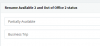
Create 2 profiles - one name it (Fully Available) and then go to the custom 1 and name it (Partially Available)

Let me help you
Go to General > "Rename Available 2" to partially available
14232

Then go to your extension > edit > Fw rules (or multiple select to do all extensions at one go) and do this:
In Available > select this "Accept Push Notifications "
In the partially Available > de - select this "Accept Push Notifications"
Save

Send a policy update to your users and tell them that when they want to be pushed, they set to available, when they don't want to be pushed but be called on phone, they send to partially available. and When they don't want no calls at all they go to DND.
 
  • Like
Reactions: Zul
The whole reason that I ask to only be reachable at a specific wifi location is that one doesn't forget to set the present/away status. If you have to switch the push-enabling, you can set the status as well.
 
  • Like
Reactions: Zul and nb
The whole reason that I ask to only be reachable at a specific wifi location is that one doesn't forget to set the present/away status. If you have to switch the push-enabling, you can set the status as well.

This is very interesting I agree. Because there are some Wifi's that you frequent and maybe in those spots you want to be available or not available.
Open it as a feature request.. Open like this:"

"Ability to set a particular status that overrides any status when connected to a particular wifi hotspot"

It is going to be tricky - Because we need to see if this is possible on ios first. But lets try.
Thanks for reporting and for clarifying..
 
  • Like
Reactions: Evolute IT and Zul
Maybe you as a "Staff member" should add this to the feature request ;) I't took me a while to convince you, so maybe you find the correct words to explain this better.
In the time being, I'll going to remove that app and only use the computer at the location where I only want to be reachable. :( or find some other software...
 
In addition to what Nicky said:

I've mentioned earlier "other technical difficulties". Well, on iOS client we had some experience on this "local" thing some years ago, so I'll put it into context:

  • office WiFi is not necessarily a single and the same subnet as the PBX - the office may have different WiFis, say some on 192.xxx and other on 10.xxx range; so which the app should consider truly "in-office" since both are?
  • office WiFi is intranet, say 192.168.1.1. Well, if you go home or hotel or airport, there are chances their WiFis be the same 192.168.1.1 - so how the app should distinguish is not "in-office"?
  • OK, WiFis has SSID/BSSID - on iOS (I don't know Android) an application cannot longer query/find them, Apple removed support due to privacy reasons.
Apart from this, assuming the local IP is indeed unique, the client would be able to change status only when is running, which might be too late.
 
  • Like
Reactions: Evolute IT
Just look at the wifi name ;)
For us we could have multiple wifi's all with the name kvik3CX in it: kvik3CX1, kvik3CX2, kvik3CX3,....
 
Just look at the wifi name ;)
For us we could have multiple wifi's all with the name kvik3CX in it: kvik3CX1, kvik3CX2, kvik3CX3,....
...
OK, WiFis has SSID/BSSID - on iOS (I don't know Android) an application cannot longer query/find them, Apple removed support due to privacy reasons.
 
  • Like
Reactions: Vali_3CX
I just checked my colleague iPhone, and the name of our wifi is present ????
 
Status
Not open for further replies.

Forum statistics

Threads
112,149
Messages
590,967
Members
165,171
Latest member
Mahlon