Automatically disable Outbound calls on all Ports outside Office hours

Status
Not open for further replies.

leandro.soaress

Forum User
Basic Certified
Joined
Dec 6, 2020
Messages
3
Reaction score
0
Hi,
I have a problem with my 3CX.

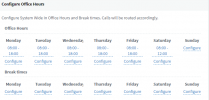
My office hours are from 8 am to 6 pm.
I have enabled the option "Automatically disable outgoing calls on all ports outside business hours" and during business hours, all calls are blocked.
The system will only release calls if I disable the mentioned option.

My information system:
  • Versão 3CX , 16.0.7.1078.
  • Sistema operacional de servidor , Linux Debian
  • O servidor 3CX está onde? AWS
  • Método de provisionamento: STUN / SBC
  • O Firewall Checker foi aprovado : Yes
 
Last edited:
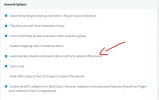
Yes, I have my general office hours set up.

The option (Automatically disable Outbound calls on all Ports outside Office hours) is activated at all times.

Today the problem started to occur and I was only able to solve it by disabling the option.
1611277105620.png

1611277114758.png
 
Hey @leandro.soaress,

First thing I would check is making sure that the 3CX PBX is in the default office hours and that it is not Forced OUT or Forced IN to office hours. To do this, first find out what the dial code is by accessing the Management Console and navigate to Settings >> Dial Codes. Check what the "Force 3CX Phone System to IN or OUT of office" dial code is set to and then dial it from any extension. You should hear a voice prompt stating that the 3CX is now using the default office hours. If it is not defined, set a dial code apply and then dial the specified dial code.

Note: If you do not use this dial code I would recommend clearing the field completely to avoid similar issues in the future.
 
Hey @leandro.soaress,

First thing I would check is making sure that the 3CX PBX is in the default office hours and that it is not Forced OUT or Forced IN to office hours. To do this, first find out what the dial code is by accessing the Management Console and navigate to Settings >> Dial Codes. Check what the "Force 3CX Phone System to IN or OUT of office" dial code is set to and then dial it from any extension. You should hear a voice prompt stating that the 3CX is now using the default office hours. If it is not defined, set a dial code apply and then dial the specified dial code.

Note: If you do not use this dial code I would recommend clearing the field completely to avoid similar issues in the future.
I did exactly what you asked for and it didn't work out.
This worked on the most current version of 3cx and we didn't have any more updates in that time.
 
When you dial the Force In/Out dial code, do you get the voice prompt saying "3CX Phone System is now using the default Office hours" ?

Can you confirm that, when trying to make an outbound call, you get the voice prompt that says "Call forbidden by Administrator" ?

What do you mean when you say that this worked on the most current version of 3CX? Are you talking about the previous stable Update which was 16.0.6.655, meaning that the issue started when you updated to 16.0.7.1078?

Try creating a test extension, change none of its settings, log into its webclient and try to make an Outbound Call, do you get the same message or does the call go through?
 
Status
Not open for further replies.