Automatically Queue in and out on phones automatically

Status
Not open for further replies.

rhys100

Customer
Joined
Apr 7, 2017
Messages
25
Reaction score
2
Is it possible that queue on and queue out can be set uatomatically.

I would like reception to automatially queue in at opening times as sometimes they forget to hit the button, then queue out so calls goto voicemail when office hours are closed in case they forget to queue out.
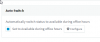
 
"Edit extension. Go to Office Hours tab. Here you can set specific office hour for that extension and actions like automatically Switch Queue Login Status." - Doesn't seem to exist in v15.

I have set up the follow as per screenshot, but not sure if this is automatically logging in and out of a queue.

It would be good if there was question marks next to every field that had an explanation of what they do and link to manual specifics
 

Attachments

  • 2017-04-15 22_47_12-3CX Phone System Management Console.png
    2017-04-15 22_47_12-3CX Phone System Management Console.png
    7.9 KB · Views: 47
Each status has it's own rules, You should turn Auto switch on so that the extension changes status depending on office hours and under each status you should set up if the extension should Log In or Out of the queues. For example under available status the option Log out from queues should not be enabled.

Please note that during break times the extension will switch to Away status and during out of office the extensions will switch to DND status
 

Attachments

  • 2017-04-17_10h05_02.png
    2017-04-17_10h05_02.png
    19.5 KB · Views: 43
ok, So I have done all that, can you confirm that it now should auto log in and out of queues between the office hours I have set?

It's not entirely clear, I feel like there should be an option under options that says "Automatically log in and out of queues based on Auto Switch"
 
Yes it should. IT should switch between statuses based on office hours and it should log in and out based on the status the extension is on
 
Status
Not open for further replies.