Unsupported Avaya 9630

Status
Not open for further replies.

Francis Aguila

New User
Joined
Aug 5, 2021
Messages
3
Reaction score
0
Hello Ladies and Gents!

Good day to you!

I am having trouble finding Legacy Avaya 9630 device on 3cx Console management.

When adding phone, the choices are 9601, 9608G, 9611G, 9621G, and 9641G.

Is there a way to use it for 3cx?

Many thanks in advance!

Regards,
Francis
 
Hi Francis,

Generally the Avaya phone template with the models that are included, even back when they were made, were on a "best effort" basis.
They have been around for many years and we don't have any immediate plans to add more models, we keep them around as 'legacy'.

You could try selecting a different model in 3CX, even though yours is the 9630, because due to that the template is extremely basic, it may take the necessary settings to make it work.

My advice though if you want to avoid headaches would be to go for a supported phone as found in this list:
https://www.3cx.com/sip-phones/
or use one of the 3CX Clients available for PC and Mobile (plus they are free!):
https://www.3cx.com/user-manual/
 
Hi NickD_3CX!

Many thanks!

Regards,
Francis
 
Hi NickD_3CX!

I got one more question.

Do we have a uniform file name for the attached xml file?

I just downloaded it and named it as 3cx template.xml.

Many thanks!

Regards,
Francis
 

Attachments

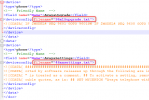
First, I think there might be something wrong with the format of the file, as there are many line breaks missing.
To your question though, the files that are dynamically generated based on this template are the ones shown in these lines:
1628149524372.png

I'm afraid though that I can't be much more help with these specific models as we don't really offer support for them.
 
Status
Not open for further replies.

Latest Posts

Forum statistics

Threads
111,982
Messages
590,117
Members
164,908
Latest member
FarizQasimov