• We do not provide troubleshooting help for unsupported phones. Please try with a supported phone.
  • V20 Update 10 Alpha 2 Learn more

Avaya Provision problem after Upgrade to V18 | Avaya IP Phones 96XX |

Status
Not open for further replies.

Gummies

Premier Customer
Advanced Certified
Joined
Apr 30, 2020
Messages
34
Reaction score
14
Hi @Gummies

When it comes to legacy phones, we do not test them with newer releases of 3CX so we cannot guarantee that they will continue to work forever.

For now, you can check if the proxy server is filled in by copying your provisioning link from an Avaya extension, then pasting in your browser and adding this to the end like my example:

Code:
http://10.31.0.30:5000/provisioning/xxxxxxxxxxxx/46xxsettings.txt

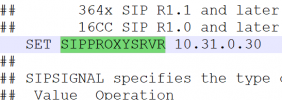
Search the text file you just downloaded for SET SIPPROXYSRVR and check if there is an IP populated in it.

1646214429984.png
 
Hi John,

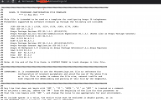
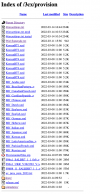
I think is a problem with 3cx v18 web server config. as you see said im not getting text plain txt . this is why my Avaya Legacy Ip phones can not get 46xxsetting.txt.

If i go to a browser file is going to be downloaded no presented as a text.


Screen Shot 2022-03-04 at 9.03.26 AM.png


This is how Avaya IP phones need to Get ours txt. ( from a production Avaya PBX ) ( text Plain )


Screen Shot 2022-03-04 at 9.04.34 AM.png

Screen Shot 2022-03-04 at 9.05.19 AM.png
 
Last edited:
Run the capture again, and see if the Avaya actually takes the file.

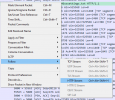
You can confirm this by right clicking on the GET packet, Follow, HTTP Stream

1646404603010.png

a) Now you should see a screen showing what the phone actually got.

b) Copy all that text into a text editor, and search for SET SIPPROXYSRVR.

This should confirm whether 3CX served the file successfully to your phone. After this, it depends on the phone more than anything..

Note: I generated the same file on a V16 and V18 and the files are identical (other than the server IP and provisioning folder of course). If the above is as I describe, then I think that whatever issue you are facing is probably not related to 3CX.
 
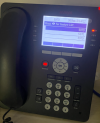
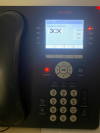
any luck with these. I have a client who has been using these 9608 for 2 years on 3cx, now they will no longer work once rebooted. Same Issue Empty SIp Proxy Server List. I can see the phone grabbing all the correct and same info as always from dhcp 242, but will no longer connect to 3cx. If the phones are working and do not reboot, they continue to function.
 
Using External Apache Web server finally is working....

my only problem right now is my phones ramdon logout after few days.
 

Attachments

  • Screen Shot 2022-03-28 at 5.38.04 PM.png
    Screen Shot 2022-03-28 at 5.38.04 PM.png
    492.4 KB · Views: 63
  • Screen Shot 2022-03-28 at 5.37.59 PM.png
    Screen Shot 2022-03-28 at 5.37.59 PM.png
    365.6 KB · Views: 52
  • Screen Shot 2022-03-28 at 5.37.53 PM.png
    Screen Shot 2022-03-28 at 5.37.53 PM.png
    497.7 KB · Views: 57
  • Screen Shot 2022-03-28 at 5.40.35 PM.png
    Screen Shot 2022-03-28 at 5.40.35 PM.png
    160.4 KB · Views: 63
hmm.. so the cause is 3cx web server. Too bad, it makes me look pretty stupid when they worked all this time and 3cx touted this to get clients and now it's not working or flakey. Seems to be a pattern with 3cx. support or partially support hardware then pull the rug.
 
Last edited:
  • Like
Reactions: pilevic
hmm.. so the cause is 3cx web server. Too bad, it makes me look pretty stupid when they worked all this time and 3cx touted this to get clients and now it's not working or flakey. Seems to be a pattern with 3cx. support or partially support hardware then pull the rug.

As mentioned above, when it comes to legacy phones, we do not test them with newer releases of 3CX so we cannot guarantee that they will continue to work forever. At some point they will stop working as software is ever evolving, but static old hardware is not.
 
  • Like
Reactions: randybell
Automatic Logout after Few Days Fixed : :D

Phone Provision profile is required
 
Automatic Logout after Few Days Fixed : :D

Phone Provision profile is required
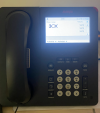
How did you get them to not boot into error mode (triangle with an exclamation point in the left hand corner of the screen)? I followed the instructions at that link except I placed the provisioning files on a separate server as it sounds like you did. Basic functions work, but they aren't quite right.
 
Please try with this file in your own web server.

Search for XXX.XXX.XXX.XXX and replace with your 3cx ip Addess or hostname.
 

Attachments

  • Like
Reactions: jmdomini
Please try with this file in your own web server.

Search for XXX.XXX.XXX.XXX and replace with your 3cx ip Addess or hostname.
This worked perfectly! Thank you very much for sharing!!:)
 
  • Like
Reactions: Gummies
Status
Not open for further replies.

Forum statistics

Threads
112,149
Messages
590,965
Members
165,170
Latest member
SupportRock