AVM 7490 POST Luxembourg + 3CX v20

Siles

Joined
Sep 19, 2025
Messages
7
Reaction score
1
Hello there,

I am seeking help with the configuration and setup of the Ftizbox 7490 and 3CX v20.
It is now Day 4 and I have not been able to configure 3CX so it works with my 7490.
The tutorials i read and saw are not working. ChatGPT cant make it work.
Conclusion seems to be that the v20 compared to the v15 is so closed down that manual port changes won't work and whatever port I want to address in 3CX i.e. port 5062 or 5070 for SIP, the Firwall test still always shows 5070...

I am at my wits end. I went up and down changed all possible config in my Fritzbox (without interupting the internet/phone system in use (DECT+3CXPhone App)) but no matter what I try, nothing works.
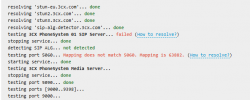
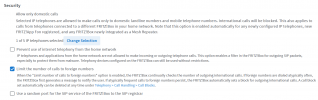
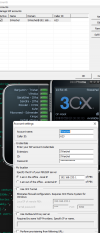
Here is the last stand firewall settings on my 7490 and Trunk in 3CX.
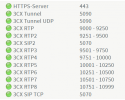
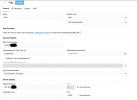
3CX.png
1758293463252.png

Firewall Test:

1758293523375.png
This port changes multiple times a day, I have no idea why Fritzbox is doing this.

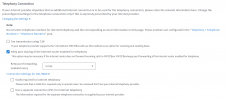
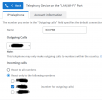
Fritz Telephony Setting (DECT and LAN Softphones still in play directly on the Fritz atm):
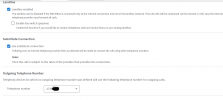
1758293658093.png
1758293683521.png
1758293707082.png

Any help would be greatly appreciated maybe I am missing something maybe chatgpt missguided me.
I know i used 3CX when it was in v15 and it was WAY more configurable than this and so the control is very limited as to how it reacts...

Thank you.
 
Your sip port is 5060, you need to change that first, 5060 doesnt work with fritzbox. than it will work. There isnt any change since v15.
 
  • Like
Reactions: fxbastler
3CX port changes (HTTP, HTTPS, SIP, Tunnel) can only be done after a full 3CX backup (save it outside 3CX) and a 3CX reset during the 3CX config wizard run using the formerly created backup.
 
  • Like
Reactions: paulodagraca
@fxbastler @bitn2
Thank you both very much for your swift feedback!
I know that the SIP port needs changing in 3CX and I also thought that changing it in the trunk settings is enough.
Cause I definitiely learned that 5060 on fritzbox is an absolute no go, but the changes which can be made in v15 vs v20 are so much different which confuses me. So I had no idea that I need to do a full reset, which I still need to find, and then run the config wizard again.
I will test this now and will report back!

Thank you!
 
So I had no idea that I need to do a full reset

Debian 3CX as user root:
  1. /usr/sbin/3CXWizard --cleanup
  2. 3CXLaunchWebConfigTool (if needed)

Windows 3CX:
  1. uninstall 3CX Software
  2. remove 3CX folder in ProgramData and Program Files
  3. install 3CX
 
Thanks!
Since I couldnt find anything, thats exactly what I've done.
And I've modified the setup file, to have the SIP op 5070, so hopefully this will work now.
 
  • Like
Reactions: fxbastler
I am lost for words..
No clue what this Fritzbox is doing and why this is not working but is even worse now.
No changes on the Fritzbox, same server, same IP, same everything about hardware and netconf.
The only thing I did was uninstall and re-install 3CX Phone System on the server and I altered the port in the setup file to 5070, that is literally all i've done, with nice reboots between everything.
So why this now, I don't know whether the Fritz is broken or I am missing something spectecularly :(
1758529998487.png
 
Alright, so let me explain how I see things and please tell me where I am going wrong, as port 5070 new install is not working either.

1. I configure the Fritzbox Permit Access with all required ports inluding the UDP and TCP for the SIP I would like to have i.e. 5070. But this is just for inbound traffic to be routed to the server.

2. Locally in my network, there is no way of telling the Fritzbox that port 5070 is now a SIP as well, so I actually have to continue using 5060 in the local network, so why do I have to configure 5070 in the setup file if 5070 can only be used from the outside but not on the more important link between server and Fritzbox..

3. Even IF i leave all at 5060 and configure everything to what I received as config, the firewall test fails, calls fail as well.

What am I missing here? This is literally been my main task since a week now and I am no further after so many hours.
I am turning round in cirlces it seems.
 
If I understand you correctly, you're trying to register the trunk on the Fritzbox in 3cx. This is neither supported nor really useful. Why don't you register the trunk directly in 3cx and leave telephony out of the Fritzbox? The reason you have to continue using port 5060 for the connection is because this is the Fritzbox, not 3cx, that you're connecting to. The Fritzbox still uses port 5060, and the 3cx uses port 5070, since both can't use the same port at the same time and the Fritzbox is always using 5060.
 
We have 2 DECT telephones, they still need to go through the voip.
Telepone line comes in through voip, so it has to go through the Fritzbox no?
I am no pro in telephony things, so I am unsure if what I am doing is right, I am merely following my IT instincts.

So I need to have the DECT phones still working, I have this configured in the fritz:1758538895341.png
And the account info, is what I am entering into 3CX so 3CX would connect "as an IP Phone" to the fritz and take that connection and work with it.

I have multiple 3CX Phone softphones installed on the PCs since years with no issues. so I thought I can do the same routing for the 3CX PBX, but apparently not.

And the telephone line config is what i posted initially alongside the trunk i created in 3CX to connect to the Fritz.

So what am I doing wrong? :/
 
Hi,

Your ISP = SIP Trunk provider

Your Fritz = SIP client that registers on the provider (ie. Fritz is the IP phone).

So what am I doing wrong? :/

You are trying to use 3CX as the "IP phone" which is neither our nor Fritz's intended purpose when instead you could:
  • Just pair your DECT handsets directly with the Fritz box's own built in DECT receiver.
  • If you cannot, then just register your SIP DECT base as a client on the Fritz instead of 3CX.
  • If on the other hand your DECT is analog, just plug them into the Analog ports of the Fritz directly.
We use independent SIP trunk providers directly, not the phone lines that come configured on ISP modems. And even if you somehow made it work (which is not guaranteed nor tested) you will have to purchase a 3CX Pro license which is a bit overkill just to access your POST Luxembourg landlines. Unlike V15 the standalone version of V20 is no longer free.
 
I get that the Fritzbox is getting the info and comms through voip.post.lu.
But what hinders the PBX system to work the same way the 3CX Phone applications work?
1758546200220.png

This works with no issues.

Do i understand correctly that the issues is that, we can only speak with the fritz via 1 channel which is not enough and makes it so that the PBX doesnt know what to do?

Because I did everything as described in tutorials as this one, altough old, it still the same functions and functionalities: https://www.3cx.com/blog/docs/avm-fritzbox-firewall-voip/

And followed this as well: https://www.3cx.com/docs/manual/sip-trunks/

But from what you're saying @JohnS_3CX this is with v20 not possible unless I go full pro enterprise edition?
Also forget about the DECT i can switch them off actually.
My priority is making this work with 3CX.

And I am failling to see exactly the reason, as technically, all is there for it work.

So again, sorry Johns, but can you narrow it down into a detailed description what it is that cannot work the way I need it (Fritz -> 3CX -> Mobile Phones & Desktop App) ?

I would greatly appreciate it!

EDIT: I forgot to mention that incoming is working. Outgoing is not working, with the Fritz -> 3CX PBX -> Mobile Phone route!
So we know technically there is nothing holding this back from working. So is this application specific i.e. 3CX PBX Licence specific then?
 
Last edited:
@Siles
To put it clearly: You can use a Fritz!Box as a router. The provider's SIP trunks should always be registered directly in 3CX as SIP trunks. This is a supported and functioning scenario. So far, so good.

However, if you use the Fritz!Box not only as a router but also for VOIP registration to your VOIP Provider, and then run 3CX as a client on the Fritz!Box afterward, that’s a very bad scenario. It may work temporarily with some minor limitations, but with any problem you are on your own, see above.

Even after that, in both scenarios, it is possible and recommended to use the DECT telephony of the Fritz!Box exclusively with 3CX. Although this is no longer a supported scenario, it will work. A user is created in 3CX for each DECT handset; the Fritz!Box uses these credentials to register each one as a separate phone line, and each DECT handset is assigned to one of these lines. The Fritz!Box then operates as a (fundamentally unsupported) IP client on the 3CX system.

And in general: ChatGPT will not help you explain all of this. Only a phone technician who is knowledgeable about VOIP telephony can do that. That’s why you’re asking here in the forum.

Last thing: What is this 3CX Phone App? Where does it come from? It’s so old that, for many reasons, it shouldn’t be used with 3CX anymore.
 
  • Like
Reactions: KyriacosS_3CX