Solved Backup/Restore issue no user data

Status
Not open for further replies.

Lakes

Free User
Joined
Oct 8, 2019
Messages
36
Reaction score
6
I need to move off server 2012 to Debian, I've backed up with license and uninstalled 3cx from windows (V16) I've used the web browser to restore the backup, same WAN and LAN IP.
There are no errors during the restore but the server comes up with only the system extension, no SIP trunks other than the web meeting bridge, no rules.

The test email came through but not the email with the logon details.

I had to roll back last night, I've repeated the process tonight with new backup, exactly the same.

Not sure what's going wrong...
 
Were you in V16 or a previous release for backuped one ?
Have you done a complete backup or not ?
did you restore during reinstall ?
 
Same problem here. Yesterday we tried to migrate 3CX Professional Annual 16.0.504 from Windows 7 to Windows 10, I've made a backup and restored on Windows 10 machine. After importing, all our Extensions and SIP Trunks was missing.
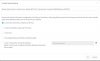
I've tried to make another backup from the old machine, and I saw that the User Data option is missing from the backup feature.
So the problem is not that the restore fails to bring back our extensions. The problem is that the extensions is not included in the backup at all.

In V16 something changed on the backup feature? How can we make a full backup?
 

Attachments

  • 111.JPG
    111.JPG
    50.4 KB · Views: 22
Current version 16.05.389, same backup options appear as above, I didn't realise there was a missing field in the backup.
I did the restore during the initial setup of Debian
I restored to the original windows box after re-installing, same issue.
Luckily I'd snapshotted the VM and was able to roll back to a working version.
 
Last edited:
  • Like
Reactions: AWS2P
Yesterday we tried to migrate 3CX Professional Annual 16.0.504 from Windows 7 to Windows 10
Hi, do you need to change computer or is it only a go on W10 with same hardware.?
If same hardware, instead of making a perhaps "buggy" 3cx backup, you can try updating windows 7 to 10 using directly on w7 pc "mediacreationtoolsV1909"
It takes a while (almost 3 or 4 hours to complete) but if pbx is out of office hours you should go to w10 keeping all content including software and so 3CX pbx too.

Already done this during a weekend on a PBX
 
Last edited:
Hi, do you need to change computer or is it only a go on W10 with same hardware.?
Hi,

We need to put it on a fresh W10 install. Old VM with Windows 7 wasn't managed properly and is full of bugs. That's why we want a clean W10 install.

Yesterday we moved another 3CX instance from v15 to v16 but on v15 we had the option to backup User Data and everything was restored fine.

Maybe in v16 the option to backup User Data was moved in another place?
 
I don't think so , let me think about a miss or a bug only
 
@Lakes if you find a solution for this, please post it here. I will do the same.
I'm still searching for a solution and hope I can do the migration this weekend.
 
I've managed a restore but by using a week old backup. this was taken before the system was patched last Sunday - we had some issues patching at that time, I suspect our installation may have been corrupted. I may stick with this restore and recreate any changes made over the last week.
 
How did you get on?
 
I didn't managed to solve this yet. I will try to open a ticket to 3CX support to see if they can help me with this problem.
 
I've exceeded my fqdn registrations trying to sort this 5 evenings in a row, I think I'll need to do the same.
 
Have logged a support call too, waiting for the call.
 
I just encountered this as well. I haven't finished auditing the 2nd installation but I did get my extensions and trunks back.

PBX was Windows server 2012 on V 16.0.4.504
Did backup without FQDN/License
On new Windows server 2019 did installation with restore.
Ended up with no extensions, no trunks.

Saw my 3cxphonesystem16.exe right click, properties, details tab was 16.0.4.493 so I uninstalled, rebooted, downloaded latest from https://www.3cx.com/phone-system/download-links/

Checked details and new installer is v 16.0.4.504 so proceeded with install/restore again.

This time I have extensions and trunks. Now to audit through the rest of the config.

So i assume the issue was using the 3cxphonesystem16.exe that was older than the system the backup came from.
 
This is a very important detail what @bbaker73 said. You need to check what exact PBX version you have before the backup is made, and then when you reinstall in the new server, use the same version or newer.

If you want to be sure, upgrade via management console to latest 3CX (non beta) and then make a backup. Download the new installer from our site for the same latest version (non-beta) and proceed.

@Lakes 16.0.5.389 is in Alpha, you should not use alpha builds to create backups or use on your production system. Open your backup zip, check the main XML file, the first lines contain the version that created the backup. You need to restore using the same or larger version.
 
Thanks I missed that detail. So it looks like my choice it to restore the last non-alpha backup or restore the alpha backup to an alpha build.
If I go with the alpha, am I stuck on an alpha channel or can I wait and allow the production versions to catch up?
 
As soon as the final comes out you will of course be able to upgrade to it via your management console so you are not going to remain stuck.

If the non alpha backup isn't too old, I would recommend to go for that one since the alpha is still under testing.
 
Thanks, I've come to the same conclusion. In the interests of stability, I'll go back to the backup from 10 days ago on the production version using windows 10. We'll lose some chat and voicemail but strictly speaking we are still in a testing phase. However due to the current situation, it's been taken up very rapidly.
 
Understood, I also think its the best choice for now. V16U5 is not too far off from release, but stability should come first. Let us know how your restore goes.
 
Will do - it will be over the weekend. Thanks again
 
Status
Not open for further replies.

Forum statistics

Threads
111,974
Messages
590,081
Members
164,899
Latest member
mazet