Backup to remote location unavailable!

Dominique_CH

SMB User
Advanced Certified
Joined
Mar 20, 2020
Messages
84
Reaction score
15
Hello,
I just discovered by chance that backups all of a sudden are configured to be made locally. I checked on 2 different systems, both on v20u3 build806, both systems being local installs and backup location was FTP.
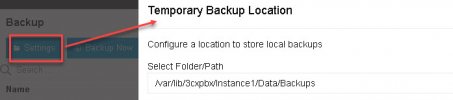
When going to Admin > Backup > Settings, I get nothing else than the local backup option (screenshot attached).
But I see that the backups are also present on the remote FTP location. Does anybody know where the remote backup location configuration was moved to? Or do I have to go through the Parameters?
 

Attachments
  • BkupLocation.jpg
    BkupLocation.jpg
    20.2 KB · Views: 8
Last edited:
Think you need Storage:
office/system/remote-storage
 
Hello Dominique_CH,
In the Backup page the Settings dialog only changes the local directory (now called 'temporary').

For FTP backups you need to go to System > Storage.
Remote Storage check box should be already enabled as you had FTP before.
The main location on top is now shared between recordings, chats, voicemails and backups.
Scroll down to backups, check if the subfolder is right (if not, change accordingly) and assign a backup schedule.
Save and wait till it applies (the button stops rolling).
Then you should be able to see your FTP backups.

Depending on your previous configuration (e.g. if you stored recordings on a different remote server), you might need to manually move your old backups to the new place.
 
Hello Dominique_CH,
In the Backup page the Settings dialog only changes the local directory (now called 'temporary').

For FTP backups you need to go to System > Storage.
Remote Storage check box should be already enabled as you had FTP before.
The main location on top is now shared between recordings, chats, voicemails and backups.
Scroll down to backups, check if the subfolder is right (if not, change accordingly) and assign a backup schedule.
Save and wait till it applies (the button stops rolling).
Then you should be able to see your FTP backups.

Depending on your previous configuration (e.g. if you stored recordings on a different remote server), you might need to manually move your old backups to the new place.
Thanks for the information.
The new settings are kind of confusing as the local backup scheduler (under Backup) and the remote backup scheduler (under System>Storage>Backup Archive) are in fact identical: changes to one location apply to the other, meaning that you cannot for example schedule daily backups locally, but remote only weekly. It's not that I'd want to do that, but the fact to be able to schedule both at different places makes you think this is possible :mad:

Anyway, my question is answered ;)
 

Members Online Now

Forum statistics

Threads
111,835
Messages
589,291
Members
164,668
Latest member
Infinity Network