Bespoke CRM Platform Integration - CRM Integration is working OK but contact number does not exist. Check log for more info or try a different number.

Status
Not open for further replies.

EIT-PJM

Customer
Joined
Dec 30, 2020
Messages
6
Reaction score
1
Hello,

We've got a bespoke CRM platform we're working to integrate with and have generated the template, attached.

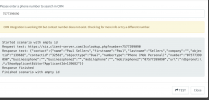
However, even when testing it, it shows the record for the users, but does not return the contact ID and says there is no match? I get the below message as per snapshot.
"CRM Integration is working OK but contact number does not exist. Check log for more info or try a different number."

Any help gratefully received!

Thanks

Peter
 

Attachments

  • RDBTest.xml
    RDBTest.xml
    2.2 KB · Views: 8
  • Snip20210119_3.png
    Snip20210119_3.png
    159.5 KB · Views: 12
  • Snip20210119_2.png
    Snip20210119_2.png
    366.9 KB · Views: 12
You don't seem to have configured the rules and variables of the output.

I'd recommend using the CRM Template Generator.
 
  • Like
Reactions: edossantos
Hi Fredrick, we did create this using the CRM Template Generator. I can see the rules and variables section?
 
Well, the test window clearly shows that a user was found but no variables were set. Please attach your XML file here.
 
Please see attached.
 

Attachments

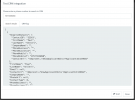
From the template, I can see that you have a rule to identify records with the path "contact.id", however, the JSON returned by the server has the path "contact.contactid". Looks like you need to properly specify the paths to map the returned nodes to variables.
 
  • Like
Reactions: Evolute IT
Hi Ernesto,

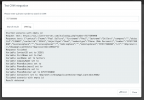
Thanks for that, I think I've fixed that and now get a correct response on the test. See attached snips.

However on a test call, the logs are showing a match not being found with the same number as the test. Any ideas?

2021/01/19 20:45:28.175|19711|0006|Verb|Not processed. Number=447577399090, connection=71, state=Dialing
2021/01/19 20:45:28.176|19711|0006|Verb|Add to processing. Number=447577399090, connection=71, state=Dialing
2021/01/19 20:45:28.176|19711|0006|Info|CRM ProcessActiveConnections(). Attached entries to connection:
2021/01/19 20:45:28.176|19711|0006|Verb|CRM: LocalMatches=. Number=447577399090, connection=71, state=Dialing
2021/01/19 20:45:28.176|19711|0006|Info|CRM: Synchronize(...) called
2021/01/19 20:45:28.176|19711|0055|Info|CRM: maxConcurrency=10
2021/01/19 20:45:28.176|19711|0055|Info|CRM: making request to CRM. Number=447577399090
2021/01/19 20:45:28.176|19711|0055|Trac|Obtaining scenario entity order for entity ''
2021/01/19 20:45:28.176|19711|0055|Trac|Ordering configuration not found, using scenario entity order 0 for entity ''
2021/01/19 20:45:28.176|19711|0055|Verb|Processing scenario 'Default'.
2021/01/19 20:45:28.176|19711|0055|Verb|Creating new HttpClient with no authentication
2021/01/19 20:45:28.176|19711|0055|Verb|Performing GET request 'https://sis.client-server.com/3cxlookup.php?number=7577399090'.
2021/01/19 20:45:28.218|19711|0006|Verb|Enqueue Updated.REGISTRAR.2
2021/01/19 20:45:28.218|19711|0011|Verb|Dequeue Updated.REGISTRAR.2
2021/01/19 20:45:28.218|19711|0006|Verb|Enqueue Updated.REGISTRATION.2
2021/01/19 20:45:28.218|19711|0011|Verb|Dequeue Updated.REGISTRATION.2
2021/01/19 20:45:28.261|19711|0040|Verb|The response is: '{"contact":{"name":"Paul Sellers","firstname":"Paul","lastname":"Sellers","company":"","objectid":"139682","contactid":"32561","objecttype":"Dual","numbertype":"Phone (Mob Personal)","number":"07577399090","businessphone":"","businessphone2":"","mobilephone":"","mobilephone2":"07577399090","url":"rdbpronet:\/\/ShowApplicantEditor?ApplicantId=139682"}}'
2021/01/19 20:45:28.261|19711|0040|Verb|No matchings found.
2021/01/19 20:45:28.261|19711|0040|Verb|Removed from processing. Number=447577399090
2021/01/19 20:45:28.261|19711|0040|Info|CRM: processing of 447577399090 has been finished
 

Attachments

  • Snip20210119_4.png
    Snip20210119_4.png
    197.8 KB · Views: 15
  • Snip20210119_5.png
    Snip20210119_5.png
    266.5 KB · Views: 14
The log doesn't show the variables assignment. Are you sure you didn't deploy the previous version of the template to this 3CX server?
 
This is the XML template currently loaded.

<?xml version="1.0"?>
<Crm xmlns:xsi="http://www.w3.org/2001/XMLSchema-instance" xmlns:xsd="http://www.w3.org/2001/XMLSchema" Country="US" Name="RDBTest" Version="1">
<Number Prefix="AsIs" MaxLength="[MaxLength]" />
<Connection MaxConcurrentRequests="10" />
<Parameters />
<Authentication Type="No" />
<Scenarios>
<Scenario Id="" Type="REST">
<Request Url="https://sis.xxx.com/3cxlookup.php?number=[Number]" MessagePasses="0" RequestEncoding="UrlEncoded" RequestType="Get" ResponseType="Json" />
<Rules>
<Rule Type="Any">contact.contactid</Rule>
</Rules>
<Variables>
<Variable Name="ContactID" Path="contact.contactid">
<Filter />
</Variable>
<Variable Name="FirstName" Path="contact.firstname">
<Filter />
</Variable>
<Variable Name="LastName" Path="contact.lastname">
<Filter />
</Variable>
<Variable Name="CompanyName" Path="contact.company">
<Filter />
</Variable>
<Variable Name="PhoneBusiness" Path="contact.businessphone">
<Filter />
</Variable>
<Variable Name="PhoneBusiness2" Path="contact.businessphone2">
<Filter />
</Variable>
<Variable Name="PhoneMobile" Path="contact.mobilephone">
<Filter />
</Variable>
<Variable Name="PhoneMobile2" Path="contact.mobilephone2">
<Filter />
</Variable>
<Variable Name="ContactUrl" Path="contact.url">
<Filter />
</Variable>
</Variables>
<Outputs AllowEmpty="false">
<Output Type="ContactID" Passes="0" Value="[ContactID]" />
<Output Type="FirstName" Passes="0" Value="[FirstName]" />
<Output Type="LastName" Passes="0" Value="[LastName]" />
<Output Type="CompanyName" Passes="0" Value="[CompanyName]" />
<Output Type="PhoneBusiness" Passes="0" Value="[PhoneBusiness]" />
<Output Type="PhoneBusiness2" Passes="0" Value="[PhoneBusiness2]" />
<Output Type="PhoneMobile" Passes="0" Value="[PhoneMobile]" />
<Output Type="PhoneMobile2" Passes="0" Value="[PhoneMobile2]" />
<Output Type="ContactUrl" Passes="0" Value="[ContactUrl]" />
</Outputs>
</Scenario>
</Scenarios>
</Crm>
 
And you're getting a different behaviour when you run a test from the management console and with a real call from the same number? In that case, I would recommend that you restart the 3CX System Server service, just in case.
 
That was it! Thanks for your help!
 
  • Like
Reactions: edossantos
Status
Not open for further replies.

Latest Posts

Forum statistics

Threads
112,324
Messages
591,897
Members
165,475
Latest member
lastshadow