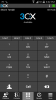
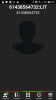
Blank screen while receiving call

Status
Not open for further replies.

agentsmithitaly

Joined
Jan 3, 2018
Messages
34
Reaction score
4
Hi everybody,
I have latest 240 release of 3CX Android client, running on Galaxy S7 with Android 7.0

When I receive a phone call while the phone is in sleep mode (i.e. not being actively used), I hear the ringtone, but the smartphone lock screen prevents responding to the call.
Once unlocked, I'm presented with 3CX screen where the only thing you can see are the bottom five icons, the rest is black. If I fiddle with the bottom icons, the Incoming call screen with the red and green button appears and at this point I'm able to pick up call.

Does it sound familiar to you?
I can try more times to better replicate the issue.
 
i've experienced this and the only thing i can say is that the android client is going through lots of updates working out a plethora of bugs. i am on beta .240 and i see that .266 is out.

are you using the beta versions? if not then i would recommend you would as they are feverishly working on eliminating these nuances as they are discovered.

the link to become a beta test is below

https://play.google.com/apps/testing/com.tcx.sipphone14
 
Thank you Shawn, I have installed beta 266, let's see if this has been sorted out.
A quality smartphone client is paramount, it's good they are taking effort to improve it.
Using DECT phones looks like the past, and VOIP WiFi phones are unicorns and very expensive.
 
Could you provide a screenshot of the above?
 
just before i read the latest post on this thread,i received a call where the screen was blank with no answer or reject button. the row of buttons across the bottom were there (presence, contacts, etc), the middle of the screen was blank. my work around to answer the call is to press any button (presence or contacts) and then press the phone button and the answer and reject buttons show up where i can answer the call. i'm on .240, i'll update to the latest but it sounds like it's still there also. i'll see if i can send a screen shot. my phone is a samsung-sm-g530a with android 5.1.1

i just tested it and it did it to me so attached are the screen shots. the phone is ringing with the dial pad showing and no answer button (phone was at screen off before it was called), tapping the contacts button and then phone button brings the normal answer screen up where i have a choice on what to do with the call.
 

Attachments

  • phone ringing screen after tapping contacts and then phone.png
    phone ringing screen after tapping contacts and then phone.png
    66.5 KB · Views: 12
  • phone ringing screen before touching anything.png
    phone ringing screen before touching anything.png
    46.6 KB · Views: 13
just got another call and this is what the screen looked like when it was ringing
 

Attachments

  • phone ringing screen before touching anything 2nd time.png
    phone ringing screen before touching anything 2nd time.png
    15.6 KB · Views: 15
Here's my screenshot, running version 15.5.266
 

Attachments

  • Screenshot_20180220-111026.png
    Screenshot_20180220-111026.png
    44.2 KB · Views: 9
Having same issue running version 266. HTC U Ultra, Android 7.0
 
Will try new build 303 to see if this happen again
 
If you have any overlay applications installed on your Android app try uninstalling them and try again.
 
Overlay applications?
 
Overlay applications are the ones which can display something on screen while not being the app in focus. They are called "Apps that can appear on top" on Samsung phones.
I have several apps that take advantage of this and cannot disable it completely.
All installedapps are working as intended except 3CX - it should coexist with other application overlays, although I don't know the inner workings.

On build 303 the incoming call screen appears as expected and I can pick up a call, but then the screen remains black. I can continue talking but then also when call is terminated, the screen stays black. I have to terminate and reopen 3CX app to restore its functionality.
This is still an improvement from original version when I opened this topic.
 
Wait a minute, can you do me a favor and you to your 3CX app settings, Advanced > Proximity sensor, disable this and try again? Just to discount the possibility of this being an issue with this feature.
 
Ok will try and report back.
Proximity sensor is very useful though - in the previous builds when any notification was coming it woke up the screen and messed up input due to user's ear contact
 
Understood, we're just trying to make sure that the proximity sensor is not what's causing the black screen you're talking about. You're the only user reporting this issue, so this means that it's not a system-wide issue and likely something very specific going on with your device.
 
He's not the only user with this issue. This has been an issue ever since I started using 3CX 2 years ago. It has been an issue in every version on Android since I've been using it Still can't be fixed, despite developers wasting time on "exciting new features" as reported in the 3CX newsletters.
 
This just happened a few minutes ago. I can't press answer of reject because the bottom buttons are covering it up. Android 7.0 on HTC U Ultra running 3CX phone client 15.5.303.

Also,why does every single person that calls me on this soft client say that "it's a really bad line" or "you sound like you're a million miles away", as well as being extremely long delay / lag?Screenshot_20180406-085736.png
 
Can you update to version 303 on the app store? This was fixed.
 
As mentioned above, I'm already on 303
 
This happened today. I was able to answer the call and talk, but unable to hang up because the screen was completely blank. See attached screenshot. Screenshot_20180410-132718.png
 
Status
Not open for further replies.

Forum statistics

Threads
112,149
Messages
590,967
Members
165,171
Latest member
Mahlon