• We do not provide troubleshooting help for unsupported phones. Please try with a supported phone.
  • V20 Update 10 Alpha 2 Learn more

BLF - Grandstream GRP2612W

Status
Not open for further replies.

bakkbone

Trainee Partner
Advanced Certified
Joined
Oct 2, 2022
Messages
10
Reaction score
2
Hi everyone

Wondering if anyone else has had this?

Have provisioned several Grandstream GRP2612W's via STUN (only practical method as they are for WFH so 1 per network). Testing them in the office and the BLF's display but don't show statuses and can't call the followed extension (nothing happens if you press the PRK)? Doesn't appear to be any errors in the responses to the SUBSCRIBE when I view in Wireshark so I'm at a loss...?
 
(v18, LightSail, Enterprise licence)
 
  • 3CX Version, Enterprise Annual
  • Server OS, Debian 10
  • Is the 3CX Server Hosted and where? LightSail
  • IP Phone Make/Model/Firmware version, GrandStream GRP2612W, 1.0.7.33
  • Provisioning Method: STUN
  • Trunk Provider or VoIP Gateway Make/Model, Atcomm
  • Has the Firewall Checker passed: YES
  • Are custom Phone Templates being used: NO
 
Were the phones factory reset, and then configured using 3CX auto-provisioning?
 
Yes they were
 
I think you did everything right then, however STUN can be unpredictable due to factors that may be beyond your and our control to prevent.

Just two things you need to be aware of:

1. The BLFs on that model / firmware work fine under ideal conditions (tested just now)

2. You will always have these issues with STUN, unless you disable SIP-ALG on each modem/router, and create port forwards for each phone on each router. Not an easy task if you have more than 2-3 remote workers I'm afraid.

A 3CX SBC will solve this of course, but you would have to install one at each workers home. People who are WFH should really be using the 3CX desktop app / mobile app / web app. The apps use a different connection path so they are less susceptible to the things that affect STUN.

In the future we plan to include the SBC in some select phones, to make life easier but for now I think our apps are your best, most reliable option for WFH.
 
  • Like
Reactions: Evolute IT
Thanks John - could you point me to any documentation on port forwarding (ie. what ports are needed etc) ?
 
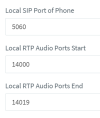
You edit your extension, and see what ports the STUN phone has defined:
1664955362665.png

- You forward those ports on the worker's modem / router as UDP.

- You also need to disable SIP Helpers / SIP-ALG which tends to break SIP.

- Avoid setting 5060 for SIP, some ISPs block it.

- Enable PBX Delivers Audio on all STUN extensions.

- Use DHCP reservation if offered, so that the forwards remain active


That's pretty much it, best effort.
 
  • Like
Reactions: Evolute IT
Status
Not open for further replies.

Forum statistics

Threads
112,147
Messages
590,961
Members
165,167
Latest member
Finatra.us