Hi all, is there a trick to getting the BLF keys to work on Yealink phones thru stun. I thought I just had to add them under the ext and them would show up. Do I have to do something with the phone first?
if this is the place to look, then no. And on the other phone it has that greyed out to even hit the config
##########################################################################################
## Programmable Key ##
##########################################################################################
#X ranges from 1 to 13.
#programablekey.x.type--Customize the programmable key type.
#The valid types are:
#0-N/A 2-Forward 5-DND 6-Redial 7-Call Return 8-SMS 9-Direct Pickup 13-Spead Dial
#22-XML Group 23-Group Pickup 27-XML Browser 28-History 29-Directory 30-Menu 31-Switch Account 32-New SMS
#33-Status 40-PTT 43-Local Phonebook 44-Broadsoft Phonebook 45-Local Group 46-Broadsoft Group 47-XML Phonebook 50-Keypad Lock
#PTT-add a specified prefix number before the dialed number.
#programablekey.x.line--Configure the desired line to apply the key feature. It ranges from 0 to 5.
#programablekey.x.value =
#programablekey.x.xml_phonebook--Specify the desired remote phonebook/local group/BSFT phonebook for the programmable key. This parameter is only appilicable to the feature XML Group/Local Group/Broadsoft Group.
#programablekey.x.history_type =
#programablekey.x.label--This parameter is only available to the key 1 to key 4.
programablekey.1.type =
programablekey.1.line =
programablekey.1.value =
programablekey.1.history_type =
programablekey.1.label =
programablekey.1.xml_phonebook =
programablekey.2.type = 47
programablekey.2.line = 1
programablekey.2.value =
programablekey.2.history_type =
programablekey.2.label = 3CX PBook
programablekey.2.xml_phonebook =
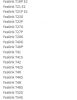
yes, it's not hosted by us tho, I can see the other phone on the system and it is able to be done. Must be this phone. It's a 40G and I had to use a 40P template as I did not see that phone on the list.
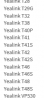
ok, fixed that, but still if I highlight it in Phones page, only thing that lights up is the password. And the other phone that's a 42S says it's not supported even tho it has the firmware on it they say should be...
Please note that T40G should be there for you to add. If it is not then that would suggest that the templates on the installation are not the default. Navigate to Settings / Templates and browse for the yealinkT4x.ph.xml and check if the phone is present there.