BLF LEDs not working on Snom D385 using Hotdesking

Status
Not open for further replies.

mltwlf

Customer
Intermediate Cert.
Joined
Mar 1, 2020
Messages
17
Reaction score
3
Hello, I setup hotdesking on multiple Snom D385 (snomD385-SIP 10.1.46.16) phones following the official tutorial. The login and logout works just fine. I am having problems however to get the BLF LEDs to work. After testing all kinds of scenarios I came across the subscritpions page on the phones webinterface: It looks like the reason is that the subscriptions are not all properly replaced by the user (13) that logged in but remain in the default (HD0004).
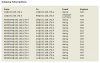
3cx.JPG

After forcing a manual restart of the phone the BLF LEDs work just fine and all subscriptions are properly replaced.
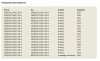
3cx1.JPG

The 3CX is hosted locally and uses the latest firmware (16.0.493). Did anyone come across the same problem or has any idea why this happens?

Thanks in advance!
 
I just discovered that a restart is not necessary. Forcing a manual reregistration using the phones menu after the user registered on the hotdesking phone also solves the problem. Does anyone have an idea why the subscriptions fail/ are stopped during the inital registration of the user?
 
  • 3CX Version: Professional Jahreslizenz (16.0.493)
  • Server OS: Debian 4.9.189-3
  • Is the 3CX Server Hosted: Local MS Hyper-V hosting
  • IP Phone Make/Model/Firmware: Snom/D385/snomD385-SIP 10.1.46.16
  • Provisioning Method: Local
  • Has the Firewall Checker passed: YES
  • Are custom Phone Templates being used: NO
 
Hi,

After testing, I can confirm that the D385 will immediately update its provisioning to show the correct BLF registrations, so I cannot replicate the issue.

Was your Hyper-V instance configured as per this guide? (including the last part about Debian prerequisites)
 
Hi @JohnS_3CX

Thanks for getting back to me on this matter. I just checked the configuration again and can confirm that it is configured as per the offial guide. Just to make sure: In my case the names of the BLF keys on the phone are displayed correctly however the LEDs next to the keys stay dark. Do you have any problems with those?
 
Hi @mltwlf

Can you please go to your management console and check the following?

Settings > Templates > Snom Template > see line 5 of the template and check the version number
 
Thanks, please note there will be some changes in the the upcoming V16 Update 5 which should address the issue for anyone affected.

For now, the BLFs will take a little while but eventually they will light up as soon as the previous registration expires.
 
Does this mean that you could reproduce the problem? When will the update be available?
 
Status
Not open for further replies.

Latest Posts

Forum statistics

Threads
111,939
Messages
589,843
Members
164,824
Latest member
Xeniosg