- Joined
- Feb 13, 2024
- Messages
- 36
- Reaction score
- 10
Hi everyone. I've recently installed a V20 3CX system and have added a Yealink sidecar/BLF expansion module onto a Yealink T43U. I have never had to deal with one of these expansion devices before so I am not familiar with them at all. It is connected to the phone with the provided USB cable without an additional power supply and it does light up but I'm not sure if there is maybe something I need to change locally on the T43U to tell it that a sidecar is attached?
I've been trawling forum posts with little success, but I did see something about sidecars being programmed via 3CX handset templates. I don't think I have the ability to customise templates for this particular system so have not attempted that yet.
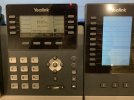
I have added extra BLF's into the user's setup within 3CX to take it up to a total of 20 and have named/numbered them 1 to 20 just to see if/how they populated the buttons on the phone/sidecar, but they only seemed to populate on the handset as shown in my picture and not on the sidecar. How do I go about programming the buttons on the actual sidecar/BLF expansion module please? I can't find it in any manuals either, and I'm sure I've missed something. I do not currently have physical access to the devices, they are at a remote customer site, so I was hoping to be able to program them via the 3CX admin console.
Thanks!
I've been trawling forum posts with little success, but I did see something about sidecars being programmed via 3CX handset templates. I don't think I have the ability to customise templates for this particular system so have not attempted that yet.
I have added extra BLF's into the user's setup within 3CX to take it up to a total of 20 and have named/numbered them 1 to 20 just to see if/how they populated the buttons on the phone/sidecar, but they only seemed to populate on the handset as shown in my picture and not on the sidecar. How do I go about programming the buttons on the actual sidecar/BLF expansion module please? I can't find it in any manuals either, and I'm sure I've missed something. I do not currently have physical access to the devices, they are at a remote customer site, so I was hoping to be able to program them via the 3CX admin console.
Thanks!