Block office calls outside office hours option not available

Status
Not open for further replies.

jasam

Free User
Intermediate Cert.
Joined
May 8, 2022
Messages
6
Reaction score
0
Dear ,

We need to allow one single extension to call outside of office hours . There was an option enabled on extension-->Option--> block outbound calls after outside office hours but now not available to disable it . the option not available anymore

Where can we allow a single extension to allow outbound calls after office hours ?
 
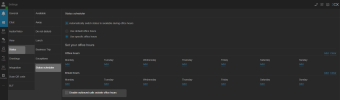
Regarding your question, you will find this option under the user webclient under settings > Status > Status Scheduler

1659622820719.png
 
  • Like
Reactions: jasam
Do you need to have MCM enabled? I dont see this.
 
Ignore me, turning it on shows the option :D
 
  • Like
Reactions: Charles_3CX
Thanks for your reply, today i will check and confirm after 6PM.
 
Better also bring the option back to admin console too.
 
No you need to have system admin rights, MCM should not be used. Please see blog post
 
  • Like
Reactions: jasam
I have the system admin rights.by the way what is MCM ? Can I have the link for the blog post ?
 
Yeah we don't allow most of the users to use web clients ? kindly do the needful to bring back the option to admin console.
 
So i just ran into a problem where a user with no management ability toggled this on himself. I do not understand why this is a user option this should be for management only. Please take this out of the user portal and put it back in the management access. This is a step backward for 3cx. Now I need to log in to each user's profile to ensure they are not being blocked from calls after hours.
 
So i just ran into a problem where a user with no management ability toggled this on himself. I do not understand why this is a user option this should be for management only. Please take this out of the user portal and put it back in the management access. This is a step backward for 3cx. Now I need to log in to each user's profile to ensure they are not being blocked from calls after hours.

Hi @mcaponong,

You can disable the 'Status' section in the WebClient/Desktop App for the users in order to prevent changing their configuration.

To do so, go to Management Console >> Users >> Select all the users(or the ones that you want to disable the Status section) >> Click on 'Edit' >> Phone Provisioning >> Select '3CX Apps' >> Scroll all the way down and under 'Access' enable the option 'Hide Forwarding Rules'.

By doing this, the users will not be able to change their status configuration from the WebClient/Desktop App.

After removing the option for the users, you can give "Manage all extension"/"Manage extensions in groups you are part of" and the "System Administration" rights to a user and the user will be able to manage the 'Status Scheduler' configuration of the other users.

With the above setup, you will be able to manage the extensions Forwarding Rules from the Management Console, and the Status Scheduler configuration from the WebClient/Desktop App of the user's that the abovementioned rights were given.

All of of the above have as a prerequisite that the PBX is on the latest version(18.0.5.418).
 
Status
Not open for further replies.

Forum statistics

Threads
111,974
Messages
590,081
Members
164,899
Latest member
mazet