Block outbound calls outside office hours

Status
Not open for further replies.

Cody Fontaine

Joined
Jun 16, 2017
Messages
43
Reaction score
0
I have checked the "Block outbound calls outside office hours" option at the extension level and it does not seem to be working.

I have global office hours set.

3cx Pro 15.5

Yealink t21 e2 phone
 
Cody, when you say "Global office hours" set, do you mean settings/time zone/office hours? Or do you mean the custom hours setup in the sip trunk?
 
settings/time zone/office hours
 
Hate to ask the obvious but 30 years in IT support and services makes me do it ...

Is the proper time zone set?

If so, thank you for checking. Please go into the SIP Trunk settings and under the general tab at the bottom, check the box "Set up Specific Office Hours for this trunk"

Define the hours in the sip trunk and see if that fixes your problem.

Please let me know.
 
Hate to ask the obvious but 30 years in IT support and services makes me do it ...

Is the proper time zone set?

If so, thank you for checking. Please go into the SIP Trunk settings and under the general tab at the bottom, check the box "Set up Specific Office Hours for this trunk"

Define the hours in the sip trunk and see if that fixes your problem.

Please let me know.

Trust me no offense taken. I've only worked in IT support for 7 years and its the obvious questions that I find are usually the answers. However, in this case I do have the right time zone set and I will try setting the hours on the trunk level.
 
Set hours at truck level. No change.
 
I wanted to wait until after hours to try it on mine as well. Not sure if a restart is necessary, but it seems to ignore the global times for me as well. Might have to get 3CX to look at this.
 
Hello @Cody Fontaine & @Marari

Let me clarify how this option works, just in case that this is the issue here

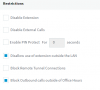
Below is a screenshot of the Restrictions in the Extension Settings. Notice that there are two options regarding outbound calls. The "Block Outbound calls outside of Office Hours" and the "Disable External Calls".

upload_2018-2-28_11-20-25.png

The option that actually blocks the outbound calls is the "Disable External Calls". The option to "Block Outbound calls outside of Office Hours" is merely a trigger to enable the option "Disable External Calls" when the PBX shifts into out of office hours. If this is enabled, then coming back to the extension settings after working hours, you'll see that "Disable external Calls" will be enabled too. And disabled when back in office hours.

Now the issue here, i believe is because you are enabling the option "Block Outbound calls outside of Office Hours" while in out of office hours. If this is the case, then you'll see the effect of this the next day. This is because, this option will be triggered when the PBX shifts from in office to out of office hours.

Let's say for example that your working hours are 8am-5pm.
If you enable this option at 4pm then at 5pm you'll see that the block external calls will be enabled.
If however, you enable this option at 6pm, then you won't see any change. That's because the trigger would occur at 5pm which has passed. Next day at 5pm though, it will be triggered.

So if you want this to work from now, you'll need to also enable the option to block external calls and it will be automatically disabled the next day when the PBX is back to in office hours
 
Adding to what marios has already said, I tried replicating the issue but for me the block is applied but only after i restarted 3CX services. Once the services are restarted the extension is not able to make outbound calls and if you enter extension's settings the option "Disable External Calls" will be also auto selected.
 
Adding to what marios has already said, I tried replicating the issue but for me the block is applied but only after i restarted 3CX services. Once the services are restarted the extension is not able to make outbound calls and if you enter extension's settings the option "Disable External Calls" will be also auto selected.
Which office settings does it follow? Global, Trunk, or Extension?
 
Status
Not open for further replies.

Latest Posts

Forum statistics

Threads
111,884
Messages
589,542
Members
164,742
Latest member
Zain101